
Free tools Windows power users keep installed
One-click scans. No signup required.
iTechGuides is reader-supported. When you buy through links on our site, we may earn an affiliate commission. As an Amazon Associate I earn from qualifying purchases. Learn more
RCA to HDMI converters really work when an active converter receives composite CVBS video from an older device and sends HDMI to a modern display. The converter must match the signal direction, video standard, and connectors. It can make a VCR, DVD player, camcorder, or older console usable, but it cannot turn standard-definition video into genuine HD.
The most important question is not whether the plugs fit. Ask: What comes out of the old device, and what goes into the new display? An old player with yellow, white, and red outputs needs a composite AV-to-HDMI converter. A modern HDMI device connected to an old television needs the opposite type: an HDMI-to-composite converter.
Key takeaways
- An active composite AV-to-HDMI converter changes analog yellow/white/red signals into a digital HDMI signal; a passive RCA-to-HDMI cable cannot perform that conversion.
- “1080p output” usually describes the converter’s HDMI output mode, not genuine 1080p detail from a VHS tape, DVD, or composite game console.
- The yellow RCA plug carries composite video, while the white and red plugs normally carry left- and right-channel analog audio.
- NTSC/PAL compatibility, USB or external power, correct input/output direction, and display compatibility determine whether a converter works.
- A basic converter is suitable for casual viewing, while serious retro gaming or VHS preservation usually calls for a specialized scaler or capture workflow.
Do RCA to HDMI converters really work?
Yes—an active RCA-to-HDMI converter can connect a composite-output source to an HDMI-input television, monitor, or projector. The converter digitizes the analog video, processes and scales the picture, embeds the analog audio in the HDMI stream, and sends the result to the display.
Outdated Drivers Are Slowing You Down
One free scan finds every outdated or missing driver and matches the right update for your exact hardware.Free scan · exact hardware matchPC Slower Than It Used to Be?
A free scan shows the junk files, broken settings and background clutter dragging Windows down - then fixes them in one click.Free scan · Windows 10 & 11The converter is an electronic device, not merely a rearrangement of wires. That is why most models need USB power or an external power adapter. For example, StarTech’s documented composite converter is an active unit intended for legacy sources such as VCRs, DVD players, cameras, and older game consoles.
Popular on Amazon
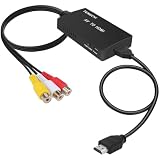
- RCA Female to HDMI Video Converters Adapter : The cable is used to convert analog composite input to HDMI 1080p output, displayed on a 1080p HD TV/TV/monitor.
- Input ports: 1xRCA Female (Yellow, White, Red), Output ports: 1xHDMI 1.3 1080p. NOT support 3D and 4K, NOT support HDMI Converts to AV
- AV to HDMI Converter: Plug and Play, Easy to Install and Operate, Powered by External USB Cable. Note: Please hook up the USB power cable (included) to 5V 1Apower source during use (not included power supply ).
- Support PAL, NTSC3.58, NTSC4.43, SECAM, PAL/M, PAL/N standard TV formats input. For PS2,PS3,Xbox,N64,STB, VHS, VCR, DVD Players and other devices with standard composite AV input.
- You Will Get : 1x RCA Female TO HDMI Converter, 1xHDMI cable, 1xUSB cable, 1xUser Manual. ONE YEAR WARRANTY - if you are not satisfied for any reason whatsoever, do not hesitate to contact us .
Success still depends on four conditions:
- The converter must convert composite AV to HDMI, not HDMI to composite.
- The source must provide composite CVBS video, not only component, RGB, or another signal.
- The converter must support the source’s video system, such as NTSC or PAL.
- The HDMI display must accept the converter’s selected output mode.
Which direction do you need?
The phrase “RCA to HDMI” is frequently used for two completely different products. Identify the output on the source and the input on the display before buying.
| Source device | Display device | Correct converter | Signal flow |
|---|---|---|---|
| VCR, DVD player, camcorder, or older console with yellow/white/red outputs | Modern TV, monitor, or projector with HDMI input | Composite AV-to-HDMI | RCA output → HDMI input |
| Streaming box, Blu-ray player, computer, or game console with HDMI output | Older television or monitor with composite RCA input | HDMI-to-composite | HDMI output → RCA input |
An HDMI-to-RCA box will not connect a VCR’s RCA output to a modern TV’s HDMI input. The two devices may look similar, but the conversion direction is reversed. The manufacturer description for AGPtek’s composite AV-to-HDMI converter explicitly distinguishes its direction from HDMI-to-RCA conversion.
A simple signal-flow test prevents most buying mistakes:
Old device with RCA OUT ──> active composite-to-HDMI converter ──> modern display with HDMI INWhat do the yellow, white, and red RCA plugs carry?
In the common three-plug composite arrangement, the yellow plug carries video and the white and red plugs carry stereo audio. RCA describes the physical connector, however; RCA plugs do not guarantee that every product carrying them uses the same signal.
| Plug | Typical signal | Where it connects |
|---|---|---|
| Yellow | Composite video, also called CVBS | Source video output → converter AV or CVBS input |
| White | Left-channel analog audio | Source left-audio output → converter white audio input |
| Red | Right-channel analog audio | Source right-audio output → converter red audio input |
Do not confuse composite with component video. Component video often uses red, green, and blue connectors for separate video channels, while composite video uses the yellow connector for one combined video signal. A converter designed for yellow composite CVBS is not automatically compatible with component video, even though both systems may use RCA-shaped plugs.
Likewise, a pair of red and white RCA connectors may carry audio only. Check the labels on the source and converter—such as AV IN, CVBS IN, VIDEO IN, or L/R AUDIO IN—rather than relying only on connector color.
How does a composite-to-HDMI converter work?
A composite-to-HDMI converter performs several electronic operations between the source and the display:
Recommended Free Tools
- Analog output: The VCR, DVD player, camera, or console sends analog composite video and analog stereo audio through the RCA cables.
- Digitization: The converter samples the analog video and audio and changes them into digital data.
- Processing: The converter may deinterlace the video, adjust timing, reduce noise, or scale the picture to an HDMI-compatible output mode.
- HDMI packaging: The converter combines digital video and audio into the HDMI signal.
- Display: The television, monitor, projector, or capture device receives HDMI as a digital input.
The conversion and scaling circuitry require power. Connecting only the RCA and HDMI cables often produces no signal because the converter’s USB cable or external adapter has not been connected. AVSL’s product information is an example of the specifications buyers should check for composite input, HDMI output, scaling modes, and USB power.
What devices can a composite-to-HDMI converter connect?
A compatible active converter can make many older composite-output devices usable with a modern HDMI display:
- VHS players and VCRs
- DVD players with yellow composite video output
- Older game consoles with standard composite output
- Camcorders and analog video cameras
- Older cable or satellite set-top boxes
- Some medical, security, or industrial analog video equipment
The display must provide an HDMI input. Common destinations include modern televisions, HDMI computer monitors, projectors, and—when the output signal is accepted—HDMI capture devices.
Compatibility is not guaranteed merely because a device has three RCA sockets. A console may output component video, RGB, or an unusual composite timing mode. A VCR may produce an unstable signal from a damaged tape. A camera may use a regional video standard that the converter does not support. Read the converter’s input specification before assuming that a connector match means a signal match.
What picture quality should you expect?
A converter makes a standard-definition analog signal acceptable to an HDMI display; it does not recreate detail that was never present in the source. Composite video is standard-definition, and VHS quality is additionally limited by the tape, recording quality, VCR heads, tracking, noise, and the composite connection.
Also popular on Amazon
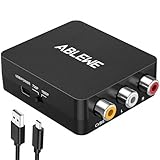
- RCA to HDMI Converter: Converts analog RCA composite (Yellow, White, Red) input to HDMI 720P/1080P (60HZ) output,displayed on HDTV/Monitor,which can bring back your childhood memories.
- Plug to Play: ABLEWE Mini RCA to HDMI converter no extra drivers need, just plug and play,easy to use.Please hook up the USB power cable (included) to 5V power source during use.
- Wide Compatibility: Support source formats of PAL, NTSC3.58, NTSC4.43, SECAM, PAL/M, PAL/N standard TV. Provide advanced signal processing with great precision, colors, resolutions, and details.
- Widely Used:Widely applied to PS2,PS3,Xbox,N64, WII, STB, VHS, VCR, DVD Players and other devices with standard composite AV input.
- Attention & Package:Please ensure to connect this rca to hdmi converter to power source to make it work.Package include:1*RCA to HDMI Converter,1*usb power cable(adapter not included),1*User Manual.
A converter advertised with 720p or 1080p output is describing the digital HDMI format selected at the converter’s output. The converter is upscaling the input rather than recovering true high-definition source detail. AGPtek’s specifications, for example, describe standard composite input alongside 720p/1080p output and upscaling.
Depending on the source and converter, the picture may look soft, noisy, jagged, flickery, stretched, or over-processed. A clean DVD or game-console signal can look better than VHS, but composite video still imposes its own limitations. Some converters advertise noise reduction, motion processing, or color enhancement; those features modify the presentation but do not add original source detail.
Is 1080p better than 720p?
Not automatically. A television or monitor may accept one converter output mode more reliably than another, and the converter’s internal processing may look better at 720p than at 1080p.
Use this practical order:
- Start at 720p if the converter offers that setting.
- Try 1080p if the display accepts 720p but the picture or processing is unsatisfactory.
- Return to 720p if 1080p causes a black screen, dropouts, or an unstable HDMI connection.
Output-resolution support varies by model. StarTech’s VID2HDCON2 product page specifies output up to 720p, while other composite-to-HDMI products advertise both 720p and 1080p. The larger number on a product box is not a universal image-quality guarantee.
What aspect ratio will old video use?
Most older television, VHS, and many older console sources use a 4:3 picture shape. A widescreen television may stretch 4:3 material to fill the screen, making people and objects look unusually wide.
Use the display’s aspect-ratio control—often labelled Original, 4:3, Aspect, or Maintain aspect—when available. If the converter has its own aspect-ratio setting, configure the converter and display consistently. Some inexpensive converters offer no aspect-ratio controls, so the television must handle the correction.
Do NTSC and PAL compatibility matter?
Yes. The converter must support the video system produced by the source. Most U.S. equipment uses NTSC, while many European and other international systems use PAL. Some equipment uses variants such as SECAM, PAL-M, PAL-N, or NTSC 4.43.
The Tool Desk
Outbyte Driver Updater FREEFix the driver behind crashes, sound loss and screen glitchesFind Drivers →Outbyte PC Repair FREEClear out junk files and repair common Windows errorsFree Scan →A video-standard mismatch can cause no picture, a rolling or unstable picture, black-and-white video, incorrect colors, flickering, or repeated signal loss. Some converters automatically detect NTSC or PAL; others use a physical switch or menu. StarTech lists NTSC and PAL support for its documented converter, but buyers should not assume that every generic converter supports both standards.
Before buying, check the source’s manual, label, or regional version and compare it with the converter’s supported standards. A PAL tape played through a PAL VCR still needs a converter that accepts the resulting PAL signal.
How do you set up an RCA-to-HDMI converter?
Use the following connection order for an old composite-output device and a modern HDMI display.
What equipment do you need?
- A source with composite video and audio output
- A yellow/white/red RCA cable, unless the source already includes one
- An active composite AV-to-HDMI converter
- An HDMI cable
- The converter’s USB cable and USB power adapter, or its included external power supply
- An HDMI television, monitor, projector, or compatible capture device
Connection steps
- Turn off the source and the display.
- Connect the source’s yellow video OUT to the converter’s yellow AV IN, CVBS IN, or video input.
- Connect the source’s white audio OUT to the converter’s white left-audio input.
- Connect the source’s red audio OUT to the converter’s red right-audio input.
- Connect the HDMI cable from the converter’s HDMI OUT to the television or monitor’s HDMI IN.
- Connect the converter’s USB or external power supply. RCA and HDMI connections alone may not power the converter.
- Turn on the display and select the HDMI input used by the converter.
- Turn on the source and start playback, or open the source’s video output.
- Set the converter to 720p or 1080p if an output switch is present.
- Select NTSC or PAL if the converter does not detect the standard automatically.
Remember the direction: source output goes into converter input, and converter output goes into display input. Reversing either connection is one of the most common causes of a blank screen.
How do you fix a black screen or missing signal?
When no picture appears, check the signal path from the source to the display rather than replacing every cable at once.
Also popular on Amazon

- AV to HDMI Converter: Converts analog RCA composite (Yellow, White, Red) input to HDMI 720P/1080P output, displayed on HDTV/Monitor, which bring back your old and cherish memories. Notice: NOT support HDMI Converts to RCA.
- RCA to HDMI Converter Kit: Contain all necessary cables you need, such as Male RCA cable, HDMI cable and micro USB Power cable, no need to buy extra cable, more convenient to use. In addition, cables can be detached for other uses. Easier to use and more cost-effective.
- Widely Used: Widely applied to PSOne, PS2, PS3, Xbox, N64, Wii, SNES, STB, VHS, VCR, DVD Players and other devices with standard composite AV input. Support PAL, NTSC3.58, NTSC4.43, SECAM, PAL/M, PAL/N standard TV formats input.
- Plug to Play: Setuact RCA to HDMI Adapter, no extra drivers need, just plug and play, easy to use. Please hook up the USB power cable (included) to 5V power source during use the Composite to HDMI Converter.
- Package&After-sales Service: Package Include: 1*RCA to HDMI Converter, 1*RCA Cable(3.3ft/1m), 1*HDMI Cable(3.3ft/1m), 1*USB Power Cable(2.6ft/0.8m), (adapter not included), 1*User Manual. We provide 18 months after-sales service quality guarantee, 24h friendly customer service.
- Confirm that the converter’s power light is on and that its USB or external power adapter is firmly connected.
- Confirm that the RCA cables are connected to the source’s outputs, not its inputs.
- Confirm that the yellow plug is in the converter’s composite-video input, not a green component-video jack.
- Confirm that the HDMI cable runs from converter OUT to display IN.
- Select the exact HDMI input used by the converter on the television or monitor.
- Start active playback; some sources show no usable video while paused, stopped, or displaying an inactive output.
- Check NTSC/PAL selection or automatic-detection settings.
- Switch from 1080p to 720p if the display rejects the selected HDMI mode.
- Test with another HDMI input, HDMI cable, or display if available.
If a yellow RCA plug is connected to a component-video input, the display may show no picture or an unusable picture. Composite and component are different signal standards even when both use RCA-style connectors.
Why is the picture black and white?
A black-and-white picture usually indicates an NTSC/PAL mismatch, an unusual regional video standard, or an incomplete or incorrect video connection. Select the correct standard on the converter, confirm that the source and converter use compatible systems, and reseat the yellow video connection.
Some products require a manual NTSC/PAL change when the picture is monochrome. The Cirago HDMI-to-composite documentation illustrates the importance of NTSC/PAL selection on conversion hardware, although Cirago’s product converts in the opposite direction from the main RCA-to-HDMI use case.
Why is there picture but no sound?
Picture without sound usually means the analog audio path is incomplete or the converter cannot embed the source audio into HDMI.
- Check that white is connected to left audio and red to right audio.
- Make sure the RCA plugs are connected to the source’s audio outputs and the converter’s audio inputs.
- Unmute the television or monitor and verify its HDMI audio setting.
- Confirm that the source is outputting analog stereo audio.
- Check whether the converter supports only uncompressed two-channel stereo rather than multichannel or unusual audio formats.
Some converter manuals specify uncompressed two-channel stereo support, so a source configured for an unsupported audio format may produce video without sound. The Tripp Lite converter manual is an example of the kind of audio-format specification to check.
Why does the picture flicker, roll, or cut out?
Flickering, rolling, or intermittent video can result from a video-standard mismatch, damaged RCA cables, insufficient USB power, an unstable VCR or tape signal, poor converter sync handling, or an HDMI output mode that the display does not accept.
Try a known-good tape or source, replace the RCA cable, use a reliable USB power adapter, switch between 720p and 1080p, and verify NTSC/PAL selection. A low-cost converter may work with a clean DVD signal but fail to lock onto a damaged tape or unstable VCR output. No generic converter should be assumed to stabilize every problematic VHS signal.
What’s actually slowing this PC down?
Pick the symptom - the matching free tool is one click away.
Why does a game console fail even when the plugs fit?
A console may fail because it outputs a nonstandard timing mode, component or RGB rather than composite, or a signal that the converter does not support. A display may also reject the converter’s HDMI timing, while deinterlacing and processing can introduce input lag or poor motion handling.
A basic converter may be adequate for occasional viewing, but serious retro gaming is a different requirement. Choose a purpose-built scaler when low latency, accurate aspect ratio, reliable sync handling, or better deinterlacing matters. Do not rely on an unverified “gaming” label as proof of low latency.
Is a cheap RCA-to-HDMI converter enough?
A basic active converter is usually enough when the goal is simply to watch a clean composite source on a modern television. A budget model can be a reasonable choice for an uncomplicated DVD player, camcorder, ordinary VCR, or casual console use if the model supports the correct direction, CVBS, the source’s video standard, HDMI audio, and the required output mode.
Choose a better scaler or specialist device when any of the following applies:
Quick wins for a faster PC:
Fix the driver behind crashes, sound loss and screen glitchesFind Drivers →Clear out junk files and repair common Windows errorsFree Scan →Scan for outdated or missing drivers - takes under a minuteDriver Scan →- You play retro games where input lag matters.
- Your console produces unusual timing or a nonstandard signal.
- Your VCR produces unstable sync or difficult tapes.
- You need reliable 4:3 control or better deinterlacing.
- You need S-Video, component, SCART, RGB, SECAM, or multiple analog standards.
- You are preserving VHS rather than merely watching it.
| Decision factor | Basic converter | Better scaler or specialist unit |
|---|---|---|
| Price and setup | Usually lower cost and simple to connect | Usually more expensive and may require configuration |
| Image processing | Adequate scaling for casual viewing | More likely to provide better deinterlacing and scaling controls |
| Input lag | Often unspecified | More likely to be designed or documented for timing-sensitive use |
| Signal compatibility | Variable; commonly limited to composite | Often supports a broader range of sources or difficult timings |
| Aspect-ratio control | Often limited | More likely to offer configurable 4:3 and 16:9 handling |
| VHS handling | Best with clean, stable signals | Better chance with difficult signals, but no universal guarantee |
| Preservation work | Not necessarily suitable for archival capture | May be part of a more controlled capture workflow |
Is an RCA-to-HDMI converter suitable for digitizing VHS?
An RCA-to-HDMI converter can help you view a VCR on an HDMI display, but HDMI output alone does not create a complete archival VHS workflow. VHS preservation also depends on the VCR, signal stability, capture settings, deinterlacing, file format, and storage choices.
Also popular on Amazon
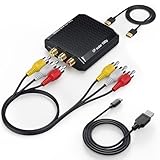
- Connect Classic RCA Devices to HDMI Displays: Bring older AV equipment back into use by converting yellow, white and red composite RCA signals into HDMI output for newer TVs, monitors and projectors. Choose between 720P and 1080P output at 60Hz to match your display. Please note that this av to hdmi adapter is built specifically for connecting an RCA/AV source to an HDMI display; it cannot convert an HDMI source to RCA/AV.
- Complete 3-Cable Set Included: Includes separate RCA, HDMI and Micro USB cables for video/audio connection, HDMI output and power. The RCA and HDMI cables are detachable for flexible placement and use with compatible equipment. USB power is required for operation. A Micro USB cable is included; a 5V/1A power adapter is not included.
- Selectable 720P and 1080P Output: Use the built-in resolution switch to select 720P or 1080P output at 60Hz based on your TV or monitor. No software or drivers are required. Connect the RCA source, HDMI display and USB power, then select the desired output resolution.
- Compatibility with Legacy AV Devices: Compatible with RCA-output VCRs, VHS players, DVD players, set-top boxes and karaoke systems, as well as compatible PS1, PS2, PS3, Xbox, Wii, N64, SNES and GameCube systems using RCA/AV output. Supports PAL, NTSC3.58, NTSC4.43, SECAM, PAL/M and PAL/N analog input formats.
- HDMI Output Based on the Original Source:Converts an analog RCA signal to HDMI output with selectable resolution up to 1080P. The av to hdmi converter changes the signal format but does not turn lower-resolution VHS footage or classic game graphics into native HD content. Final picture quality depends on the original source, connected equipment and display. For stable operation, connect the included USB power cable to a 5V/1A USB power source.
For preservation, use a dedicated computer capture device or video-capture system designed for recording analog video. Treat a cheap HDMI upscaler as a viewing accessory unless its documentation and the rest of the workflow meet your preservation requirements.
What should you check before buying?
- Direction: Confirm that the product says composite AV, CVBS, or RCA input to HDMI output.
- Signal type: Confirm composite support rather than component-only RCA input.
- Video standard: Check NTSC, PAL, SECAM, or other required regional support.
- Output mode: Check whether the converter offers 720p, 1080p, or only a particular HDMI mode.
- Power: Confirm whether USB power or an external adapter is included.
- Audio: Confirm red/white RCA audio input and HDMI audio embedding.
- Aspect ratio: Check whether the converter or display can preserve 4:3 material.
- Source compatibility: Look for your specific category of VCR, console, camera, DVD player, or set-top box.
- Return policy: A return option matters because display and source compatibility can vary.
- Use case: Decide whether you need casual viewing, gaming, recording, or preservation.
Which converter type fits each use case?
| Reader’s need | Best starting point | Important limitation |
|---|---|---|
| Watch an old device on a modern TV | Active composite AV-to-HDMI converter with USB power | Expect standard-definition detail after upscaling |
| Watch VHS tapes | Converter with correct NTSC/PAL support and reliable returnability | VCR, tape condition, tracking, and sync affect the result |
| Play retro games | Specialized scaler when latency, sync, or deinterlacing matters | A generic converter may add lag or fail with unusual timings |
| Preserve VHS | Dedicated analog video-capture workflow | HDMI upscaling alone is not archival conversion |
| Connect HDMI to an old TV | HDMI-to-composite converter | This is the reverse direction and will not solve RCA-to-HDMI needs |
Examples of documented product categories include Vanco’s composite-to-HDMI scaler, which lists multiple analog television standards, and StarTech’s HDMI-to-composite converter, which documents the reverse HDMI-source-to-analog-display direction. These product pages illustrate why direction, standards, and output specifications must be checked separately.
What about prices and reverse-direction products?
Converter prices vary by model, vendor, geography, and date. The supplied research recorded an official-page price of $69.99 for Cirago’s HDMI-to-AV converter and $78.00 for InLighten’s HDMI-to-AV converter, both observed on August 18, 2026. Those prices describe reverse-direction HDMI-to-composite products, not a representative price for every composite-to-HDMI converter.
Do these 3 things before closing this tab:
1Scan for outdated or missing drivers - takes under a minute2Repair Windows errors before they cause bigger problems3Fix the driver behind crashes, sound loss and screen glitchesCirago’s HDM2ACRCA is appropriate when an HDMI source must feed an old RCA/composite display. InLighten’s WhiteBox HDMI-to-AV converter serves the same general reverse-direction need. Neither is the correct choice for connecting a VCR’s RCA output to a modern TV’s HDMI input.
Does HDCP prevent RCA-to-HDMI conversion?
HDCP is chiefly a concern when protected HDMI content is being converted toward analog output, not a universal explanation for every RCA-to-HDMI problem. For example, StarTech’s HDMI-to-composite documentation warns that HDCP can block conversion of protected digital content to analog output, including some Blu-ray players and game consoles.
That limitation should not be generalized to every composite-to-HDMI installation. For an RCA-output source, first check direction, power, composite-versus-component wiring, NTSC/PAL compatibility, and HDMI input selection.
Frequently Asked Questions
Can I use a passive RCA-to-HDMI cable?
A passive RCA-to-HDMI cable generally cannot convert composite analog video and audio into HDMI. Use an active electronic composite AV-to-HDMI converter with its required USB or external power supply.
Will an RCA-to-HDMI converter make VHS look like true 1080p?
No. A converter may output a 1080p HDMI signal, but the output is upscaled from standard-definition composite video. The converter cannot restore detail lost through VHS recording, tape wear, tracking problems, or the composite connection.
Why does my RCA-to-HDMI converter show a black-and-white picture?
The most likely causes are an NTSC/PAL mismatch, an unusual regional video standard, or an incorrect yellow-video connection. Check the source standard, select the matching converter setting, and connect the yellow plug to a composite CVBS input.
Can an RCA-to-HDMI converter record VHS on a computer?
An RCA-to-HDMI converter can make a VCR visible on an HDMI display, but HDMI upscaling alone is not a complete archival workflow. VHS preservation normally requires a suitable analog video-capture device and controlled capture, deinterlacing, file-format, and storage settings.
The Bottom Line
Bottom line: RCA-to-HDMI converters really work when the device is an active composite AV-to-HDMI converter, the yellow/white/red outputs are connected correctly, the converter is powered, and NTSC/PAL and HDMI output compatibility match the equipment. Buy a basic converter for casual viewing; choose a specialized scaler for serious retro gaming and a dedicated capture workflow for VHS preservation.

