
For most small and medium conference rooms, the Logitech Rally Bar Mini is the best all-around choice. It combines capable microphones and speakers, a wide camera, broad meeting-platform support, remote management, and an upgrade path for additional table microphones. Choose the Jabra PanaCast 50 when panoramic 180-degree coverage matters most, the Poly Studio X52 for a balanced medium-room appliance, the Yealink MeetingBar A30 for dual-camera speaker tracking, and the Neat Bar Pro for large or premium rooms.
This is a specification-based comparison of integrated conference-room video bars and room systems documented for the United States market as of August 11, 2026. It is not a hands-on or laboratory test. The rankings reflect published specifications, platform support, room positioning, expansion options, and deployment requirements—not independently measured sound quality, reliability, or microphone performance.
Top five at a glance
| Rank | System | Best for | Why it stands out | Main limitation |
|---|---|---|---|---|
| 1 | Logitech Rally Bar Mini | Most small and medium rooms | Strong balance of audio, camera coverage, platform support, management, and microphone expansion | Expansion uses Logitech’s proprietary Rally ecosystem and can raise the total installation cost |
| 2 | Jabra PanaCast 50 Video Bar System | Wide rooms and inclusive framing | Three-camera panoramic 180-degree view, eight microphones, four speakers, and full-duplex audio | Less suitable when long-distance optical PTZ reach is the priority; complete bundles can be enterprise-oriented |
| 3 | Poly Studio X52 | Flexible medium-room appliance | 4K camera, 20-foot microphone pickup specification, dual 20-watt speakers, and broad interoperability | Its published microphone-array design is less expansive than several competitors |
| 4 | Yealink MeetingBar A30 | Dedicated Zoom or Teams medium rooms | Dual-camera design, speaker tracking, eight MEMS microphone arrays, and integrated speakers | Platform-specific editions and controller requirements make SKU selection important |
| 5 | Neat Bar Pro | Large or premium rooms | 16-microphone array, three full-range speakers, subwoofer, 16x hybrid zoom, and three-screen support | Highest-cost and most deployment-intensive option in this group |
Important: Manufacturer pickup distances and room-size recommendations are useful planning figures, but they are not guarantees of intelligible speech in every room. Glass, hard surfaces, HVAC noise, ceiling height, table length, and speaker placement can change the result substantially.
1. Logitech Rally Bar Mini: best overall for most small and medium rooms
The Logitech Rally Bar Mini is the safest general recommendation because it does not depend on one headline specification. It offers a balanced combination of room coverage, audio hardware, platform compatibility, management, and expansion.
Logitech positions Rally Bar Mini for small-to-medium rooms. The integrated unit includes a PTZ camera, six beamforming microphones, three speakers, AI Viewfinder functionality, integrated cable management, and Logitech CollabOS. The camera supports up to 4K resolution at 30 frames per second, a 120-degree diagonal field of view, and a 113-degree horizontal field of view. Its motorized pan range is plus or minus 25 degrees, motorized tilt is plus or minus 15 degrees, and its digital zoom is 4x HD. Logitech lists microphone pickup of up to 23 feet.
#1 Best Overall
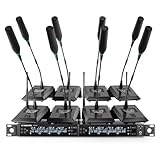
- ENHANCED SIGNAL RELIABILITY: Harnessing the power of Auto Scan, the UHF wireless conference microphone system rapidly identifies the least-interference frequency to sync. This advanced feature of the wireless mic system increases anti-interference ability and decreases interference between each channel. The microfonos inalambricos professional also has lock function to lock selected frequency. 8x25 Selectable UHF frequencies allow multiset operation of up to 16 conference mics simultaneously
- PREMIUM WIRELESS PERFORMANCE: The gooseneck microphone system with 25 frequencies per channel. (CH 1: 540.1–547.3 MHz, CH 2: 547.6–554.8 MHz, CH 3: 555.1–562.3 MHz, CH 4: 562.6–569.8 MHz, CH 5: 570.1–577.3 MHz, CH 6: 577.6–584.8 MHz, CH 7: 585.1–592.3 MHz, CH 8: 592.6–599.8 MHz) This podium microphone features hassle-free IR synchronization for seamless pairing within seconds. Enjoy minimal dropouts, excellent feedback rejection, and a long operational range of up to 328 ft line of sight
- REFINED SOUND CLARITY: Designed for meeting & public speaking environments, the wireless microphone system features specially tuned EQ to enhance voice clarity and reduce listener fatigue during extended sessions. Its foam windscreen minimizes wind noise and plosives, ensuring clear audio. The desktop conference microphone securely connects to the base via a 4-pin XLR port with a tightening mechanism and allows 360-degree rotation for precise positioning
- ELABORATE CRAFTMANSHIP: The UHF receive delivers 8 channels in a 1U rackmount design—doubling your wireless capacity without expanding your rack footprint. It includes a display screen for status updates and convenient handles for easy rack mounting. The gooseneck dynamic mic has a one-key mute function for quickly disabling the mic during pauses. Ideal for corporate meetings, churches, classrooms, lecture halls, public speaking, and more
- BOX CONTENTS: 1 x 8-channel wireless metal receiver, 8 x gooseneck conference microphones, 8 x foam covers, 1 x 6.35 mm audio cable, 1 x power adapter, 1 x 6.35 mm to 3.5 mm adapter, 4 x antennas, 16 x AA batteries, 1 x user manual, 4 x rubber feet. You can conveniently source all necessary components from our store, enabling the quick and efficient setup of your system according to your specific needs
For organizations standardizing on more than one meeting service, the platform support is a major advantage. Logitech documents support for Microsoft Teams Rooms on Android and Windows and lists certification for major platforms including Microsoft Teams, Zoom, and Google Meet. Logitech Sync provides remote device-management capability, which is useful when an IT team is responsible for multiple rooms rather than one local installation.
Why it ranks first
- Good general-purpose coverage: The wide camera and PTZ movement suit conventional small and medium rooms.
- Useful microphone expansion: The integrated microphones can be supplemented with up to three additional Rally Mic Pods and two Mic Pod Hubs.
- Flexible deployment: It can operate as a dedicated room appliance and is supported in multiple collaboration environments.
- Manageability: Logitech Sync gives administrators a documented path for remote monitoring and device management.
Limitations and buying warnings
The optional microphone expansion is not a generic USB microphone arrangement. It uses Logitech’s Rally connection ecosystem, so a longer-table deployment may require Rally Mic Pods, hubs, extension cabling, a controller, mounting hardware, and installation. Those accessories can make the complete room cost considerably higher than the bar alone.
Logitech also states that, on supported configurations, enabling an external USB audio device disables the bar’s internal microphone and speaker system. That matters if you are planning to combine Rally Bar Mini with a third-party speakerphone or DSP. Validate the intended audio architecture before ordering rather than assuming all connected audio devices will operate together.
Recommended Free Tools
Best fit: A small or medium room that needs one integrated bar now but may need additional table microphones later.
Verdict: The best default choice for buyers who want the fewest compromises across audio, video, software platforms, and room management.
2. Jabra PanaCast 50 Video Bar System: best for wide rooms and inclusive framing
The Jabra PanaCast 50 Video Bar System is the strongest choice when the key requirement is keeping people at the sides of a wide room visible. Instead of relying on a traditional pan-and-tilt camera, it combines three 13-megapixel cameras to create a panoramic 180-degree horizontal field of view in 4K.
That design is particularly useful in rooms where participants sit spread across a long table or where the room is wider than it is deep. It reduces the chance that people near the edges will be cropped out of a conventional front-facing shot.
What’s actually slowing this PC down?
Pick the symptom - the matching free tool is one click away.
Audio hardware
Jabra publishes eight beamforming microphones and four speakers for the system. The speaker arrangement consists of two 50-millimeter woofers and two 20-millimeter tweeters. The documented audio features include full-duplex audio, automatic speaker detection, echo reduction, and noise suppression. The room-system configuration also provides an auxiliary output for assistive-listening devices.
The PanaCast 50 includes onboard Android compute and is certified for Microsoft Teams Rooms and Zoom Rooms. Jabra also documents an optional PanaCast Control touchscreen and BYOD mode. These capabilities make it more than a USB camera and speaker bar, although the exact controller and room-system bundle should be confirmed before purchase.
Trade-offs
The 180-degree view is a strength for horizontal inclusion, but it is not the same as the long-distance optical reach of a camera with a dedicated telephoto lens. If a room is deep and participants sit far from the display, a dual-camera system with speaker tracking may frame distant speakers more deliberately.
Availability can also vary between the bar-only product and complete room-system packages. Check whether a listing includes the controller, wall mount, table stand, power components, and the intended room-computing configuration. Marketplace sellers and bundle contents can change.
Crashes, No Sound, or Screen Glitches?
Random freezes, missing sound and display glitches usually trace back to one bad driver. Find and replace yours safely.Free scan · under a minutePC Slower Than It Used to Be?
A free scan shows the junk files, broken settings and background clutter dragging Windows down - then fixes them in one click.Free scan · Windows 10 & 11Rank #2

- ENHANCED SIGNAL RELIABILITY: Harnessing the power of Auto Scan, the UHF wireless conference microphone system rapidly identifies the least-interference frequency to sync. This advanced feature of the wireless mic system increases anti-interference ability and decreases interference between each channel. The gooseneck microphone system also has lock function to lock selected frequency. 4×50 Selectable UHF frequencies allows multiset operation of up to 12 conference microphones simultaneously
- PREMIUM WIRELESS PERFORMANCE: Quad wireless microphone system with selectable frequencies. Channel 1: 540.1 - 554.8 Mhz (50 frequencies). Channel 2: 555.1 - 569.8 MHz. Channel 3: 570.1 - 584.80 MHz. Channel 4: 585.10 - 599.80 MHz. This podium microphone features hassle-free IR synchronization for seamless pairing between receiver and conference microphones within seconds. Enjoy minimal dropouts, excellent feedback rejection, and a long operational range of up to 328 ft line of sight
- REFINED SOUND CLARITY: Designed for meeting & public speaking environments, the microfonos inalambricos professional features specially tuned EQ to enhance voice clarity and reduce listener fatigue during extended sessions. Its foam windscreen minimizes wind noise and plosives, ensuring clear audio. The gooseneck dynamic mic securely connects to the base via a 4-pin XLR port with a tightening mechanism and allows 360-degree rotation for precise positioning
- ELABORATE CRAFTMANSHIP: The UHF mic receiver features a sleek metal design, ensuring durability and a premium feel. It includes a display screen for status updates and convenient handles for easy rack mounting. Anti-slip feet provide stable placement. The desktop conference microphone has a one-key mute function for quickly disable the mic during pauses. Ideal for corporate meetings, churches, classrooms, lecture halls, public speaking, and more
- BOX CONTENTS: 1 x quad channel wireless metal receiver, 4 x gooseneck conference microphones, 4 x foam covers, 1 x 6.35 mm audio cable, 1 x power adapter, 1 x 6.5 mm to 3.5 mm adapter, 2 x antennas, 8 x AA batteries, 1 x user manual, 4 x rubber feet. You can conveniently source all necessary components from our store, enabling the quick and efficient setup of your system according to your specific needs
Best fit: Wide rooms, rooms with participants seated at the sides of a display, and organizations that value inclusive panoramic framing more than motorized PTZ movement.
Verdict: The best option in this group when “keep everyone visible” is the primary camera requirement.
3. Poly Studio X52: best balanced medium-room appliance
The Poly Studio X52 is a sensible middle-ground system for organizations that want a conventional front-of-room appliance with broad software interoperability. HP positions it for medium rooms of approximately six to nine people.
The X52 includes a 4K UHD camera with a 110-degree diagonal field of view and a 95-degree horizontal field of view. Its published audio hardware consists of two MEMS microphones and two second-order microphones, with microphone pickup specified up to 20 feet. The bar has two integrated speakers rated at 20 watts RMS each.
Audio and connectivity
Poly documents full-duplex audio, acoustic echo cancellation, Poly NoiseBlockAI, Poly Acoustic Fence, and automatic gain control. These features address common conference-room problems such as feedback, persistent background noise, and uneven speech volume, although their real-world effectiveness still depends on room conditions.
The connectivity options are a useful reason to consider the X52. The documented interfaces include USB device mode, HDMI content input, two HDMI outputs, USB-C, USB-A, and Ethernet. An optional microphone line input is also available for deployments that need to extend the audio design.
Platform support is broad. The system is documented as certified for Microsoft Teams, Zoom, and Google Meet, with native support for third-party applications including Dialpad, GoToRoom, RingCentral, and StarLeaf. That flexibility can matter more than camera resolution for companies with mixed meeting-service requirements.
What to check before buying
The X52’s published microphone design provides less microphone-array capacity on paper than the Rally Bar Mini or Neat Bar Pro. That does not automatically mean it will perform worse in a particular room, but it does make room geometry especially important. A long table, glass walls, high ceilings, or loud HVAC may justify testing the included audio coverage or planning for an optional microphone configuration.
Do these 3 things before closing this tab:
1Fix the driver behind crashes, sound loss and screen glitches2Repair Windows errors before they cause bigger problems3Scan for outdated or missing drivers - takes under a minuteMarketplace listings may separate the bar from the controller, mount, licensing, or other room accessories. Confirm the complete package rather than comparing the bar-only price with a complete Logitech, Jabra, or Yealink room bundle.
Best fit: A six-to-nine-person medium room where broad platform support, conventional front-of-room framing, and Poly ecosystem compatibility are priorities.
Rank #3

- 8 CHANNEL: This handsfree wireless microphone system by Pyle Pro has 8 frequency channels and dual telescoping receiver antenna for wireless freedom. This system is the perfect for a conference, professional engagement, religious event, and more
- STABLE SIGNAL & CLEAR SOUND: This portable wireless handsfree VHF mic set has a channel frequency response of 50Hz~16KHz and high signal / noise ratio performance for capturing high quality audio
- INDEPENDENT MIC VOLUME CONTROL: Each table top mic features its own dial volume control so you can balance the vocals as desired. The receiver is rack mountable for DJs who want to install it on their racks, or other users with similar set ups
- MIXED ¼” OUTPUT: The PDWM8300 features a ¼ inch mixed output to hook up all microphones to one input on your mixer / speaker / stereo and 1 balanced XLR jack. It also has a power switch, LED status signal indicator light and antenna
- WHAT'S IN THE BOX: The package includes a rack mountable receiver base and 8 table top microphones. The device can be used outdoor and indoor / personal home use
Verdict: A strong balanced choice when you want an integrated appliance without committing to a highly specialized panoramic or premium large-room design.
4. Yealink MeetingBar A30: best for dedicated Zoom or Teams medium rooms
The Yealink MeetingBar A30 is designed as an all-in-one medium-room appliance. It integrates cameras, microphones, speakers, and room-computing functionality, reducing the need for a separate room PC.
The Tool Desk
Outbyte Driver Updater FREEScan for outdated or missing drivers - takes under a minuteDriver Scan →Outbyte PC Repair FREEClear out junk files and repair common Windows errorsFree Scan →Its main differentiator is the dual-camera design. In the Zoom Rooms version, Yealink documents a 10x hybrid-zoom optical camera alongside an 8-megapixel digital camera with a 120-degree field of view. The system supports automatic framing, speaker tracking, picture-in-picture, and Smart Gallery. That combination is attractive when the room needs both a broad group view and more targeted views of active speakers.
For audio, Yealink publishes eight MEMS microphone arrays and integrated speakers intended to cover spaces up to six meters. A CTP18 touch panel can be paired with the MeetingBar A30 for room control.
The platform-edition warning
The A30 requires more careful purchasing than a generic USB video bar. Yealink documents separate platform editions and comparison materials for Microsoft Teams Rooms and Zoom environments, as well as support for other deployment scenarios such as RingCentral. The correct model, firmware, controller, and licensing arrangement depend on the platform you intend to run.
Do not assume that any A30 listing will work interchangeably with Zoom Rooms and Microsoft Teams Rooms. Confirm the exact edition and whether the CTP18 controller, wall mount, room license, and required accessories are included.
Free tools Windows power users keep installed
One-click scans. No signup required.
Best fit: A medium room where automatic speaker tracking, dual-camera behavior, and a dedicated Zoom Rooms or Teams Rooms appliance are more important than maximum microphone count.
Verdict: A compelling option for organizations already comfortable with Yealink and willing to match the hardware carefully to the chosen meeting platform.
5. Neat Bar Pro: best premium option for large rooms
The Neat Bar Pro is the most capable and deployment-intensive system in this comparison. It is aimed at larger or premium rooms rather than ordinary six-to-ten-person meeting spaces.
Neat publishes a 16-microphone beamforming array, four tracking microphones, three full-range speakers, and a subwoofer with two opposing drivers designed to reduce vibration. The camera system combines a wide camera with a 113-degree horizontal field of view, a telephoto camera, and a depth sensor. It supports hybrid zoom up to 16x and up to three displays.
Neat positions the Bar Pro for approximately 25 to 30 participants, but that should be treated as a planning indication rather than a guarantee. Room acoustics, seating layout, display arrangement, network design, and installation quality will determine whether a large room actually works well.
Rank #4

- CLEAR PRISTINE AUDIO: This wireless conference microphone system features UHF digital transmission and a 24-bit/48kHz sampling rate, delivering high-resolution audio with enhanced dynamics and fidelity. Specially tuned EQ enriches low frequencies and high-end overtones for balanced, crystal-clear sound and lasting listening comfort. Meanwhile, the foam cover on the gooseneck microphone minimizes wind noise and plosives, ensuring cleaner, more intelligible speech
- SEAMLESS WIRELESS CONNECTIVITY: Benefit from expansive 200ft coverage with UHF 500MHz signal clarity, the gooseneck microphone system possess an excellent wireless performance. With frequency hopping, our wireless microphone enables the selection of clear frequencies free from interference, ensuring smooth wireless transmission even in complex scences. Meanwhile, its 4x10 frequency groups support the simultaneous use of multiple systems, providing added convenience for extensive setups
- EASY PORTABILITY: This 4-channel wireless conference microphone system offers effortless portability with its compact half-rack design, making it perfect for on-the-go use in meetings, lectures, or conferences. The receiver's built-in antenna of the microfono inalambrico eliminates the need for frequent assembly and disassembly, making it easy to carry and install, and contributes to smooth operation
- USER-FRIENDLY FEATURES: The conference microphone features a 360-degree rotatable gooseneck for flexible positioning, while its hands-free design helps you stay focused during meetings or lectures. A built-in MUTE button ensures smooth coordination in multi-user settings, and color-coded gooseneck mics simplify channel identification. With a full charge, the desktop conference microphone delivers up to 12 hours of use—ideal for long meetings or lectures
- BOX CONTENT: 1 x Wireless receiver, 4 x Gooseneck conference microphones with foam covers, 1 x User manual, 1 x Power adapter, 1 × 3.5mm TRS male to 6.35mm TS female adapter, 1 × 6.35mm TS male to TS male audio cable, 2 × Dual USB Type-C cable for simultaneous charging
Audio and room features
The documented audio processing includes acoustic echo cancellation, noise suppression, automatic gain control, and dereverberation. The system supports native Zoom Rooms and Microsoft Teams Rooms on Android, BYOD mode, HDMI content input, and built-in environmental sensors.
The multi-display support is especially relevant in larger rooms. A presenter may need one screen for remote participants, another for shared content, and a third for room views or a secondary layout. Few compact room bars in this shortlist are positioned with the same combination of audio hardware, zoom capability, and three-screen support.
External-audio limitation
Neat’s guidance for third-party USB audio is important. Using external audio bypasses the onboard microphones, speakers, and Neat Audio processing. Neat also notes that networked audio support remains under development and that external components need their own acoustic echo cancellation and processing.
That makes the Bar Pro a poor choice for casually adding a third-party audio chain while retaining all of Neat’s built-in processing. If the room needs a professional DSP, ceiling microphones, distributed speakers, or networked audio, design the entire signal path before selecting the bar.
Best fit: A large or premium conference room where extensive microphone coverage, multiple displays, and long-distance participant framing justify a higher equipment and installation budget.
Verdict: The premium pick for demanding rooms, but excessive for a normal small or medium conference room.
Independent reader supportYour contribution helps us test, update, and keep practical guides available for everyone.Which system should you choose?
For a small room or huddle room
Prioritize a wide field of view, dependable near-field voice pickup, straightforward cabling, and remote management. The Rally Bar Mini is the most balanced choice. The PanaCast 50 is attractive if the room is wide or participants sit at the edges of the display. The Poly Studio X52 can also work when the room is conventional and Poly interoperability is important.
Quick wins for a faster PC:
Repair Windows errors before they cause bigger problemsFix Now →Scan for outdated or missing drivers - takes under a minuteDriver Scan →Clear out junk files and repair common Windows errorsFree Scan →For a typical medium room
Compare microphone reach and framing behavior—not resolution alone. Choose Rally Bar Mini if you want a clear path to additional table microphones. Choose Yealink A30 if dual-camera speaker tracking is central to the room experience. Choose Poly Studio X52 for a broadly interoperable appliance with conventional framing. Choose PanaCast 50 when the room is wider than it is deep.
For a large room
Neat Bar Pro is the only system in this shortlist explicitly positioned with a 16-microphone array, three full-range speakers, a subwoofer, and support for up to three screens. Even so, it should be considered a starting point for room design rather than a substitute for acoustic treatment, additional DSP, or professional integration where the room is difficult.
For a dedicated room appliance
A dedicated appliance reduces reliance on a participant’s laptop and can provide one-touch joining, consistent room controls, centralized updates, and more predictable meeting behavior. This is usually the better approach for frequently used corporate rooms.
Best Value

- ALL 8 MICS,ONE GLANCE: You get four LCD screens and eight knobs — one for every channel. No menus. No scrolling. Just grab a knob and turn it, just like you would on a real mixer. The moment someone speaks, you adjust their level on the spot and keep the whole room balanced in real time.
- DROP-FREE AUDIO: Dual diversity antennas and PLL phase-lock transmission keep you connected up to 230 feet away.Walk the aisle, lead a Q&A, move around the stage — the audience hears every word clearly, with no static or dropouts to interrupt your flow.
- LIVE IN MINUTES: One-button IR sync scans for a clean frequency and pairs all 8 mics in seconds. No software to install. No sound engineer to hire. Just press it once before your guests arrive, and forget the system is even there.
- BOARDROOM READY: A rugged metal body and low-profile trapezoid base take up minimal desk space and keep sightlines clear. Plug into your existing sound system through XLR, MIX, or 8 individual outputs — whatever your room already uses.
- ALL INCLUDED, NO PREMIUM:Open the box and you'll find 8 desktop mics, 4 antennas, the receiver, and every cable you need — no hidden extras, no "oh wait, I need to buy that separately" moments. This is pro-level 8-channel audio at a price that leaves room in your budget for everything else that matters.
For BYOD flexibility
BYOD mode is useful when users regularly bring an unsupported meeting service or need to connect a laptop directly. Jabra, Logitech, Poly, and Neat document platform or BYOD flexibility, but the exact behavior varies by model, software version, and bundle. Verify how camera selection, speaker output, content sharing, and room controls work before standardizing on BYOD.
Quick wins for a faster PC:
Repair Windows errors before they cause bigger problemsFix Now →Scan for outdated or missing drivers - takes under a minuteDriver Scan →Conference-room buying checklist
- Measure the room: Record its length, width, ceiling height, table length, seating positions, and distance from the bar to the farthest participant.
- Identify acoustic problems: Note glass walls, bare floors, hard ceilings, HVAC noise, and reverberation. A published pickup range does not cancel out poor acoustics.
- Choose the camera behavior: Panoramic 180-degree coverage favors the Jabra design; PTZ movement favors Rally Bar Mini; dual-camera tracking favors Yealink A30; long-range hybrid zoom favors Neat Bar Pro.
- Check the microphone plan: Decide whether the integrated microphones are enough or whether you need table pods, a line input, ceiling microphones, or a separate DSP.
- Confirm the platform edition: Pay particular attention to Yealink A30 editions and to whether the room will run Teams Rooms, Zoom Rooms, Android, Windows, or BYOD.
- Price the complete installation: Include the controller, mount, table stand, cabling, hubs, microphone pods, displays, licenses, and labor—not just the bar.
- Plan content sharing: Check HDMI inputs and outputs, USB-C behavior, display count, and whether the chosen room configuration supports the intended presentation workflow.
- Validate external audio: Logitech and Neat both document important limitations when third-party audio is used. Make sure the selected design does not silently disable the built-in microphones, speakers, or processing you expected to retain.
- Plan administration: Confirm how firmware, health monitoring, room settings, and security updates will be managed across all installed rooms.
Do you need separate conference-room microphones and speakers?
Not necessarily. For a properly sized small or medium room, an integrated video bar can reduce cabling and simplify installation. The Rally Bar Mini, PanaCast 50, Studio X52, and MeetingBar A30 all combine camera, microphone, and speaker functions in one appliance.
Separate audio equipment becomes more compelling when the room is unusually long, acoustically reflective, noisy, divided into zones, or expected to accommodate many participants. In those cases, an installer may need to design a system with additional microphones, distributed speakers, acoustic echo cancellation, and a DSP. The Neat Bar Pro’s third-party-audio guidance illustrates why this should be designed as a complete system rather than assembled from unrelated components after installation.
Are these systems actually tested?
No hands-on test results are available for this comparison. The rankings are editorial judgments based on manufacturer specifications, documented software support, room-size positioning, expansion options, and installation constraints. Terms such as “best overall” and “best for large rooms” describe fit for a use case; they do not claim independently measured sound quality or reliability.
Frequently Asked Questions
What is the best conference-room mic and speaker system overall?
The Logitech Rally Bar Mini is the best overall fit for most small and medium rooms because it balances microphone and speaker hardware, camera coverage, platform support, remote management, and expansion options. Its proprietary Rally microphone ecosystem and accessory costs should be included in the budget.
Which system is best for a wide conference room?
The Jabra PanaCast 50 Video Bar System is the strongest choice when participants sit across a wide horizontal area. Its three-camera design creates a 180-degree panoramic view, although it does not provide the same long-distance optical PTZ reach as a telephoto camera system.
Which conference-room system is best for a large room?
The Neat Bar Pro is the most suitable option in this group for large or premium rooms because it has a 16-microphone array, three full-range speakers, a subwoofer, hybrid zoom up to 16x, and support for up to three displays. Large rooms may still require acoustic treatment, DSP, or professional AV design.
Can these video bars work with any meeting platform?
No. Support varies by model, software version, regional configuration, and room-system bundle. Check the exact certification and edition before buying. The Yealink MeetingBar A30 requires especially careful matching because its Zoom and Microsoft Teams deployments use platform-specific editions.
The Bottom Line
Bottom line: Start with the Logitech Rally Bar Mini for the broadest small- and medium-room fit. Select the Jabra PanaCast 50 for panoramic inclusion, the Poly Studio X52 for a flexible medium-room appliance, the Yealink MeetingBar A30 for dual-camera speaker tracking on a dedicated platform, and the Neat Bar Pro only when a large or premium room justifies its greater audio, display, and installation requirements.
Quick Recap
Product prices and availability are accurate as of the date/time indicated and are subject to change. Any price and availability information displayed on Amazon at the time of purchase will apply.

