
What’s actually slowing this PC down?
Pick the symptom - the matching free tool is one click away.
iTechGuides is reader-supported. When you buy through links on our site, we may earn an affiliate commission. As an Amazon Associate I earn from qualifying purchases. Learn more
The smart way to text via satellite with your smartphone depends on your phone, carrier, location and safety needs. iPhone 14-or-newer owners can use Apple Messages via satellite where supported; compatible U.S. phones can use T-Mobile T-Satellite; Android emergency satellite features are not automatically ordinary texting; serious backcountry users should carry Garmin inReach or ZOLEO.
Key takeaways
- Apple Messages via satellite supports ordinary iMessage and, where the carrier permits it, SMS on iPhone 14 or later with an active SIM, supported software and a clear view of the sky.
- Google Pixel Satellite SOS is an emergency-service workflow, not proof that a Pixel can carry on ordinary conversations with friends by satellite.
- T-Mobile T-Satellite is a U.S. carrier direct-to-cell service advertised at $10 per month, but exact phone, plan, app and feature eligibility must be checked before activation.
- Garmin inReach and ZOLEO require separate hardware and subscriptions, but they are the more conservative choice when SOS, tracking or dependable backcountry communication matters.
- All smartphone satellite messaging remains sensitive to trees, cliffs, buildings, canyon walls, device compatibility and satellite visibility.
What does “texting via satellite” actually mean?
Texting via satellite can describe several different services that should not be treated as interchangeable. Some services contact emergency responders only, some allow ordinary person-to-person messages from a supported smartphone, and others use a dedicated satellite communicator paired with a phone app.
| Service type | Ordinary texts? | Emergency help? | Extra hardware? | Main dependency |
|---|---|---|---|---|
| Apple Messages via satellite | Yes, on supported iPhones and with carrier or regional limitations | Separate Emergency SOS via satellite | No | iPhone model, iOS, active SIM, region, carrier and clear sky |
| Google Pixel Satellite SOS | Not established as general person-to-person texting | Yes, through an emergency-service workflow | No | Eligible Pixel model, Google service, region and emergency workflow |
| T-Mobile T-Satellite | Yes, on eligible devices, plans and supported apps | Text-to-911 and other features vary | No | T-Mobile service, device eligibility, app, plan and sky visibility |
| Garmin inReach | Yes | Yes | Yes | Compatible inReach device and active subscription |
| ZOLEO | Yes | Yes | Yes | ZOLEO communicator, app and active subscription |
Apple’s Messages via satellite documentation separates ordinary Messages from Emergency SOS. Google’s Pixel documentation describes Satellite SOS as a way to connect with emergency services. Those distinctions matter: a feature called “Satellite SOS” should not be advertised as a general satellite texting plan.
Which satellite texting option should you choose?
Choose the service category before comparing brands. An existing iPhone is the simplest answer for occasional reassurance messages. A supported T-Mobile phone is more suitable if you want carrier-integrated everyday texting in the United States. A dedicated communicator is the safer category for remote trips where communication or rescue coordination is important.
Popular on Amazon

- Small, rugged, lightweight satellite communicator enables two-way text messaging even in areas with no cell coverage (Active satellite subscription required. Some jurisdictions regulate or prohibit the use of satellite communication devices)
- Send two-way messages globally; easily text back and forth directly with friends via the Garmin Messenger app, even when you’re out of cellular coverage. (Active satellite subscription required. Some jurisdictions regulate or prohibit the use of satellite communication devices.)
- Group messaging via the Garmin Messenger smartphone app lets you share your adventures with multiple contacts simultaneously — and have group text chats with friends and family
- Check in with contacts directly by using preset messages that do not count toward your allotted text messages (Active satellite subscription required. Some jurisdictions regulate or prohibit the use of satellite communication devices)
- Share your GPS location (Active satellite subscription required. Some jurisdictions regulate or prohibit the use of satellite communication devices)
| Your situation | Best starting point | Why | What to verify |
|---|---|---|---|
| Occasional camping or hiking with an iPhone 14 or newer | Apple Messages via satellite | No additional device; familiar Messages app | Purchase region, iOS version, active SIM, country and SMS carrier support |
| Compatible U.S. smartphone user wanting regular texts outside cellular coverage | T-Mobile T-Satellite | Direct-to-cell service integrated with supported mobile messaging apps | Exact model, plan, app, unlocked status, eSIM and current coverage |
| Android user relying on emergency communications | Dedicated communicator, unless ordinary carrier messaging is separately verified | Pixel Satellite SOS alone does not establish ordinary texting | Carrier and model-specific messaging support |
| Frequent remote hiking, hunting, boating or expeditions | Garmin inReach or ZOLEO | Purpose-built hardware, SOS and additional backcountry functions | Subscription, plan limits, coverage, battery and device availability |
| International travel | Verify the destination-specific service before departure | Phone, carrier, regulatory and regional support differ | Country, purchase region, roaming, plan and emergency coverage |
How does Apple Messages via satellite work?
Apple Messages via satellite lets a supported iPhone send and receive ordinary text conversations outside cellular and Wi-Fi coverage. The iPhone connects through Apple’s supported satellite service, and the Messages app guides the user through positioning the phone toward a satellite.
What iPhone requirements matter?
Apple requires an iPhone 14 or later, all models, subject to purchase-region restrictions. The phone must have an active SIM. Apple lists iOS 18 or later for the United States, Canada and Japan, and iOS 18.4 or later for Mexico. iMessage must be enabled before the phone leaves cellular and Wi-Fi coverage.
Apple’s support page lists availability in the United States, Canada, Mexico and Japan as of its May 15, 2026 update. Apple also lists restrictions affecting some iPhones purchased in Armenia, Belarus, mainland China, Kazakhstan, Russia, Hong Kong and Macao. Availability is therefore not determined by the phone model alone.
SMS through Apple Messages via satellite depends on carrier support. iMessage remains end-to-end encrypted in transit, according to Apple’s current requirements and availability guidance.
How do you send an iPhone satellite text?
- Enable iMessage before leaving cellular and Wi-Fi coverage.
- Move outdoors when cellular and Wi-Fi are unavailable.
- Open Messages and start or open a supported conversation.
- Follow the on-screen prompt to connect to a satellite.
- Move to an open area with a clear view of the sky and horizon.
- Follow the directional guidance shown on the iPhone.
- Hold and aim the phone as instructed until the message transmits.
- Wait for delivery confirmation rather than assuming that tapping Send means the recipient received the message.
According to Apple, a satellite message may take about 30 seconds in ideal conditions. Trees, cliffs, buildings and canyon walls can make transmission slower or prevent it entirely. Satellite messaging is therefore not a replacement for normal cellular SMS speed.
What can Apple Messages via satellite not do?
Apple Messages via satellite is not a full cellular connection or general satellite internet service. SMS availability depends on the carrier, recipients may not receive messages immediately, and the phone may need to be manually aimed. Apple says ordinary Messages via satellite should not be used for emergencies; use Emergency SOS via satellite instead.
Apple says Messages via satellite is free for two years after activation of an iPhone 14 or later. That statement does not establish a universal post-trial price or continuation policy, so check Apple’s current terms before treating the feature as a permanent free service.
Can Android phones send ordinary texts by satellite?
Android phones do not share one universal satellite-texting capability. Ordinary messaging depends on the exact phone model, carrier, service plan, region and supported messaging application. An Android phone’s emergency satellite feature does not automatically mean that the phone can send normal conversations to friends and family.
What does Pixel Satellite SOS support?
Google’s official Pixel instructions describe a Satellite SOS option in the dialer when no mobile or Wi-Fi network is available. The phone guides the user through connecting to a satellite, and an emergency-service provider can reply by text. Google Messages must be the default messaging app for the documented emergency workflow.
Also popular on Amazon

- Lightweight SOS satellite communicator uses the global Iridium satellite network so you can stay connected without cell coverage (active satellite subscription required; some jurisdictions regulate or prohibit the use of satellite communication devices)
- Explore with peace of mind knowing you can trigger an interactive SOS message with location coordinates to Garmin Response℠, a 24/7-staffed international coordination center, for help in an emergency (active satellite subscription required; some jurisdictions regulate or prohibit the use of satellite communication devices)
- Exchange photos, texts and voice messages without cell service; taking and sending photos requires pairing your inReach device with your compatible smartphone by using the Garmin Messenger app (active satellite subscription required; some jurisdictions regulate or prohibit the use of satellite communication devices)
- Rugged design features a high-resolution and scratch-resistant color touchscreen; can withstand impact, extreme weather and harsh temperatures (IP67 water rating)
- Internal, rechargeable lithium battery supports up to 350 hours with 10-minute inReach tracking and up to 95 hours in performance messaging mode
Google’s documentation establishes emergency satellite messaging, not universal person-to-person satellite texting. Pixel owners should verify ordinary messaging separately with their carrier and exact device model. For an urgent emergency, use the documented Satellite SOS workflow rather than attempting to improvise a normal text thread.
What should Samsung, Motorola and other Android owners check?
Check the exact model number, not just the product family. Then verify the carrier and plan, whether the phone is unlocked, whether an eSIM is available where required, and which app supports the service. T-Mobile’s compatibility guidance maintains device-specific requirements and warns that some features are not supported on every phone.
The Tool Desk
Outbyte PC Repair FREEClear out junk files and repair common Windows errorsFree Scan →Outbyte Driver Updater FREEFix the driver behind crashes, sound loss and screen glitchesFind Drivers →How does T-Mobile T-Satellite work?
T-Mobile T-Satellite is a carrier direct-to-cell service that uses Starlink satellites as an extension of the mobile network. Instead of requiring a separate satellite handset, an eligible phone can connect to the satellite network when terrestrial coverage is unavailable.
T-Mobile describes the satellites as “cell towers in space.” Depending on the phone and service, the device may show a satellite indicator and a network label such as “T-Mobile SpaceX” or “T-Sat+Starlink.” Messaging is intended to work through supported phone messaging applications.
T-Mobile advertises text messaging, photo messaging, location sharing and emergency-contact capabilities, but the available features can vary by device and plan. The current T-Mobile service page reviewed on August 16, 2026 advertises T-Satellite at $10 per month. Price, eligibility, promotions and included benefits can change.
How do you set up T-Satellite?
- Check the exact phone against T-Mobile’s eligible-device list.
- Confirm that the plan includes T-Satellite or add it through the account’s Manage Add-Ons area.
- Install or update the required messaging application.
- Grant required permissions, including location access where the service requires it.
- Go outdoors after cellular and Wi-Fi coverage are unavailable.
- Wait for the satellite network indicator or network label.
- Open a new or existing conversation in the supported messaging app. T-Mobile’s support material specifically documents a Google Messages thread for some devices.
- Send a short plain-text message first and wait for delivery confirmation.
Non-T-Mobile customers may have a separate enrollment path. T-Mobile says a non-T-Mobile phone must be unlocked and have an available eSIM to activate its service. Confirm those requirements at signup rather than assuming that an unlocked phone is automatically eligible.
Do these 3 things before closing this tab:
1Clear out junk files and repair common Windows errors2Scan for outdated or missing drivers - takes under a minute3Repair Windows errors before they cause bigger problemsWhat are T-Satellite’s limitations?
T-Satellite is not full satellite internet, and voice calling should not be assumed to work like ordinary cellular calling. Picture messaging and data features may be app-specific or device-specific. T-Mobile expressly warns that features a device does not support, including picture messaging or data, may not work through T-Satellite.
Coverage is not identical to terrestrial T-Mobile coverage. Trees, terrain, buildings and poor sky visibility can still interrupt a direct-to-cell connection. A phone that supports Apple emergency satellite features is not automatically eligible for T-Satellite. Carrier provisioning, device lock status and eSIM capability can block activation.
When is a dedicated satellite communicator smarter?
A dedicated communicator is the more conservative choice when communication, tracking or SOS coordination is safety-critical. Garmin inReach and ZOLEO use separate satellite hardware paired with a phone app: the phone supplies the interface, while the communicator supplies the satellite radio connection.
Also popular on Amazon
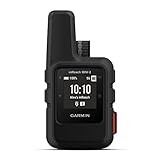
- Compact, lightweight satellite communicator enables two-way messaging and interactive SOS globally (Active satellite subscription required. Some jurisdictions regulate or prohibit the use of satellite communication devices.)
- Navigate back to where you started by using TracBack routing
- Share your location with loved ones back home at any time (active satellite subscription required) by using your MapShare page or with your coordinates embedded in your messages
- Get accurate heading information using the digital compass — even when you’re not moving
- Sync with the Garmin Explore app and website on your compatible smartphone for trip planning and topographical mapping, and create waypoints, courses, activities and collections you can sync to your device
| Criterion | Phone-based satellite service | Dedicated communicator |
|---|---|---|
| Hardware | Uses an existing smartphone | Requires a separate communicator |
| Subscription | May be included, free for a limited period or added through a carrier | Requires a satellite service plan |
| Carrier dependence | Often tied to Apple, a mobile carrier, a country and a supported device | More independent of the user’s cellular carrier |
| SOS | Uses a separate phone emergency workflow where supported | Purpose-built SOS workflow; device and active subscription are required |
| Backcountry features | Usually limited to supported messaging, location or selected data features | May include tracking, check-ins, weather, voice or photo functions depending on model and plan |
| Battery strategy | Uses the same phone needed for navigation and other tasks | Can preserve the phone’s battery by handling the satellite link separately |
| Main trade-off | Lower friction and no extra device, but narrower compatibility and more phone dependence | More equipment and recurring cost, but better suited to remote communication |
Is Garmin inReach a good choice?
Garmin says compatible inReach devices support two-way voice and text messaging and photo sharing through Garmin Messenger. Garmin also says SOS requires a compatible inReach device and an active subscription. The Garmin inReach messaging information is therefore relevant to users who need more than occasional phone-only texts.
Garmin’s plan documentation describes an Enabled plan with unlimited SOS and pay-as-you-go pricing for other features, but plan prices and terms vary. Check Garmin’s live plan selector for the current U.S. price rather than relying on an old comparison chart.
Is ZOLEO a good choice?
ZOLEO is a separate communicator that connects to a phone or tablet app and uses the Iridium network outside cellular coverage. ZOLEO describes support for two-way messaging, SOS, check-ins, weather and location sharing. The official ZOLEO product page is the appropriate place to confirm current hardware and regional details.
ZOLEO’s plans are tiered and subject to a Fair Use Policy. The current plans information lists optional Location Share+ at $6 per month, while base-plan prices should be taken from the live U.S. plan selector because the retrieved plan material did not expose every price reliably.
How can you make a satellite text succeed?
- Test before leaving coverage. Confirm that the feature appears, the account is active and the intended recipients can reply.
- Update first. Install the required iOS or Android version and update the supported messaging app before the trip.
- Charge everything. Carry a power bank; intermittent satellite searching can consume battery.
- Prepare contacts. Save emergency contacts and agree on simple check-in wording before departure.
- Find open sky. Move away from trees, cliffs, buildings and canyon walls.
- Send small messages. Start with a short plain-text message to one recipient. Avoid photos, videos, unnecessary links and unsupported message types.
- Follow the aiming guide. Keep the phone or communicator oriented as instructed until transmission is complete.
- Wait for delivery confirmation. A message accepted by the phone is not necessarily transmitted, delivered to the service network or received by the recipient.
- Carry a backup plan. Tell someone where you are going, carry navigation and lighting equipment, and do not make a phone-only satellite feature your sole rescue plan for a remote expedition.
What should you do when satellite texting fails?
“There is no satellite option.”
Possible causes include an unsupported phone model, unsupported region, missing iOS or Android version, inactive account add-on, carrier restrictions, a locked phone, missing eSIM capability or a weak remaining cellular or Wi-Fi connection that has not triggered satellite mode.
- Move fully outdoors and turn off Wi-Fi.
- Confirm that terrestrial cellular coverage is unavailable.
- Check the exact phone model and operating-system version.
- Confirm the plan, account add-on and regional availability.
- Check carrier-lock status and eSIM requirements.
- Update the messaging app.
- Try a short plain-text message instead of a photo or group message.
- If the situation is an emergency, use the device’s emergency satellite workflow rather than ordinary messaging.
Apple’s documented requirements specifically include the iPhone generation, software version, active SIM, carrier dependency and regional restrictions.
“The message will not send.”
Obstructed sky, incorrect phone orientation, a moving satellite, service congestion, an unsupported message type or recipient incompatibility can all prevent delivery. Walk to a clearing or higher point, follow the aiming guide, remove media and extra content, send a plain text to one person, keep the messaging session open and retry from another position.
According to Apple, ideal-condition delivery can take about 30 seconds, so a longer delay does not necessarily mean the service is broken. If the communication is urgent, use an emergency service or a dedicated communicator instead of repeatedly relying on an ordinary message.
“The recipient never got it.”
Sending involves several separate stages: the phone accepts the message, the phone transmits it to the satellite, the satellite delivers it to the service network and the recipient’s device receives it. The sender should wait for a delivery state and should not interpret the Send button alone as proof of arrival.
Recommended Free Tools
Also popular on Amazon

- SYNC WITH BLUETOOTH: Connect to SpotX to cellphone so you can communicate with family or even search and rescue; Use as a standalone communication device with it's own dedicated US mobile number to receive messages
- PEACE OF MIND: Send S.O.S. to 24/7 Search & Rescue service, message back and forth about the nature of your emergency, receive confirmation when help is on the way; Message any cell number or email address virtually anywhere
- GLOBALSTAR SATELLITE & SPOT products use GPS to determine location and transmit GPS coordinates to others; SPOT users can notify friends, family or emergency rescue their exact GPS coordinates
- WHAT'S IN THE BOX: SpotX Device, strap and carabiner, micro usb data/power cable, quick start guide, SOS mirrored sticker, warranty card and kickstand
- PURCHASE, ACTIVATE, EXPLORE: Grab a Spot X 2-way Satellite Messenger; Activate by selecting your service plan; Get out there and explore the world with peace of mind
Some message types require a compatible operating system or messaging capability on the recipient’s side. Apple’s support information includes additional requirements for replying to SMS messages via satellite. If delivery matters, send a short plain-text message and request a reply or confirmation.
“I need help, but ordinary satellite texting is unavailable.”
Use the emergency-specific function: iPhone Emergency SOS via satellite, Pixel Satellite SOS, T-Mobile text-to-911 where supported, or the SOS workflow provided by a Garmin inReach or ZOLEO communicator. Do not rely on an ordinary text thread as a substitute for emergency rescue coordination.
Which option is best for each type of user?
| User | Recommendation | Reason |
|---|---|---|
| Casual camper | Apple Messages via satellite if using a supported iPhone | Occasional reassurance texts do not justify another device for every user |
| Frequent hiker or hunter | Garmin inReach or ZOLEO | Tracking, check-ins and SOS are more important than avoiding hardware |
| Remote expedition user | Dedicated communicator | Phone-only service is too dependent on carrier, model and handset availability |
| Boater | Dedicated communicator after checking water, coverage and plan needs | Two-way communication and SOS may matter more than simple texting convenience |
| Rural worker | T-Satellite if the exact U.S. phone and plan qualify; otherwise a communicator | Carrier direct-to-cell service may be convenient for routine messages |
| International traveler | Verify country-specific support before travel | Apple, carrier and dedicated-service availability differs by country |
| Family emergency backup | Use built-in emergency satellite features only where documented, or provide a communicator to the person traveling | Emergency workflows should not be confused with ordinary texting |
What is the final recommendation?
Use Apple Messages via satellite if you already own a supported iPhone and only need occasional personal texts. Consider T-Mobile T-Satellite if you are in the United States, your exact smartphone qualifies and the currently advertised $10-per-month service fits your needs. Android owners should verify ordinary messaging separately from Satellite SOS. For serious backcountry travel, Garmin inReach or ZOLEO remains the more dependable choice because the dedicated device, subscription and SOS workflow are designed specifically for satellite communication.
Frequently Asked Questions
Can I text someone by satellite without buying a satellite phone?
Yes. Supported iPhones can use Apple Messages via satellite, and eligible U.S. smartphones can use T-Mobile T-Satellite without a separate satellite phone. Dedicated communicators such as Garmin inReach and ZOLEO are another option when you need stronger backcountry communication and SOS features.
Windows Errors? Fix Them Before They Spread
Repair common Windows errors and clear accumulated junk for a smoother, more stable PC - no reinstall needed.Free scan · no reinstallOutdated Drivers Are Slowing You Down
One free scan finds every outdated or missing driver and matches the right update for your exact hardware.Free scan · exact hardware matchDoes Pixel Satellite SOS let me text friends and family?
Google’s official Pixel documentation describes Satellite SOS as an emergency-service workflow, not universal person-to-person satellite texting. Verify ordinary messaging separately with the exact phone model, carrier, plan, region and supported app.
Does satellite texting work under trees or in a canyon?
Satellite texting can fail or become delayed under trees, beside cliffs or buildings, and inside canyon walls because the phone or communicator needs a clear view of the sky and horizon. Move to an open area and follow the device’s aiming instructions.
Is satellite texting free?
Costs vary. Apple says Messages via satellite is free for two years after activation of an iPhone 14 or later, while T-Mobile’s current page advertises T-Satellite at $10 per month. Garmin inReach and ZOLEO require separate hardware and subscriptions, with plan prices and limits varying by service.
The Bottom Line
Bottom line: Match the tool to the risk. An iPhone 14-or-newer is convenient for occasional messages, T-Satellite can provide carrier-based texting on eligible U.S. phones, and a Garmin inReach or ZOLEO is the safer investment when remote communication, tracking or SOS response is mission-critical.
Free tools Windows power users keep installed
One-click scans. No signup required.

