
iTechGuides is reader-supported. When you buy through links on our site, we may earn an affiliate commission. As an Amazon Associate I earn from qualifying purchases. Learn more
The best weather apps for Android depend on the job: The Weather Channel is the strongest broad-feature starting point, AccuWeather suits daily planning, MyRadar is best for quick radar, Windy is best for model comparison, and RadarScope is best for advanced radar. No app is reliably most accurate in every location or weather situation.
Weather apps solve different problems. A simple built-in Android or manufacturer widget may be enough for today’s temperature, while outdoor users may need wind and wave maps, storm trackers may need radar, and safety-conscious users should combine a commercial app with official emergency alerts.
The recommendations below are primarily aimed at Android users in the United States. App availability, radar coverage, warning systems, forecast providers, widgets, subscriptions, and privacy practices can differ by country, device, Android version, and account.
Free tools Windows power users keep installed
One-click scans. No signup required.
Key takeaways
- The Weather Channel is the best broad-feature starting point for users who want forecasts, radar, and mainstream severe-weather information in one app.
- AccuWeather is a strong daily-planning choice, but MinuteCast-style precipitation timing is an estimate rather than a guarantee.
- MyRadar is the simplest choice for watching precipitation approach, while Windy compares forecast models and RadarScope targets advanced radar users.
- Weather Underground is useful for neighborhood-level observations from personal weather stations, although station quality can vary considerably.
- Android users who need dependable safety information should keep official emergency alerts enabled and treat commercial weather apps as supplements.
What is the best weather app for Android?
For most Android users, start with The Weather Channel on Google Play if you want a broad set of forecasts, radar, and alerts. Start with AccuWeather on Google Play if your priority is a conventional, easy-to-scan daily forecast and short-term precipitation timing.
#1 Best Overall

- Effortless App Connectivity: Connect to the Tuya app via Wi-Fi for simple setup and management. View all channels' temperature and humidity data at a glance, and easily adjust units, backlight, and alarms from your smartphone for a user-friendly experience.Note: Only compatible with 2.4GHz Wi-Fi
- Easy-to-read Display: Features a large 8'' color display that presents weather data, including temperature, humidity, daily high/low records, frost alarm, weather forecast, moon phase, and sunrise/sunset time. Also, view network data: pressure, wind speed/direction, air quality PM2.5/AQI, and UVI, updated hourly
- Five-day Weather Forecast: Once connected to Wi-Fi, this weather station automatically updates the current day's weather and provides forecasts for the next four days, helping you plan your week and stay prepared for upcoming conditions
- Advanced Backlight Control: Experience clear visibility with five backlight levels and automatic light sensing. Whether wall-mounted or placed on a tabletop, the Raddy N80 adapts to your environment for optimal readability
- Four Customizable Alarms: Set up to four alarms tailored to your schedule, complete with a convenient snooze function. Stay on track with personalized alerts, ensuring you never miss an important task or event
The two apps are not universal accuracy winners. Forecast performance depends on the location, forecast horizon, weather variable, and provider. An app can be useful because it presents hourly information clearly, sends relevant notifications, or offers a good radar even when another provider performs better for a particular temperature or rainfall forecast.
| App | Best for | Free access | Radar or maps | Widgets | Alerts | Paid upgrade |
|---|---|---|---|---|---|---|
| The Weather Channel | All-around coverage and mainstream features | Yes; current limits vary | Consumer radar and weather maps | Available; verify current Android options | Severe-weather information; coverage varies | Available; current plan varies |
| AccuWeather | Daily planning and short-term rain timing | Yes; current limits vary | Radar and precipitation features | Available; verify current Android options | Available; geography and settings vary | Available; current plan varies |
| MyRadar | Fast, radar-first storm tracking | Yes; current limits vary | Radar is the core experience | Available; verify current options | Features vary by location and plan | Available for advanced features |
| Windy | Forecast models, wind, and large-scale maps | Yes; current limits vary | Animated map layers and model comparison | Available; verify current options | Not a replacement for official warnings | Available for selected capabilities |
| Weather Underground | Personal-weather-station observations | Yes; current limits vary | Station maps and weather maps | Verify current Android options | Verify current warning coverage | Available; current terms vary |
| CARROT Weather | Personality and customization | Yes; current limits vary | Verify current radar and map tier | Verify current Android options | Customizable notifications; plan varies | Recurring premium tiers available |
| Weawow | Clean, low-cost or free alternative | Confirm current Play listing | Confirm current provider and radar features | Confirm current options | Confirm current coverage | Confirm current monetization |
| RadarScope | Advanced radar interpretation | Limited or paid access; verify current plan | Professional-style radar products | Verify current options | Not a replacement for emergency alerts | Paid access and data tiers vary |
Which weather app is best for everyday forecasts?
The Weather Channel is the better starting point for users who want one mainstream app with hourly and daily forecasts, consumer radar, and broad weather-related features. The service presents itself through weather.com, while the Android experience is available through its Google Play listing.
The Weather Channel’s trade-off is density. Advertising, promotional content, and a large feature set can make the interface feel busy, especially when the only requirement is tomorrow’s temperature. Premium features and widget behavior should be checked in the current Android listing because plans and capabilities can change by market.
AccuWeather is a better fit for readers who prefer a conventional forecast layout and short-term planning details. AccuWeather highlights hourly and daily forecasts and precipitation-timing features such as MinuteCast through its main service.
Minute-by-minute rain predictions are most useful near the present time and in locations with suitable data coverage. MinuteCast is not a promise that rain will begin or stop at the exact displayed minute. Ads, upsells, widgets, and premium boundaries should be checked in the current Android listing.
| If you prioritize | Start with | Why | Main limitation |
|---|---|---|---|
| One app with broad consumer features | The Weather Channel | Forecasts, radar, and mainstream weather information in one place | The interface may feel busy and paid boundaries vary |
| Daily planning and rain timing | AccuWeather | Clear hourly and daily forecast presentation plus short-term precipitation tools | Short-term timing is location-dependent and not guaranteed |
| A quick temperature check | Built-in Android or manufacturer weather | No extra installation may be necessary | Usually fewer radar, alert, and customization options |
Which weather app has the best radar?
MyRadar is the best quick-check radar app for most casual users. The MyRadar service is built around visually checking precipitation and approaching storms rather than replacing a full daily forecast app. Its Android listing should be consulted for current alert, hurricane, wildfire, traffic, Android Auto, and premium-layer availability.
Windy is better when the question is broader than “Is rain nearby?” Windy provides animated maps for variables such as wind, rain, temperature, waves, and pressure, and its central advantage is the ability to compare forecast models. The Windy web service and Android app are particularly useful for travel, hiking, boating, aviation, and weather enthusiasts.
Do these 3 things before closing this tab:
1Fix the driver behind crashes, sound loss and screen glitches2Repair Windows errors before they cause bigger problems3Scan for outdated or missing drivers - takes under a minuteModel disagreement in Windy is valuable information, not automatically evidence that one model or app is broken. When models diverge, confidence should fall, especially for a specific location or event several days away.
RadarScope is the specialist option. The RadarScope service is designed for serious weather hobbyists, storm spotters, meteorology students, and users who understand detailed radar products. RadarScope is not the best one-tap forecast for most people, and its current Android plans and data tiers should be checked in the Google Play listing.
What does weather radar actually show?
Weather radar shows observed or estimated precipitation near the radar’s coverage area; radar is not the same thing as a forecast. Radar imagery can be delayed, can miss or misrepresent some precipitation types, and can be affected by ground clutter, beam blockage, attenuation, anomalous propagation, and increasing beam height with distance.
Rank #2

- 【16-in-1 Ultimate Weather Station with Air Quality Monitor】 This all-in-one wireless weather station integrates temperature, humidity, barometric pressure, wind speed/direction, rainfall, UV index, light intensity, and TVOC air quality detection — 16 essential functions in one device. Unlike ordinary weather stations, it monitors both weather and air quality, giving you a complete picture of your outdoor environment.
- 【WiFi Remote Control & Smart APP】 Connect to 2.4GHz WiFi and pair with the free TUYA APP to access real-time weather data, historical trends, and rainfall records anytime, anywhere. The large color display with 5-level brightness adjustment and night mode ensures easy reading day or night. Plus, built-in dual alarms with snooze, calendar to 2099, and sunrise/sunset time display make it a truly smart home hub.
- 【Professional-Grade Sensors with UV & Light Intensity】 Equipped with high-precision sensors for temperature (±0.5℃), humidity (±2% RH), and rainfall. What sets it apart: UV index (0-15 levels), light intensity (0-128klux), and TVOC air quality (0-9.999mg/m³) — features rarely found in other weather stations. Know not just the weather, but also sun exposure and air safety for your family and garden.
- 【Easy Setup & 300ft Wireless Range】 No complicated wiring! The outdoor sensor uses 433.92MHz RF transmission with a 100-meter (300ft) open-area range. Simply mount the sensor, power the main unit, and connect to WiFi — you're up and running in 5 minutes. Stable signal even through walls, perfect for garden, patio, greenhouse, and backyard use.
- 【IPX5 Waterproof & Built to Last】 The outdoor sensor features IPX5 waterproof rating and weather-resistant construction, handling rain, snow, and extreme temperatures from -40℃ to 70℃ (-40°F to 158°F). Designed for long-term outdoor use with 2-year data storage and export capability — your reliable weather companion for years to come.
Bright colors do not automatically mean dangerous weather, and an apparent gap in radar returns does not guarantee safe conditions. Warning polygons, official emergency messages, and local authorities take priority over a consumer app’s map.
Quick wins for a faster PC:
Fix the driver behind crashes, sound loss and screen glitchesFind Drivers →Clear out junk files and repair common Windows errorsFree Scan →Which Android weather apps are best for widgets?
The best widget depends on the phone, Android version, launcher, screen size, and subscription tier, so screenshots alone are not enough to rank widget quality. A useful widget should show the information needed at a glance, update reliably, support the launcher’s resizing behavior, and remain readable in light and dark themes.
For a basic current temperature and forecast, the built-in Google or manufacturer weather widget may be sufficient. Overdrop is the most obvious candidate for users who prioritize visual design and home-screen customization; check its current service information and Android listing for current widget and subscription terms.
AccuWeather, The Weather Channel, CARROT Weather, Weawow, and other mainstream apps may also offer widgets, but the useful sizes, hourly details, precipitation information, transparency controls, and paid features can change. Add both the smallest and largest widget before subscribing, then test resizing, dark mode, refresh behavior, and information density.
Android battery restrictions can make a good widget appear unreliable. If a widget stops refreshing, check the app’s battery setting and the launcher’s background behavior rather than assuming the forecast provider is offline.
Which weather app is best for severe-weather alerts?
No commercial weather app should replace official emergency alerts or local authorities. U.S. readers should keep Wireless Emergency Alerts enabled and use National Weather Service guidance, including the National Weather Service’s mobile-weather resources, during dangerous conditions.
The Weather Channel and AccuWeather are sensible mainstream complements for forecast notifications and severe-weather information. WeatherBug may appeal to users who specifically want lightning and storm-related features; verify current alert types and country coverage through WeatherBug and its Android listing.
Alert behavior depends on more than the app name. Check whether the app supports the warning types needed in the reader’s country, whether alerts require precise or background location, whether the app can notify when closed, and whether Android has restricted its background activity. Some commercial notifications are app-generated, while official government warning systems have different delivery and coverage rules.
How can you stop Android from delaying weather alerts?
Android can delay weather notifications when battery optimization, restricted background activity, disabled notification categories, data-saver settings, or manufacturer-specific process controls interfere with the app.
- Open Settings → Apps → [weather app] → Notifications and enable the relevant notification categories.
- Open Settings → Apps → [weather app] → Battery and allow background use or remove restrictive optimization where appropriate.
- Confirm the app has the location permission and precise-location access required for local alerts.
- Open the app’s own alert settings and verify saved locations, warning types, quiet hours, and notification sound settings.
- Keep Android’s official emergency-alert settings enabled.
Menu names differ between Android versions and manufacturers, including Samsung, Pixel, and budget-phone interfaces. Do not assume that an alert setting in the app can override a system-level restriction.
Rank #3

- Comprehensive Weather Monitoring: Tracks indoor/outdoor temperature & humidity, trends, barometric pressure, wind speed & direction, light intensity, UV index, PM2.5 and AQI air quality, moon phases, plus local sunrise and sunset times—all shown clearly on a vivid 8.8" HTN display
- Smart APP Monitor: Easily connect to Wi-Fi and access real-time weather data through the Tuya app, which also allows you to view and analyze data trends for up to one year. Keeping you updated on weather conditions from anywhere with ease. Note: Only compatible with 2.4GHz Wi-Fi
- Five-day Weather Forecast: Once connected to Wi-Fi, this weather station automatically updates the current day's weather and provides forecasts for the next four days, helping you plan your week and stay prepared for upcoming conditions
- Multi-Sensor Support: Connect up to 3 wireless outdoor sensors (1 included) with a stable 100-meter transmission range—ideal for monitoring your garden, greenhouse, or multiple rooms. Need extra sensors? Search ASIN B0DZTBWSZB to purchase additional units
- User-Friendly Design: With auto-adjusting backlight, 4 customizable alarms with snooze, and flexible wall-mount or desktop setup, the N90 is designed for effortless everyday use. Perfect for home weather monitoring, gardening enthusiasts, and smart home integration
Which weather app is best for weather enthusiasts and outdoor planning?
Windy is the strongest choice for users who need more than a temperature forecast. Model comparison and map layers help users inspect wind, rain, pressure, waves, and other large-scale patterns for hiking, travel, boating, aviation, and general weather analysis.
Windy’s strength is also its learning curve. A casual user may find the map layers and model choices overwhelming, and model comparison does not guarantee a precise neighborhood forecast. Windy is also not automatically the best source for official local warnings.
Weather Underground solves a different problem: current observations from a network of personal weather stations. A nearby station can represent a neighborhood or microclimate better than a distant airport station, but “nearby” does not mean “reliable.” A station may be indoors, poorly shielded, in direct sunlight, offline, stale, badly calibrated, or several miles away despite its map position.
What’s actually slowing this PC down?
Pick the symptom - the matching free tool is one click away.
Use Weather Underground’s station and map information to investigate local conditions, but separate current observations from forecast quality. Weather Underground, The Weather Channel, and related services have historically been associated with a broader weather-data ecosystem; two apps agreeing with each other should not automatically be treated as two independent forecasts.
Which weather app is best if you want free or low-friction weather?
Weawow is worth considering for users who dislike ad-heavy mainstream interfaces and want a clean, low-cost or free alternative. The current Weawow service and Google Play listing should be checked before publication or installation for current data sources, widgets, radar, privacy disclosures, Android support, and monetization.
“Free” does not mean “most accurate,” and “ad-free” does not automatically mean “private.” Check Google Play’s Data safety section, the app’s privacy policy, requested permissions, account requirements, and whether saved locations are linked to an account.
The built-in Android or manufacturer weather experience remains the lowest-friction option for users who need only the current temperature, hourly conditions, and a basic forecast. Install a dedicated app when you need richer radar, multiple locations, model comparison, more capable widgets, specialized alerts, or different advertising and privacy terms.
Is CARROT Weather worth paying for on Android?
CARROT Weather is worth considering when personality, customization, and notification controls matter more than having the simplest possible forecast. The app’s distinctive presentation is a feature for users who enjoy it and a distraction for users who want strictly utilitarian weather.
Premium tiers may provide expanded customization, notifications, and data-source choices, but availability and feature parity can change between Android and iOS. Review the CARROT Weather service and current Android listing before purchasing. A subscription can improve the experience or unlock data choices; it does not automatically make a forecast more accurate.
How should you judge weather-app accuracy?
Judge accuracy by location, forecast horizon, weather variable, and provider rather than by an app’s reputation. Temperature, precipitation timing, wind, severe-weather detection, and air-quality information can have different strengths, and a provider that performs well in one region may not perform as well elsewhere.
Rank #4
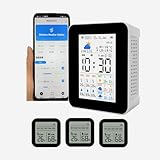
- 【Multifunctional WIFI APP weather forecast weather station & wireless thermometer】Weather forecast for the next 3 days & Maximum and minimum temperature forecast, today's weather, maximum and minimum temperature, UV intensity, sunrise/sunset, time, date, alarm clock,3 wireless sensors temperature and humidity detection,3 sensors can set the maximum and minimum temperature alarm, Smart App connection,Phone app mobile remote real-time monitoring data, Mobile Phone APP Store 1 year's data. The WiFi can only connect to 2.4G WiFi and is not supported 5GWiFi.
- 【 3 sensors】Can take up to 3 wireless temperature and humidity sensors, The 3 sub- sensors can be placed in 3 different areas to detect temperature and humidity respectively and transmit data to the host and mobile APP,the sensor use 2 AAA battery.( not included ).The smart APP can set the maximum and minimum temperature alarm of 3 sensors respectively. If it is found that one of the sensors has no data on the host, please re-pair (all sensors need to be re-paired ).
- 【 Display screen 】 The host uses a 2.8-inch TFT display, and the sensor uses a 2-inch LCD display , The 2.8-inch color TFT screen provides clear and easy-to-read data, allowing you to view real-time data with ease.
- 【 Time and date updated 】The host monitor automatically syncs with your smartphone's time and date each time you connect, ensuring accurate and up-to-date information.
- 【Portable and Rechargeable】 With a compact and lightweight design, the smart weather station wireless hygrothermograph is suitable for a variety of environments, including homes, public places, nursing rooms, restaurants, hotels, and more. rechargeable battery supports USB charging so you can use it anywhere, anytime.
A transparent accuracy comparison should identify the geography, season or evaluation period, forecast horizon, variable measured, sample size, and independent methodology. Without those details, claims that an app is “the most accurate” are not meaningful enough to support a universal ranking.
Windows Errors? Fix Them Before They Spread
Repair common Windows errors and clear accumulated junk for a smoother, more stable PC - no reinstall needed.Free scan · no reinstallCrashes, No Sound, or Screen Glitches?
Random freezes, missing sound and display glitches usually trace back to one bad driver. Find and replace yours safely.Free scan · under a minuteWhen two apps disagree, compare the exact location and forecast time first. Then check whether one app is showing an airport observation and another is using a personal station, whether the apps identify different providers or models, and whether the disagreement concerns current conditions or a future forecast. Disagreement usually signals uncertainty rather than proving that one app is malfunctioning.
Long-range forecasts can help with broad planning, but a 10-day or 14-day display should not be read as precise certainty. For rain that may arrive soon, inspect radar and official warnings alongside the forecast percentage.
Do you need more than one weather app?
A two-app setup is often more useful than one app attempting to handle daily forecasts, radar, model comparison, hyperlocal observations, and emergency information at once.
| Need | Recommended combination | Reason |
|---|---|---|
| Everyday forecast and radar | AccuWeather or The Weather Channel + MyRadar | One app handles daily planning while the second provides a fast radar view. |
| Minimalist forecast and advanced maps | Built-in Android weather or Weawow + Windy | The first app stays simple while Windy supplies model and map depth. |
| Severe-weather monitoring | The Weather Channel or AccuWeather + RadarScope | A mainstream app provides general notifications while RadarScope supports detailed radar inspection. |
| Neighborhood conditions | Weather Underground + a mainstream alert app | Personal-station observations complement broader forecasts and warning notifications. |
| Outdoor planning | Windy + a clear hourly forecast app | Windy covers wind, waves, and map trends while the second app simplifies hourly precipitation and temperature. |
Do not install multiple apps merely to count how many forecasts agree. Apps may share providers, models, or related data ecosystems, so apparent agreement is not necessarily independent confirmation.
Recommended Free Tools
What should you check before choosing a weather app?
- Forecast usefulness: Look for hourly and daily views with the variables you actually use, such as precipitation probability, wind, humidity, visibility, UV, or air quality.
- Alerts: Check warning geography, alert types, background-location requirements, notification behavior when the app is closed, and whether core warnings are free.
- Radar: Determine whether the app shows actual or near-live radar, a simplified precipitation animation, forecast maps, lightning layers, or warning polygons.
- Location specificity: Compare geocoding, saved locations, rural coverage, international availability, and any personal-weather-station data.
- Android experience: Test widgets, dark mode, resizing, notifications, tablet or foldable layouts, battery behavior, and Android Auto if relevant.
- Cost: Check the current Google Play purchase screen for currency, monthly or annual billing, trial length, renewal, taxes, and cancellation terms.
- Privacy: Distinguish approximate one-time location from precise foreground location, continuous background location, account-linked locations, advertising data, and analytics sharing.
Prices and plans change by country, account, tax, promotion, billing period, and purchase channel. Current roundup prices can conflict, so use the app’s current Google Play purchase screen rather than an old comparison table.
Final recommendations by user type
- Most people: Begin with The Weather Channel for a broad all-around feature set or AccuWeather for a more conventional daily-planning experience.
- Quick radar: Choose MyRadar.
- Maps and forecast models: Choose Windy.
- Advanced storm radar: Choose RadarScope if you understand radar products and accept its paid-access model.
- Hyperlocal observations: Try Weather Underground, while checking the quality and freshness of individual stations.
- Customization and personality: Try CARROT Weather, especially if its premium model fits your budget.
- Free or low-friction use: Try Weawow after checking its current provider, privacy, widget, and monetization details, or use the built-in Android weather experience.
- Safety-critical warnings: Keep official emergency alerts enabled and follow local authorities and the National Weather Service in the United States.
Frequently Asked Questions
What is the most accurate weather app for Android?
There is no defensible single most accurate weather app for every Android user. Accuracy varies by location, forecast horizon, weather variable, and provider, so choose by need and compare forecasts with radar and official warnings during important events.
Is MyRadar better than AccuWeather?
MyRadar is better for quickly viewing approaching precipitation, while AccuWeather is better suited to daily forecasts and short-term planning. MyRadar is not necessarily a complete replacement for a daily forecast app.
Can a weather app replace official emergency alerts?
No. Commercial weather apps should supplement, not replace, official emergency alerts and local authorities. U.S. users should keep Wireless Emergency Alerts enabled and consult the National Weather Service during dangerous weather.
The Tool Desk
Outbyte Driver Updater FREEFix the driver behind crashes, sound loss and screen glitchesFind Drivers →Outbyte PC Repair FREEClear out junk files and repair common Windows errorsFree Scan →Are paid weather apps more accurate?
A paid weather app is not automatically more accurate. Paid plans may remove ads or unlock radar layers, widgets, longer forecasts, notifications, or additional data sources, but accuracy still depends on the provider, location, variable, and forecast horizon.
Why do two weather apps show different forecasts?
Two weather apps may use different forecast providers, models, locations, stations, or update times. Disagreement indicates uncertainty more often than it proves that one app is broken, and two apps may also share related data rather than providing independent forecasts.
The Bottom Line
The best weather app for Android is the one that matches your decision: The Weather Channel or AccuWeather for everyday forecasts, MyRadar for quick radar, Windy for maps and model comparison, Weather Underground for personal-station observations, and RadarScope for advanced radar. For dangerous conditions, keep official emergency alerts enabled regardless of which app you choose.
Quick Recap
Product prices and availability are accurate as of the date/time indicated and are subject to change. Any price and availability information displayed on Amazon at the time of purchase will apply.
The Tool Desk
Outbyte PC Repair FREEClear out junk files and repair common Windows errorsFree Scan →Outbyte Driver Updater FREEFix the driver behind crashes, sound loss and screen glitchesFind Drivers →
