
What’s actually slowing this PC down?
Pick the symptom - the matching free tool is one click away.
iTechGuides is reader-supported. When you buy through links on our site, we may earn an affiliate commission. As an Amazon Associate I earn from qualifying purchases. Learn more
You can watch movies online for free without downloading suspicious files or entering a credit-card number. The legitimate options fall into three groups: ad-supported services such as Tubi and Pluto TV, library-funded services such as Kanopy and Hoopla, and free movie sections inside larger platforms such as YouTube and Prime Video.
The main trade-off is predictable: ad-supported services have larger, easier-to-access catalogs, while library services usually offer cleaner playback and stronger independent, documentary, and international selections. Catalogs also change with licensing, so a movie that is free today may disappear later.
Quick comparison
| Service | Free model | Account needed? | Best for |
|---|---|---|---|
| Tubi | Ad-supported on-demand streaming | No for basic viewing | The best general-purpose catalog |
| Pluto TV | Ad-supported live channels and on-demand movies | No; optional account | Scheduled movie channels |
| The Roku Channel | Ad-supported on-demand and live TV | Varies by device and market | Roku Originals and free live TV |
| Plex | Ad-supported movies, shows, and live TV | No for basic viewing | Cross-device access and discovery |
| Xumo Play | Ad-supported live and on-demand streaming | No | Watching without registration |
| Kanopy | Library- or university-funded streaming | Participating library card or university login | Criterion, indie, documentary, and international films |
| Hoopla | Library borrowing | Participating library card | Ad-free viewing and downloads |
| YouTube | Free ad-supported Primetime movies | Usually no for public viewing | Convenience and broad device support |
| Prime Video | Free ad-supported titles and live channels | Amazon account | Former Freevee content |
1. Tubi: best overall
Tubi is the easiest starting point for most viewers. Its free catalog includes movies and TV shows, and basic viewing does not require a subscription, payment card, or account. Open Tubi in a browser and select Browse Titles, or use its apps on Roku, Fire TV, Apple TV, Android TV, game consoles, smart TVs, phones, and tablets.
Tubi is funded by advertising and currently has no paid, ad-free upgrade. Creating a free account is optional, but it adds My List and synchronized Continue Watching across devices.
Popular on Amazon

- HD streaming made simple: With America’s number 1 TV streaming platform,* exploring popular apps—plus tons of free movies, shows, and live TV—is as easy as it is fun. *Based on hours streamed—Hypothesis Group
- Compact without compromises: The sleek design of Roku Streaming Stick won’t block neighboring HDMI ports, and it even powers from your TV alone, plugging into the back and staying out of sight. No wall outlet, no extra cords, no clutter.
- No more juggling remotes: Power up your TV, adjust the volume, and control your Roku device with one remote. Use your voice to quickly search, play entertainment, and more.
- Shows on the go: Take your TV to-go when traveling—without needing to log into someone else’s device.
- TV, simplified: With setup that only takes minutes, a simple-to-navigate Home Screen, and an uncluttered remote control that does all you need—Roku makes it easier to watch the TV you love.
Best for: viewers who want the largest all-purpose free catalog with minimal setup.
Watch out for: titles rotate as licensing agreements change. “Free” does not mean that a movie will remain available permanently.
2. Pluto TV: best for live movie channels
Pluto TV combines a traditional live-TV guide with on-demand movies and shows. Select Live TV to browse scheduled channels, or choose On Demand when you want to start a specific movie immediately. Pluto’s service pages describe more than 100 live channels and thousands of on-demand movies and TV shows, although the lineup changes.
Quick wins for a faster PC:
Clear out junk files and repair common Windows errorsFree Scan →Scan for outdated or missing drivers - takes under a minuteDriver Scan →Repair Windows errors before they cause bigger problemsFix Now →You do not need an account to watch. An optional account adds favorites, personalization, and a kid-friendly space. Pluto supports web browsers, Android and iOS, Roku, Apple TV, Fire TV, Google TV, smart TVs, Xbox, PlayStation, and other platforms.
Best for: people who enjoy channel surfing and do not mind waiting for a movie’s scheduled showing.
Watch out for: a movie shown on a live channel is not necessarily available in Pluto’s on-demand library. Closed captions are available for many programs, but not every title.
3. The Roku Channel: best for Roku Originals and free live TV
The Roku Channel offers free ad-supported movies, TV shows, Roku Originals, children’s content, and live channels. It works on Roku devices, the Roku website, and the Roku mobile app; availability varies by location and device.
On a Roku device, press Home and select Free or Featured Free. To install another free service, use Home → Streaming Store → Top Free & TV, choose the app, and select Add app.
Also popular on Amazon

- Ultra-speedy streaming: Roku Ultra is 30% faster than any other Roku player, delivering a lightning-fast interface and apps that launch in a snap.
- Cinematic streaming: This TV streaming device brings the movie theater to your living room with spectacular 4K, HDR10+, and Dolby Vision picture alongside immersive Dolby Atmos audio.
- The ultimate Roku remote: The rechargeable Roku Voice Remote Pro offers backlit buttons, hands-free voice controls, and a lost remote finder.
- No more fumbling in the dark: See what you’re pressing with backlit buttons.
- Say goodbye to batteries: Keep your remote powered for months on a single charge.
Roku’s search also displays rentals, purchases, and premium subscriptions. A search result is not proof that a title is free. Use the dedicated free sections and check the playback label before starting.
Best for: Roku owners who want free content integrated into the home screen, though the website and mobile app are also useful.
4. Plex: best for cross-device streaming and discovery
Plex provides free, licensed, ad-supported movies, shows, documentaries, and live TV. Select Browse Movies & TV Shows and filter by genres such as Action, Comedy, Documentary, Horror, Romance, Sci-Fi, Thriller, and Western.
PC Slower Than It Used to Be?
A free scan shows the junk files, broken settings and background clutter dragging Windows down - then fixes them in one click.Free scan · Windows 10 & 11Outdated Drivers Are Slowing You Down
One free scan finds every outdated or missing driver and matches the right update for your exact hardware.Free scan · exact hardware matchBasic use does not require payment, a subscription, a credit card, or even a Plex account. A free account adds a universal watchlist, cross-device resume, and personalization. Plex is available in browsers, on phones and tablets, smart TVs, Roku, Apple TV, Chromecast, Android TV, Fire TV, and game consoles.
Best for: viewers who watch on several devices or want Plex’s broader discovery tools.
Important distinction: Plex also displays discovery results that may point to other services. Confirm that a title is marked free before assuming Plex provides the playback. Plex Pass does not remove ads from Plex’s own free catalog.
5. Xumo Play: best with no sign-in
Xumo Play offers free, ad-supported live channels and on-demand movies without a subscription, login, account, or credit card. Its web movie page includes categories such as Most Popular, Recently Added, Leaving Soon, Action, Thriller & Horror, Comedy, Classics, Documentaries, Kids & Family, and Bollywood & Indian.
For scheduled programming, open the Live Guide and select movie-focused channels. Xumo supports web browsers, Roku, Fire TV, Chromecast, Android TV, Google TV, Samsung, Sony, Vizio, Hisense, iPhone, iPad, Xfinity, and Xumo hardware.
Also popular on Amazon

- 4K streaming made simple:With America’s number 1 TV streaming platform,* exploring popular apps—plus tons of free movies, shows, and live TV—is as easy as it is fun. *Based on hours streamed—Hypothesis Group
- 4K picture quality: With Roku Streaming Stick Plus, watch your favorites with brilliant 4K picture and vivid HDR color.
- Compact without compromises: Our sleek design won’t block neighboring HDMI ports, and it even powers from your TV alone, plugging into the back and staying out of sight. No wall outlet, no extra cords, no clutter.
- No more juggling remotes: Power up your TV, adjust the volume, and control your Roku device with one remote. Use your voice to quickly search, play entertainment, and more.
- Shows on the go: Take your TV to-go when traveling—without needing to log into someone else’s device.
Best for: starting a movie immediately without creating an account.
Watch out for: Xumo has no ad-free version and currently does not provide parental controls. Channel schedules and the movie catalog change regularly.
6. Kanopy: best for quality films through a library or university
Kanopy is a strong choice for independent, classic, international, documentary, educational, and Criterion-related films. It is ad-free, but it is not universally free: access requires a participating public library card or university login.
Do these 3 things before closing this tab:
1Fix the driver behind crashes, sound loss and screen glitches2Repair Windows errors before they cause bigger problems3Scan for outdated or missing drivers - takes under a minute- Open Kanopy and select Get Started.
- Choose your public library or university.
- Enter the requested card credentials or university login.
- Browse the catalog and select a film.
To add another library later, use My Account → My Libraries → Add New Library → Find Your Library on the website. In the mobile app, use More → My Libraries → Add library.
Access limits are controlled by the institution. A library may restrict streaming temporarily to manage its budget, and some accounts use ticket or viewing limits. If Kanopy begins asking for a PIN or password that it did not previously require, the library may have changed its authentication system. Update the credentials under My Account → My Libraries → Edit.
Best for: film quality rather than the biggest possible catalog.
7. Hoopla: best for ad-free viewing and downloads
Hoopla lets patrons borrow movies through participating public libraries. Streaming is ad-free, and the service supports computers, phones, tablets, Roku, Apple TV, Google TV, Samsung TV, and other devices. Supported mobile devices can also download movies for offline viewing.
Free tools Windows power users keep installed
One-click scans. No signup required.
- Open HooplaDigital.com or install the Hoopla app.
- Select Get started and choose your library.
- Sign in with a valid library card.
- Select a movie and choose the borrow or play option.
Monthly borrowing limits are set by each library, so two Hoopla users can have different limits and catalogs. The Instant collection has no holds or waiting lists, but its availability also depends on the participating library.
Also popular on Amazon

- Stunning 4K and Dolby Vision streaming made simple: With America’s number 1 TV streaming platform,* exploring popular apps—plus tons of free movies, shows, and live TV—is as easy as it is fun. *Based on hours streamed—Hypothesis Group
- Breathtaking picture quality: Stunningly sharp 4K picture brings out rich detail in your entertainment with four times the resolution of HD. Watch as colors pop off your screen and enjoy lifelike clarity with Dolby Vision and HDR10+.
- Seamless streaming for any room: With Roku Streaming Stick 4K, watch your favorite entertainment on any TV in the house, even in rooms farther from your router thanks to the long-range Wi-Fi receiver.
- Shows on the go: Take your TV to-go when traveling—without needing to log into someone else’s device.
- Compact without compromises: Our sleek design won’t block neighboring HDMI ports, so you can switch from streaming to gaming with ease. Plus, it’s designed to stay hidden behind your TV, keeping wires neatly out of sight
Best for: viewers who have a participating library card and want to avoid ads or watch offline.
8. YouTube: best for convenience
YouTube Movies includes a formal free-of-charge Primetime Movies program with advertising. In the United States, browse youtube.com/movies or look for YouTube’s free movie shelf on the homepage. Public videos usually play without an account, although age restrictions, device rules, and regional availability can change that.
YouTube’s apps are available on smart TVs, Roku, Fire TV, Apple TV, Android TV, phones, tablets, and game consoles. The major drawback is that YouTube search mixes free movies with rentals, purchases, paid channels, and user-uploaded videos. Check for a clearly marked free or ad-supported playback option.
YouTube Premium is not required for the free catalog. Premium can remove ads from eligible content, but the movies themselves are offered free with advertising.
Best for: viewers who already use YouTube and want the fewest new apps or interfaces to learn.
Independent reader supportYour contribution helps us test, update, and keep practical guides available for everyone.9. Prime Video’s free catalog: the current Freevee replacement
Freevee is no longer a separate service. Amazon deprecated the standalone Freevee branding in early 2025 and integrated its free, ad-supported movies, shows, and FAST channels into Prime Video.
Open Prime Video and look for titles labeled Watch for free, Watch with ads, or With ads. Do not confuse those labels with Included with Prime, Rent, or Buy. Free live channels are available from the Live TV tab, including for non-Prime customers.
Recommended Free Tools
An Amazon account is required, but a paid Prime membership is not required for the free ad-supported catalog. Amazon’s free ad-supported videos are online-streaming only and cannot be downloaded. One account can stream up to three videos at once, with the same video limited to two devices simultaneously.
Also popular on Amazon
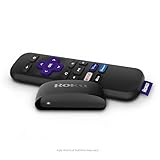
- Streaming made easy: Roku Express lets you stream free, live and premium TV over the Internet—right to your TV. It’s perfect for new users, secondary TVs and easy gifting—but powerful enough for seasoned pros
- Quick and easy setup: Just plug it into your TV with the included High Speed HDMI Cable and connect to the internet to get started
- Tons of power, tons of fun: Compact and power-packed, you’ll stream your favorites with ease; from movies and series on Apple TV, Prime Video, Netflix, The Roku Channel, HBO, Showtime and Google Play to cable alternatives like Hulu with Live TV and PlayStation Vue, enjoy the most talked about TV across free and paid channels
- Low cost, no extra fees: For under $30, Roku Express streaming device includes a High Speed HDMI Cable—and there’s no monthly equipment fee; with access to free TV on hundreds of channels, there’s plenty to stream without spending extra
- Simple remote: Incredibly easy to use, this remote features shortcut buttons to popular streaming channels
Best for: people who want the former Freevee selection inside a familiar Amazon interface.
How to choose the right free movie service
- Want the broadest on-demand choice? Start with Tubi, then try Plex or Xumo Play.
- Prefer a live-TV experience? Use Pluto TV, The Roku Channel, or Xumo Play.
- Want fewer or no ads? Check Kanopy and Hoopla through your library.
- Need offline viewing? Hoopla is the option on this list that supports movie downloads on supported mobile devices.
- Do not want to register? Tubi, Pluto TV, Plex, Xumo Play, and much of YouTube can be used without an account.
- Already use Amazon? Search Prime Video for the Watch with ads label rather than looking for a separate Freevee app.
How to stay safe on free movie sites
Use official websites and app-store listings. Legitimate services do not require you to install a special video codec, disable your browser’s security protections, or download a “player” from a pop-up. Avoid sites that promise every new theatrical release for free, repeatedly redirect you, or ask for payment details before showing a catalog.
Also remember that an app can be legal while still showing advertisements and collecting normal account or device information. Review permissions, use a separate password for optional accounts, and keep your TV or streaming device updated.
The Tool Desk
Outbyte PC Repair FREEClear out junk files and repair common Windows errorsFree Scan →Outbyte Driver Updater FREEFix the driver behind crashes, sound loss and screen glitchesFind Drivers →FAQ
Are free movie apps legal?
The services listed here provide licensed or institutionally supplied content. They are legal alternatives to unauthorized streaming sites, but their catalogs vary by country, device, and licensing date.
Do free movie apps require a credit card?
Tubi, Pluto TV, Plex, Xumo Play, and YouTube’s free movie selection generally do not require a credit card. Prime Video requires an Amazon account but not Prime membership for its free ad-supported catalog. Kanopy and Hoopla require eligible library or university access.
Which free movie app has no ads?
Kanopy and Hoopla are the main ad-free choices on this list, although both require participation through a library or university. The other services use advertising for their free catalogs.
Why did Freevee disappear?
Amazon deprecated Freevee as a standalone service in early 2025 and moved its free ad-supported movies, shows, and live channels into Prime Video. Search Prime Video for titles marked Watch with ads or With ads.
The Bottom Line
For most people, start with Tubi for on-demand movies or Pluto TV for live channels. Check Kanopy and Hoopla before accepting advertisements if you have a participating library card. Use the free labels carefully on Roku, YouTube, and Prime Video because those interfaces also show rentals, purchases, and paid subscriptions. No service guarantees a permanent catalog of new releases; free availability changes as licensing agreements expire.

