
Recommended Free Tools
Snagit 12’s defining change was a built-in video trimmer. It let users remove unwanted material from the beginning, middle or end of a captured video. The release also changed the capture workflow, refreshed the editor interface and raised the Windows compatibility floor: Windows XP and Windows Vista were no longer supported.
What was new in Snagit 12?
Video trimming for captured recordings
TechSmith positioned video trimming as the headline addition. After recording, you could select an unwanted section and cut it out, including filler such as “ums,” “ahs,” coughs, extra time or other mistakes. The documented feature covered removals at the beginning, middle and end of a recording, as well as a selected section in the middle.

This was editing of an existing Snagit capture, not evidence of a full, multi-track timeline editor. The release materials describe removing sections from a recording rather than advanced transitions, layered tracks or extensive post-production tools.
A revised capture workflow
Snagit 12 changed when you chose the capture type. The release notes describe starting the capture, then selecting the type afterward. They also describe resizing the selected capture area. In practical terms, the workflow gave you a chance to adjust the region and decide whether you were making an image or video capture after the initial snag.
The Tool Desk
Outbyte PC Repair FREEClear out junk files and repair common Windows errorsFree Scan →Outbyte Driver Updater FREEFix the driver behind crashes, sound loss and screen glitchesFind Drivers →#1 Best Overall
![Camtasia 2024 - Video Editor & Screen Recorder [PC/Mac Online Code]](https://m.media-amazon.com/images/I/31a+AOtyMxL._SL160_.jpg)
- Camtasia is the best screen recorder and video editor for creating software demos, educational content, tutorials, walkthroughs, social media content, and much more!
- With a much smaller learning curve than other video editors, Camtasia allows anyone to create great videos with no specialized training.
- Trusted by everyone from influencers and educators to Fortune 500 companies
- Getting started making videos with Camtasia is easy thanks to a huge library of templates and free assets
- Version Note: This listing is for Camtasia 2024. Please note that official technical support and software updates for this version are scheduled to conclude on December 31, 2026.
Refreshed editor interface
TechSmith also updated the editor interface to focus attention on the content being edited. The change was an interface and workflow refresh rather than a separate new file format or a claim of broad professional video-editing capabilities.
Text capture was removed, according to contemporaneous reporting
Contemporaneous BetaNews coverage reported that text capture mode was dropped in the Windows release. That is a secondary-source report, so it should not be confused with the specific feature claims made in TechSmith’s own release notes.
Rank #2

- 【1080P@60fps Video Recorder】-- This Video Recorder records Full HD 1080P videos from game consoles, set-top boxes, video players, PC, DV, VCR onto the inserted TF card. The recorded MP4 files are compatible with PC, mobile phone and any other platforms
- 【3.5" LCD and Remote Control】-- The large 3.5" LCD and built-in speaker allow you to preview the audio & video. With the custom remote control, press one button to start recording now!
- 【Built-in Speaker & Playback】-- Built-in 3000mah lithium battery and speaker provides you for a 3-hour portable fun watching videos anywhere. It allows you to have instant playback of recorded video. If you are worried about disturbing others, you can also use your headphones with it
- 【Schedule Recording】 -- Simply schedule the recording task, set up your set-top box, select the target channel and let it go. You'll never miss the latest sports events and other favorite videos
- 【Standalone Capture with Mic-in】 -- Easy operation, one-click recording without computing required. The device record videos from the HDMI video source and saves them in MP4 format onto the TF card (up to 128 GB). The internal 3.5mm mic jack allows you to add own live commentary and it only works with TRS standard microphone
Does Snagit 12 support Windows XP or Vista?
No. Snagit 12 removed support for both Windows XP and Windows Vista. The official Snagit 12.1.0 help manual, dated July 2014, lists Windows 7 or Windows 8 and newer as the supported Windows baseline, corroborating the higher compatibility floor reported at launch.
Do not apply current Snagit requirements to this historical release. Snagit 12’s documented requirements describe the software and operating systems of its own era.
Outdated Drivers Are Slowing You Down
One free scan finds every outdated or missing driver and matches the right update for your exact hardware.Free scan · exact hardware matchPC Slower Than It Used to Be?
A free scan shows the junk files, broken settings and background clutter dragging Windows down - then fixes them in one click.Free scan · Windows 10 & 11Rank #3
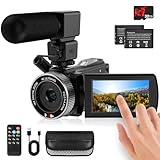
- 🎥【HD4K Video Camera Camcorder】This video camera camcorders supports shooting HD 4K video and 48 Megapixel crystal-clear images, It equipped with 3.0"/ 270° flip touch screen,18X digital zoom and 32G SD card. Great for travelling, meeting, studying and kids/ beginners/ students/ olders record their lovely moments.
- 🎥【Multifunction Video Camera】This video camera for youtube supports loop /time-lapse /self-timer /continuous shooting /pause function /ISO brightness /TV output /Smile capture /Anti-shaking /USB 2.0 ect. Various functions can record your wonderful moments in daily life. It is small and lightweight with high-class materials. Easy to carry everywhere.
- 🎥【Flip Touch Screen & External Microphone】This 4K video camera features a durable metal-hinge and 3.0" IPS touch screen for flexible selfies, low-angle shots, and group filming. Also come with built-in microphone and external microphone. The upgrade external microphone has excellent sound processing technology, It can capture sound far from 3-5m. which improved recording volume and reduces noise. The sound is very loudly when you playback.
- 🎥【Webcam Function & Fill Light】This video camera is equipped with fill light, You can shoot images or videos in low light condition or in the darkness; This vlogging camera can be used as a webcam for YouTube /Skype /TikTok /Facebook live streaming or make video calls with your family or friends; also you can connect the digital viedeo camera camcorders to TV via usb cable to playback HD photos or videos.
- 🎥【Recording While Charging & 32GB SD Card】This kids video camera comes with 1 high capacity 1500mAh battery. Full-charged battery can be sustainably used for 90-120 minutes. This youtube camera can be charged with power bank or PC; Support recording while charging. So not worry about running out of power when recording. This blogging camera include 32G SD card (Max up to 256GB), please format the SD card before using.
Snagit 12 system requirements
The following figures come from TechSmith’s Snagit 12.1.0 manual. They are product requirements for that documented 12.x release, not modern Snagit specifications.
| Component | Requirement | Qualification |
|---|---|---|
| Operating system | Windows 7 or Windows 8 and newer | Windows XP and Vista were no longer supported. |
| .NET | .NET Framework 4.0 Full or later | Required by the documented release. |
| Processor | 2.4 GHz single-core | A 2.4 GHz dual-core processor was required for video. |
| Memory | 1 GB RAM | 2 GB RAM was required for video. |
| Free disk space | 125 MB | Listed by the 12.1.0 manual. |
| Windows 7 N video support | Media Feature Pack | Needed for video capture on Windows 7 N editions. |
How Snagit 12 changed the product in context
Snagit 12 was not simply a cosmetic update. Its changes affected three parts of the product:
Rank #4
- Output: recorded video could be shortened without exporting to a separate editor for basic removals.
- Capture: the capture area could be resized and the capture type chosen after the initial capture step.
- Compatibility: users on XP or Vista had to remain on an older Snagit release or move to a newer Windows version.
The 12.x series later received additional updater changes. For example, version 12.4.1 added Windows 10 support, while intervening updates addressed account sign-in, OneDrive for Business integration and workflow improvements. Those later updates should not be read back into the initial 12.0 feature list.
What the 12.1.0 manual confirms
The July 2014 manual documents screen-image capture, video recording, audio recording, editor functions and capture profiles. Its date establishes when that manual was published, but it does not by itself prove the exact initial public launch date of Snagit 12. A precise launch day is therefore not stated here.
Can you still get Snagit 12?
Current TechSmith pages promote a newer Snagit subscription and trial rather than confirming continued distribution of Snagit 12. The historical requirements and feature descriptions above should not be treated as a current purchase or download offer. Availability of an old 12.x installer, activation service and support can differ from the current product.
Quick Recap
Product prices and availability are accurate as of the date/time indicated and are subject to change. Any price and availability information displayed on Amazon at the time of purchase will apply.

