
What’s actually slowing this PC down?
Pick the symptom - the matching free tool is one click away.
iTechGuides is reader-supported. When you buy through links on our site, we may earn an affiliate commission. As an Amazon Associate I earn from qualifying purchases. Learn more
For most new replacement purchases, choose the Siri Remote with USB-C. Apple identifies it as the third-generation model introduced in 2022, and lists it for Apple TV 4K (first, second and third generations) and Apple TV HD. Apple’s current retail listing also includes Apple TV 4K (fourth generation).
Choose a Lightning remote instead when you are replacing a first- or second-generation remote and want the matching hardware and cable. The meaningful difference is the charging connector; the available evidence does not establish a USB-C advantage in battery runtime, wireless performance or the basic Apple TV controls.
USB-C vs Lightning: the short answer
The connector identifies the remote generation:
| Remote | Generation | Charging port | Best fit |
|---|---|---|---|
| Siri Remote (USB-C) | Third generation, introduced in 2022 | USB-C | Most new replacement purchases and Apple TV models listed by Apple for this remote |
| Siri Remote (Lightning) | First or second generation | Lightning | Replacing an existing first- or second-generation remote or using a Lightning cable already on hand |
Both versions are wireless Apple TV remotes with Siri voice control, a touch-enabled clickpad and a rechargeable battery. Changing the port changes how you recharge the remote, not its fundamental role. No dated head-to-head test establishes that USB-C makes either remote last longer per charge, communicate better or respond faster.
Free tools Windows power users keep installed
One-click scans. No signup required.
What changed between the generations?
Third-generation Siri Remote: USB-C
Apple introduced the third-generation Siri Remote in 2022. Its bottom edge has a USB-C port. Apple’s specification lists a microphone for Siri, an infrared transmitter, a touch-enabled clickpad, Bluetooth 5.0 and a rechargeable battery. The practical benefit of USB-C is that the remote uses the same connector family found on many current phones, tablets, computers and accessories.
Popular on Amazon

- SIRI REMOTE—Siri Remote (4th generation) brings precise control to your Apple TV 4K.*
- TOUCH-ENABLED CLICKPAD—Select titles, swipe through playlists, and use a circular gesture on the outer ring to find just the scene you’re looking for.
- SIRI BUTTON—A dedicated Siri button makes it easy to find what you want to watch using your voice. Includes voice recognition for up to six family members.*
- FIND MY—If the remote goes missing, use Find My to have it play a sound or locate it with Precision Finding on iPhone.*
- USB-C PORT—USB-C port allows for quick recharging.
Apple describes the latest design as including “a USB-C port to quickly recharge.” That wording describes the connector and Apple’s charging guidance; it does not provide a comparative charging-time measurement against Lightning.
First- and second-generation Siri Remote: Lightning
First- and second-generation remotes use Lightning. If your existing remote has a narrow, flat Lightning socket, it is not a USB-C model. A USB-C cable cannot be inserted into it, and a Lightning cable cannot be inserted into the USB-C remote.
The second-generation design is often confused with the third-generation model because the remote’s overall shape and controls are similar. Check the port rather than relying on a seller’s title, a memory of when the Apple TV was purchased or a photograph that does not show the bottom edge.
Apple TV compatibility
Apple’s support specification lists the USB-C Siri Remote for these Apple TV devices:
- Apple TV 4K (1st generation)
- Apple TV 4K (2nd generation)
- Apple TV 4K (3rd generation)
- Apple TV HD
Apple’s current retail listing additionally includes Apple TV 4K (4th generation). That difference in the lists is worth noting: the support specification gives the first-through-third-generation and HD range, while the current retail page adds a fourth-generation Apple TV 4K entry. If you are buying for a recently released or used Apple TV, verify the model shown in Settings before ordering.
| Apple TV model | USB-C remote listed by Apple | What to verify before purchase |
|---|---|---|
| Apple TV 4K (1st generation) | Yes | Confirm the Apple TV is the 4K first-generation model, not a different box bundled with a Lightning remote |
| Apple TV 4K (2nd generation) | Yes | Match the remote generation and inspect the charging port |
| Apple TV 4K (3rd generation) | Yes | Check whether the replacement includes a cable; Apple lists the cable or power adapter separately |
| Apple TV 4K (4th generation) | Included on Apple’s current retail listing | Use the current product listing for the exact model and package contents |
| Apple TV HD | Yes | Confirm the existing remote is not a first- or second-generation unit you intend to keep |
Compatibility and charging are separate questions. A USB-C remote can be listed as compatible with your Apple TV while still requiring you to buy or supply a USB-C cable.
Also popular on Amazon
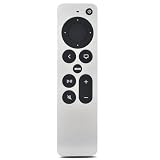
- [Compatible Apple TV model] Compatible with Apple TV & HD 4K (1st, 2nd, and 3rd Generation: Models A1625, A1842, A2169, A2737, A2843). Delivers seamless TV control and smooth app navigation.
- [Seamless BT Control] Advanced BT connectivity allows you to control your Apple TV from anywhere in the room—no line of sight required. Control your device comfortably at any angle. (Note: Voice control/Siri is not supported.)
- [TV Volume Control]If your TV supports HDMI-CEC, volume control works automatically. If not, hold TV Power + Volume Up (+) for 5 seconds. When the TV volume responds, press Select (center) to confirm and save. If it doesn’t pair, simply try the steps again.
- [Rechargeable & Eco-Friendly] Powered by a built-in 200mAh rechargeable battery that lasts up to 6 months on a single charge. Features a standard USB-C port for fast and hassle-free charging with no disposable batteries needed. (Charging cable and adapter sold separately.)
- [Easy Pairing] Simply press and hold the Back (<) and Volume Up (+) buttons simultaneously for 5 seconds. Detailed troubleshooting steps are available in the included user manual.
Charging and cable requirements
USB-C remote
Apple says to charge the third-generation Siri Remote or Apple TV Remote with a USB-C cable. The cable or power adapter is sold separately, so inspect the box contents when comparing new, open-box and used listings. A USB-C-to-USB-C cable and a compatible power source are convenient if your charging setup already uses USB-C, but the essential requirement is a cable with a USB-C connector that fits the remote.
The Tool Desk
Outbyte Driver Updater FREEScan for outdated or missing drivers - takes under a minuteDriver Scan →Outbyte PC Repair FREEClear out junk files and repair common Windows errorsFree Scan →Lightning remote
Apple says to charge a first- or second-generation Siri Remote or Apple TV Remote with the included Lightning cable or another third-party “Made for iPhone” Lightning cable. A Lightning cable is therefore the right accessory for a legacy remote. Having a USB-C charger does not make a Lightning cable unnecessary; you need a cable whose remote-end connector is Lightning.
Charging safety
Apple’s manual guidance is to use genuine or undamaged cables and chargers and not to charge when moisture is present. Do not force a connector, continue using a cable with exposed conductors or charge a wet remote. If the port is obstructed, remove visible debris carefully without pushing anything into the socket. Persistent charging failure after trying a known-good, compatible cable points to a cable, power source or remote-port problem rather than a generational difference.
Which remote should you buy?
Buy USB-C for a new replacement
The USB-C Siri Remote is the sensible default when you are replacing a lost or damaged remote today. It is Apple’s current separately sold model in the cited retail information, and its listed compatibility covers Apple TV HD and Apple TV 4K generations one through three, with the current retail listing also naming generation four. Select it when you want the newest remote generation and do not need to preserve a Lightning-only charging setup.
Buy Lightning for a first- or second-generation replacement
If the remote you are replacing is first or second generation, a Lightning remote is the direct hardware match. This can be the least disruptive choice when you already own an appropriate Lightning cable, when the replacement is being paired with a collection of older accessories or when a listing is specifically for the same legacy generation.
Do not buy solely on the word “Siri” in a listing. Both generations use Siri branding. The port, not the name alone, determines the cable you need.
Also popular on Amazon

- Replacement Remote Control for All Apple TV Remote - 2 Year Warranty
Standardize around the cables you already use
Households that have moved to USB-C can reduce cable variety by choosing the USB-C remote. Households with several Lightning devices may prefer a Lightning replacement for an older remote. Treat this as a convenience and accessory decision, not evidence that one remote has better battery life or wireless range.
Buying used or open-box
Ask the seller for a clear photograph of the bottom edge showing the port. A listing that says “Apple TV remote” is incomplete because that description can refer to either connector. Also ask whether a cable is included, whether the battery accepts a charge and which Apple TV model was used with the remote. If the seller cannot identify the port or provide a photo, the risk of receiving the wrong generation is higher.
How to identify your remote before ordering
- Turn the remote over and locate the charging socket on its bottom edge.
- Look for a USB-C opening, which is symmetrical and identifies the third-generation remote, or a Lightning opening, which identifies a first- or second-generation remote.
- Write down the Apple TV model from Settings on the television: open the Apple TV’s Settings app and use the device-information screen to confirm whether it is Apple TV HD or a specific Apple TV 4K generation.
- Check the replacement listing’s stated generation and connector against both observations.
- Confirm whether the package includes a cable or power adapter. Apple lists the USB-C cable or power adapter separately, and a legacy Lightning remote may likewise require you to provide a cable.
When the remote is missing entirely, identify the Apple TV model first and then use a retailer’s product photograph to confirm the connector. Model-year assumptions are less reliable than a visible port and a documented compatibility list.
Do these 3 things before closing this tab:
1Fix the driver behind crashes, sound loss and screen glitches2Clear out junk files and repair common Windows errors3Scan for outdated or missing drivers - takes under a minuteHow to charge the correct remote
- Use a cable that matches the remote port: USB-C for the third-generation remote or Lightning for the first- and second-generation remote.
- Inspect the cable and power source for damage. Replace a frayed, bent or intermittently connecting cable.
- Make sure the remote and connector are dry. Apple’s guidance says not to charge when moisture is present.
- Connect the cable to the remote and then to a suitable power source. Do not force the plug; a mismatch usually means the cable is for the other generation.
- After charging, disconnect the cable and test Siri, the clickpad and Apple TV navigation. A charging connector does not alter the wireless controls.
What the USB-C port does—and does not—change
What it changes
- The cable you must carry and replace.
- Whether an existing USB-C or Lightning charging kit can be reused without buying another cable.
- Which generation you are receiving when a listing is ambiguous.
- The practical convenience of consolidating your household’s cables around one connector type.
What it does not establish
- No supplied specification publishes a USB-C-versus-Lightning battery-runtime test.
- No supplied specification publishes a comparative charging-speed measurement.
- No evidence here shows a USB-C improvement in Bluetooth range, Siri accuracy, clickpad response or infrared performance.
- The connector does not turn a Lightning remote into a third-generation remote, or make the two cables interchangeable.
Apple’s published description for the USB-C model says its rechargeable battery provides months of battery life on a single charge with typical daily usage. That is a product specification, not an independent test, and it is not a claim that the USB-C model lasts longer than either Lightning generation.
Independent reader supportYour contribution helps us test, update, and keep practical guides available for everyone.Physical specifications and operating limits
Apple’s 2022 specification for the third-generation USB-C remote gives these figures:
| Specification | USB-C Siri Remote (third generation) | Lightning generations |
|---|---|---|
| Height | 5.4 inches (136 mm) | Not stated in the cited specification |
| Width | 1.4 inches (35 mm) | Not stated in the cited specification |
| Depth | 0.36 inch (9.25 mm) | Not stated in the cited specification |
| Weight | 2.3 ounces (66 g) | Not stated in the cited specification |
| Operating temperature | 32°–95° F (0°–35° C) | Not stated in the cited specification |
| Tested operating altitude | Up to 10,000 feet (3,000 m) | Not stated in the cited specification |
| Battery description | Rechargeable; months of battery life on a single charge with typical daily usage | Not stated as a comparative figure |
| Wireless/control hardware | Bluetooth 5.0, microphone, IR transmitter and touch-enabled clickpad | Not stated as a generation-by-generation comparison |
These values describe the USB-C model under Apple’s stated conditions. They should not be presented as laboratory measurements or as proof that the Lightning versions are physically identical.
Also popular on Amazon

- 【Note】NOT Siri Remote, NO Voice Function! The power/volume/mute buttons could only works for samsung/LG/Vizio/Hisense/Sony/Amz Firre/Toshiba/Insignia Firre TVs. Please "UNLOCK" your old device with remote before using our remote, or our remote will not connect to your device!!!
- 【Compatible Models】 Replacement for Apple TV Remote: For Apple TV A1218(1st Gen), for Apple TV A1378(2nd Gen), for Apple TV A1427/A1469(3rd Gen). For Apple TV HD A1625(4th gen), for Apple TV HD MHY93LL/A(5th gen). For Apple TV 4K A1842(1st Gen), for Apple TV 4K A2169(2nd Gen), for Apple TV 4K A2737/A2843(3rd Gen)
- 【Remote Compatibility】Replacement IR remote compatible with Apple TV Remote (white) A1156 MA128LL/A, for Apple TV Remote (aluminum) MM4T2AM/A. For Siri Remote (1st Gen)/Apple TV Remote (1st Gen) MQGD2LL/A, for Siri Remote (2nd Gen)/Apple TV Remote (2nd Gen) MJFM3LL/A, for Siri Remote(3rd Gen) /Apple TV Remote (3rd Gen) MNC73AM/A
- 【Packing Included】Comes with user manual. NO more worry on pairing. Just need to insert 2*AAA remote and it's ready for use. (Package includes 1*Replacement and 1*User Manual. Batteries are NOT included)
- 【Note】If you TV brand is not what we listed in our detail page, please do not take this remote home, or it will not be compatible! Please "UNLOCK" your old device with remote before using our remote, or our remote will not connect to your device!!!
Troubleshooting by symptom
The cable will not fit
Stop instead of forcing it. A USB-C cable belongs with the third-generation remote; a Lightning cable belongs with first- and second-generation remotes. Recheck the port visually and exchange the cable for the matching type.
Recommended Free Tools
The remote charges intermittently
Try a different undamaged cable of the correct type and a different compatible power source. If the problem follows one cable, replace the cable. If several known-good cables fail, inspect the port for damage or contamination and consider replacing the remote.
The remote works but the replacement listing seems wrong
Compare the physical connector with the listing photographs and generation description. Contact the seller before opening a return request if the listing does not identify the port. The phrase “Apple TV remote” alone does not distinguish USB-C from Lightning.
You bought the wrong connector
Do not rely on an adapter as a substitute for the correct remote cable unless the adapter is explicitly designed for that cable and charging use. The simplest remedy is to exchange the remote or obtain the matching cable, depending on whether the remote itself matches your Apple TV and intended generation.
The remote has no charge after storage
Connect the correct cable and allow charging time before judging the remote. If it still does not respond with a known-good cable and power source, the issue may be a depleted or failed battery, cable, charger or port. The connector choice alone cannot diagnose that fault.
Decision checklist
- Need a new, generally compatible replacement: choose the USB-C third-generation Siri Remote.
- Replacing a first- or second-generation remote: choose Lightning when you want the same generation and already have the matching cable.
- Already have mostly USB-C charging gear: USB-C minimizes cable duplication.
- Already have a Lightning cable and the old remote generation matters: Lightning may be the more convenient match.
- Buying used or open-box: verify the port in a photograph, confirm Apple TV compatibility and check whether a cable is included.
- Comparing performance: do not pay a premium based on an unverified claim that USB-C improves battery life, wireless range or charging speed.
Bottom line
The USB-C connector marks Apple’s third-generation Siri Remote, introduced in 2022, and it is the best default for a new replacement because Apple currently sells it separately and lists broad Apple TV compatibility. Lightning identifies the first- and second-generation remotes and remains the right choice when you are matching legacy hardware or a Lightning cable you already own. Inspect the port, verify the Apple TV model and budget for the correct cable before ordering.
Quick Recap
Product prices and availability are accurate as of the date/time indicated and are subject to change. Any price and availability information displayed on Amazon at the time of purchase will apply.

