
iTechGuides is reader-supported. When you buy through links on our site, we may earn an affiliate commission. As an Amazon Associate I earn from qualifying purchases. Learn more
Short answer: If you are replacing your remote, the Siri Remote (4th generation) is the cleaner solution when you have a compatible recent iPhone: tracking is built in, the remote can play a sound, and you do not add a holder or puck. If you already own a working Siri Remote (2nd or 3rd generation), an AirTag is usually the better upgrade because it adds map and last-known-location tracking, a speaker, and a tracker you can later move to keys or a bag.
The practical verdict
The better choice depends less on theoretical accuracy than on what you already own and which finding method you need. Apple does not publish a controlled, same-conditions test comparing Siri Remote Precision Finding with an AirTag on the same remote, so there is no evidence-based winner for accuracy, range or battery endurance.
- Choose Siri Remote (4th generation) when you are buying or replacing a remote, own a supported iPhone, want the thinnest integrated setup, and value a sound played directly by the remote.
- Choose an AirTag when you already have a Siri Remote (2nd or 3rd generation), do not want to replace a working remote, want map or last-known-location information, or want to reuse the tracker on another item later.
- Check the phone requirement before spending money: fourth-generation remote Precision Finding needs a newer iPhone family than the general Apple TV Remote finding screen, while AirTag Precision Finding requires an Ultra Wideband-capable iPhone.
What Siri Remote finding actually does
Find My support starts with the second generation
Apple’s current documentation says a misplaced Siri Remote (2nd generation or later) can be located from the Apple TV Remote control in Control Center on an iPhone running iOS 17 or later. This is separate from buying an AirTag. The remote itself participates in the finding feature.
The Tool Desk
Outbyte Driver Updater FREEScan for outdated or missing drivers - takes under a minuteDriver Scan →Outbyte PC Repair FREERepair Windows errors before they cause bigger problemsFix Now →On the iPhone, tap the Apple TV Remote control, choose Find, and move around to establish a connection. The interface guides you with a white dot that grows as you get closer and reports whether the remote is near, far or here. This documented interface provides proximity guidance; it should not be described as a map showing the remote’s last known address.
Popular on Amazon
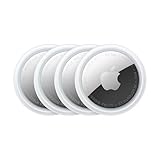
- FIND YOUR ITEMS ON FIND MY — AirTag (2nd generation) helps you keep track of what matters. Attach one to an item you want to keep track of using the Find My app.*
- EXPANDED PRECISION FINDING ON IPHONE AND APPLE WATCH — Get step-by-step directions to your lost item on iPhone and, now, Apple Watch.*
- ENHANCED SPEAKER — With a 50% louder speaker and a new, distinctive chime, it’s easier than ever to hear and find AirTag.*
- PING FROM FAR AND WIDE — Upgraded Ultra Wideband and Bluetooth chips allow you to find your items from even farther away than ever before.*
- SHARE ITEM LOCATION — Share AirTag location access temporarily and securely with trusted contacts, third parties, or over 50 airline partners if you lose something important.
Precision Finding is a fourth-generation feature
Apple identifies the Siri Remote (4th generation) as the model with Precision Finding. Apple also says the newest remote can play a sound when it is misplaced. That audible function is exclusive to the newest Siri Remote, rather than a feature of every Find My-compatible remote.
The fourth-generation model is sold separately for $59 in the United States in Apple’s 2026 store listing. The price and availability can change, and the listing is not a worldwide price. It works with Apple TV HD and Apple TV 4K (1st through 4th generation).
Compatibility: the detail that decides whether either option works
Requirements for Siri Remote Precision Finding
Apple’s October 13, 2026 Apple TV 4K announcement specifies that Precision Finding works when a Siri Remote (4th generation) is paired with an iPhone Duo, iPhone Air, or iPhone 17 or later, excluding iPhone 17e, running the latest iOS software. Availability varies by region.
Recommended Free Tools
This is narrower than the basic remote-finding interface. An iPhone running iOS 17 or later can use the Apple TV Remote control’s Find function for a Siri Remote (2nd generation or later), but that does not mean the phone supports fourth-generation Precision Finding. If your phone is older than the listed models, you may still have the general near/far interface with a compatible remote, but you should not assume the Precision Finding view will appear.
Also popular on Amazon

- FIND YOUR ITEMS ON FIND MY — AirTag (2nd generation) helps you keep track of what matters. Attach one to an item you want to keep track of using the Find My app.*
- EXPANDED PRECISION FINDING ON IPHONE AND APPLE WATCH — Get step-by-step directions to your lost item on iPhone and, now, Apple Watch.*
- ENHANCED SPEAKER — With a 50% louder speaker and a new, distinctive chime, it’s easier than ever to hear and find AirTag.*
- PING FROM FAR AND WIDE — Upgraded Ultra Wideband and Bluetooth chips allow you to find your items from even farther away than ever before.*
- SHARE ITEM LOCATION — Share AirTag location access temporarily and securely with trusted contacts, third parties, or over 50 airline partners if you lose something important.
Requirements for AirTag Precision Finding
An AirTag is a separate Find My item. Apple says nearby distance-and-direction Precision Finding requires an Ultra Wideband-capable iPhone. Current software and regional availability also matter for Find My features.
When the iPhone cannot establish the required nearby connection, an AirTag can still provide its broader Find My behavior, including a map or last-known location when the network has a recent report. Nearby finding can use the AirTag’s built-in speaker and the iPhone’s vibration and direction guidance. Walls, furniture and other objects between the phone and AirTag can reduce or interrupt the precision guidance.
How to find a Siri Remote with an iPhone
For a Siri Remote (2nd generation or later)
- Make sure the iPhone is running iOS 17 or later and that the remote is associated with the Apple TV you use.
- Open Control Center on the iPhone.
- Tap the Apple TV Remote control.
- Tap Find in the remote controls.
- Walk slowly through the room or nearby rooms while the iPhone establishes a connection.
- Follow the white-dot guidance and the near, far or here status until you reach the remote.
The process is most useful when the remote is still somewhere within a reachable area of the Apple TV setup. It is a proximity tool, not a promise that an offline remote can be located anywhere in the world.
Free tools Windows power users keep installed
One-click scans. No signup required.
For a Siri Remote (4th generation)
- Confirm that the fourth-generation remote is paired and that the iPhone meets Apple’s listed model requirement: iPhone Duo, iPhone Air, or iPhone 17 or later, excluding iPhone 17e.
- Update the iPhone to the latest available iOS version.
- Open the Apple TV Remote control from Control Center and select Find, or use the Find My control Apple provides for the remote when it is shown.
- Move around until the phone establishes a nearby connection, then follow the Precision Finding direction and distance cues.
- Use the remote’s sound option when you are close enough to hear it. Check quiet, enclosed places such as between cushions, under furniture and inside a blanket.
The integrated sound is the main practical distinction from the older remote-finding experience. You do not need to attach another device to make the fourth-generation remote audible.
Also popular on Amazon

- Smart Finder:The luggage GPS tracker makes it easy to manage your valuables. Working with the Find My app(IOS ONLY), you can quickly locate your items. It comes with one case, allowing you to attach the tag to your keys, wallet, backpack etc.
- Find Nearby:Use the Find My app to ring your luggage tracker when it's within Bluetooth range,or ask your Siri to find it for you.Click the 'Play Sound' Button, the tag tracker will make a sound 'di di di'. You can according to the sound find your items
- Find Far Away: When outside of Bluetooth range, use the Find My app to view your 'Item Locator's most recent location on a map. You can use the network and GPS of millions of Apple devices to locate it anywhere in the world.Reduce the loss of your items
- Share Your Items and Privacy Protection:The item finders tag lets your family view the location of your items (a feature for iOS 17).The chip in this Bluetooth tracker is MFi certified,guaranteeing that your location data is encrypted and protected
- Water Resistant & Replaceable Battery: Designed for outdoor adventures, this tracker can withstand rain, ensuring you can use it confidently in various weather conditions. Plus, it features a replaceable CR2032 battery that lasts up to a year
How an AirTag changes the search
Attach the tracker without making the remote unusable
An AirTag is a round, separate puck. To use one with a Siri Remote, you need a loop, holder or adhesive mount designed to keep it attached. The mount adds thickness and may change how comfortably the remote fits in a hand, rests on a table or slides between sofa cushions. A holder also creates another part that can detach or get lost.
Place the AirTag where the speaker opening is not blocked by the holder. If the sound is muffled, the tracker may be harder to hear even though Find My reports that it is nearby.
Use Find My for a nearby or remote search
- Open the Find My app on the iPhone and select the AirTag under your items.
- Review its map or last-known location when it is not currently nearby.
- When you are in range, start Precision Finding if the iPhone supports Ultra Wideband.
- Follow the distance-and-direction prompts and the iPhone’s vibration.
- Tap the option to play a sound on the AirTag, then listen around cushions, cabinets and other hiding places.
The map capability is the AirTag’s biggest advantage. It can show where the item was last reported, whereas the documented Siri Remote interface focuses on establishing a nearby connection and guiding you toward the remote.
Quick wins for a faster PC:
Scan for outdated or missing drivers - takes under a minuteDriver Scan →Repair Windows errors before they cause bigger problemsFix Now →Fix the driver behind crashes, sound loss and screen glitchesFind Drivers →Feature comparison
| Question | Siri Remote (4th generation) | AirTag attached to a remote |
|---|---|---|
| Hardware | A replacement remote with finding hardware integrated | A separate tracker added to an existing remote |
| Compatible remote | The fourth-generation Siri Remote | Works with a second- or third-generation remote, and can be attached to other items |
| Nearby guidance | Precision Finding, subject to the newer iPhone requirement | Distance-and-direction Precision Finding with an Ultra Wideband-capable iPhone |
| Sound | The newest remote can play a sound; Apple says this is exclusive to it | Built-in AirTag speaker sound |
| Map or last-known location | Not described in Apple’s documented remote-finding interface | Find My can show a map or last-known location |
| Phone requirement | iPhone Duo, iPhone Air, or iPhone 17 or later, excluding iPhone 17e, with the latest iOS; availability varies by region | Ultra Wideband-capable iPhone for Precision Finding, with current software |
| Physical effect | No added puck or holder | Requires a holder, loop or adhesive mount and adds thickness |
| Reuse | Remains a dedicated Apple TV remote | Can later move to keys, a bag, a car or another item |
| Published price in the evidence | $59 U.S. Apple store listing in 2026; verify the current price | AirTag and holder price not stated; verify current retail prices |
Which option fits your situation?
You are replacing a lost or damaged remote
Buy the Siri Remote (4th generation) if your iPhone meets the Precision Finding requirement and you want the least bulky setup. The $59 U.S. listing is the known Apple price for the remote itself in 2026; it does not include an AirTag or holder because neither is needed.
Also popular on Amazon
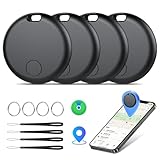
- Easily Track Items: Easily track and bluetooth luggage tracker your items with the locator and stop worrying about losing your valuables. Within the signal range of Connect to the global Find My Network that covers billions of iOS devices to easily track and locate items through the Find My app without paying a subscription fee. Within (60 meters/200 feet) Bluetooth range, trigger the built-in speaker to locate your belongings using your phone. (iOS only, not available for Android)
- Left-Behind Remind & Lost Mode: If an item with our smart bluetooth tracker is left behind and the Bluetooth connection to your iOS device is disconnected, the Find My app will immediately send you a notification that the item is missing. If you preset the lost mode and keep your contact information, the Key Finder Tracker will allow nearby Apple devices to access your contact information and remotely provide you with the location of the tag.
- Protect Privacy and Easy Pairing: weTag mini focuses on protecting privacy, all communication with the “Find My” network is anonymous and encrypted,location data and history are not stored on air tags. Open the “Find My app” and Bluetooth, click on ‘Items’, then click on “Add Item” and select “Other Supported Item” and follow the in-app instructions for easy pairing without waiting. (Please make sure your device has been updated to iOS 18 to utilize this feature.)
- IP67 Water and Dust Resistant with Replaceable Battery: The item finder is IP67 water resistant to splashes, rain and brief submersion. The luggage tracker comes with a replaceable battery that lasts up to a year without the need for frequent battery changes. You can check the battery status in the Find My app.
- Lightweight and Compact Tracking Tags: The finder is conveniently designed with a length and width of only 3.3 cm (1.3 inches), a thickness of 0.76 cm (0.3 inches), and a weight of only 7.6 grams. Keep track of your belongings with ease. The smooth surface of the item locator will not scratch other items. The locator's slim, durable design makes it the perfect companion for wallets, keys, backpacks, suitcases, luggage and laptop bags
Your second- or third-generation remote still works
An AirTag avoids replacing a functional remote. You gain a speaker, map or last-known-location information and a tracker that can move to another possession later. The trade-off is the added thickness and the need to buy and attach a mount.
You frequently search outside the room where the Apple TV is located
An AirTag is the stronger fit when you want to know where the item was last reported before you start looking. That is especially useful if the remote was carried into a bedroom, travel bag or another part of the house. The map is a location clue, not a guarantee that the AirTag is currently there or that the signal will pass through walls.
You want to trigger a sound from the finding interface
Both choices can provide an audible search signal, but they do so differently. The fourth-generation Siri Remote has the sound feature built into the remote. An AirTag uses its own speaker, which means the sound comes from the attached puck. Apple identifies sound playback as exclusive to the newest Siri Remote among Siri Remote generations.
You may reuse the tracker
Choose an AirTag if the device will eventually move to keys, a backpack, a car or another item. Apple says an AirTag can be shared with up to five people, which may help a household manage an item. A fourth-generation remote upgrade does not provide that flexibility because it remains a remote.
Also popular on Amazon

- 【4-Pack Value Set】 This set of four tracking tags includes black and white tags for everyday item tracking. Designed to work with the Find My app and Find My network for iOS devices only, these tracker tags are suitable for keeping track of keys, luggage, wallets, backpacks, bags, and other daily essentials. They are not for Android devices. Whether used as luggage trackers for iPhone users or for managing everyday items, they provide a simple tracking option for daily use.
Accuracy, range and battery claims: what is and is not known
It is tempting to declare one option more accurate, but the available evidence does not support that conclusion. Apple publishes feature descriptions rather than a controlled head-to-head test measuring a Siri Remote and an AirTag attached to the same remote under identical conditions. There is also no cited comparison of their battery life or endurance.
Apple’s 2026 AirTag product page claims that the current generation has a speaker that is 50% louder and offers up to a 1.5-times greater Precision Finding range. Those are Apple-published product claims, not independent measurements, and they should not be treated as proof that an AirTag will outperform a fourth-generation Siri Remote in every room or building.
For either system, physical obstructions matter. Apple specifically notes that walls and objects between an iPhone and AirTag can affect Precision Finding. Similar real-world factors—distance, furniture, cushions, radio conditions and the phone’s supported hardware—can determine whether guidance appears quickly.
What’s actually slowing this PC down?
Pick the symptom - the matching free tool is one click away.
Common problems and fixes
Find does not appear for the remote
- Confirm that the remote is at least second generation; the documented iPhone finding control does not cover older models.
- Update the iPhone to iOS 17 or later for the general remote-finding interface.
- For a fourth-generation remote, check that the phone is an iPhone Duo, iPhone Air, or iPhone 17 or later excluding iPhone 17e, and that it is running the latest iOS.
- Check regional availability and make sure the remote is paired with the Apple TV.
The iPhone says the remote is far away
Move slowly and give the connection time to update. Search the room where the Apple TV is installed before expanding outward. A far status is proximity guidance, not a map coordinate; it does not prove that the remote is outside the home.
The AirTag cannot provide direction
- Verify that the iPhone supports Ultra Wideband; without that hardware, AirTag Precision Finding is unavailable.
- Move around the suspected area and remove obstacles where practical.
- Use the AirTag’s sound and the map or last-known location as alternate clues.
- Inspect the holder to ensure it has not covered the speaker or separated from the remote.
The sound is difficult to hear
Check soft or enclosed hiding places first. For an AirTag, make sure the mount does not block its speaker. For a fourth-generation remote, try the sound command again after the iPhone has established a nearby connection.
A simple buying checklist
- Remote generation: Is your current remote second, third or fourth generation?
- iPhone model: Does it meet the fourth-generation Siri Remote requirement, or is it Ultra Wideband-capable for AirTag Precision Finding?
- Software: Is the iPhone on iOS 17 or later, and preferably the latest available iOS?
- Finding style: Do you need only nearby guidance, or a map and last-known location as well?
- Sound: Do you want the remote itself to play a sound, or is an attached tracker acceptable?
- Bulk: Will a holder or adhesive mount make the remote uncomfortable or too thick?
- Reuse: Could the tracker later move to keys, a bag or a car?
- Price: Compare the current local price of the $59 U.S.-listed fourth-generation remote, the AirTag and a suitable holder before ordering.
Bottom line for most buyers
For a new purchase, the Siri Remote (4th generation) is the most integrated answer: no separate puck, Precision Finding on the specified recent iPhones, and a sound feature built into the remote. For an existing second- or third-generation remote, an AirTag is the more versatile retrofit because it adds a speaker, map or last-known-location tracking and can be reused elsewhere. Neither should be marketed as demonstrably more accurate or longer-lasting than the other; Apple has not published a controlled comparison.
Quick Recap
Product prices and availability are accurate as of the date/time indicated and are subject to change. Any price and availability information displayed on Amazon at the time of purchase will apply.

