
Windows Errors? Fix Them Before They Spread
Repair common Windows errors and clear accumulated junk for a smoother, more stable PC - no reinstall needed.Free scan · no reinstallCrashes, No Sound, or Screen Glitches?
Random freezes, missing sound and display glitches usually trace back to one bad driver. Find and replace yours safely.Free scan · under a minuteiTechGuides is reader-supported. When you buy through links on our site, we may earn an affiliate commission. As an Amazon Associate I earn from qualifying purchases. Learn more
Usually, no. Set every full-range channel to the same measured reference level at the main listening position, then let the soundtrack determine how much the surrounds play. In a correctly mixed 5.1, 7.1 or Dolby Atmos program, the front stage normally carries more continuous music, dialogue and major effects, while the rear channels supply ambience and directional cues. Permanently boosting the rears can make effects draw attention to the speakers, reduce dialogue clarity and upset the intended soundstage.
If your surrounds seem silent, do not start by raising their trim. First confirm that the source contains surround channels, the receiver is decoding the intended format, the speakers are wired correctly and room calibration completed successfully. A calibrated system can have quiet rear passages and still be working exactly as designed.
What level should rear speakers be set to?
Dolby’s guidance is to calibrate each full-range speaker to the same C-weighted sound-pressure level at the central listening position. Dolby Laboratories identified a typical home target of 79–82 dB SPL(C) in 2018. The number is a measurement at the seat, not a volume percentage or a guess based on where the receiver’s trim sliders happen to land.
Equal calibration does not mean equal activity. A front left channel and a surround right channel may both measure the same during the receiver’s test tone, yet the movie can send far more average energy to the front. Surround mixers use the rear channels for spaciousness, movement and occasional effects rather than constant foreground sound.
Popular on Amazon
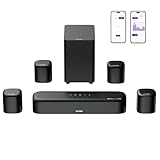
- 7.1ch Dolby Atmos Surround Sound System for TV: This 7.1ch sound bar features 3 main channels for crisp dialogue and 4 surround speakers. Power the rear right surround speaker to pair it wirelessly with sound bar. The setup delivers an immersive surround sound audio experience, making you feel fully engaged in the action. Note: Recommended for space of 108 to 270 ft².
- 4 Surround Speakers for Home Theater Sound System: The Aura A60 Pro soundbar for tv comes with 2 wired front surround speakers and 2 wired rear surround speakers, positioned to create a wide, room-filling soundstage. The rear speakers connect wirelessly with the soundbar, minimizing cable clutter and optimizing space efficiency.
- Dolby Atmos Delivers an Immersive 3D Soundscape: This 7.1ch dolby atmos soundbar enhances your listening experience with multidimensional audio that surrounds you from every direction, upgrading your home theater with powerful, dynamic sound that brings each scene to life.
- 5.25-inch Wired Subwoofer with BassMX Technology: The Aura A60 Pro sound bar comes with a 5.25" wired subwoofer powered by BassMX technology to boost low-frequency performance. An optimized magnetic structure and diaphragm produce deep, powerful bass. Enjoy enhanced low-end sound and experience the impact of every beat.
- Precision Audio Tuning Redefined: Customize your audio experience with the Ultimea App, designed for precise sound control. It provides 121 professionally tuned EQ presets across styles such as Bass, Pop, Classical, and Rock, along with 10-band control and 6 tailored EQ modes including Movie, Music, Voice, Sport, Game, and Night. Using the advanced “Customize” option, you can adjust audio details to suit your personal taste, ensuring every sound is tuned exactly how you prefer.
| Setting or format | What the listener should expect | Qualification |
|---|---|---|
| Home 5.1 or 7.1 | Full-range channels calibrated to the same reference SPL | Dolby’s home guidance; surrounds can remain less active in the mix |
| Dolby Atmos home or broadcast production | Main channels aligned to the same SPL | Dolby says Atmos studios align all channels consistently |
| Older theatrical mixes | Surrounds may be aligned 3 dB below the screen channels | A historical cinema practice; it does not justify boosting every home surround channel |
| Receiver test tone | Each channel should read the same at the listening seat | Use the receiver’s internal tone and a C-weighted meter |
The “C” in C-weighted refers to the meter’s frequency weighting. It is less aggressive than A-weighting at low frequencies, making it more suitable for checking a broadband theater reference. Hold the meter at ear height where your head normally is, point it consistently, and measure from the main seat rather than from the speaker itself.
Why do surround speakers sound quieter than the front speakers?
Surrounds often carry ambience, reverberation and occasional directional events. A dialogue-heavy scene may put almost all intelligible speech in the center channel, with the left and right fronts handling music and front-stage effects. Long stretches of low rear output therefore indicate the soundtrack’s design, not automatically a fault.
Harman Kardon’s AVR documentation summarizes the intended balance: “In most 5.1-channel and 7.1-channel film soundtracks, the surround speakers are not intended to be as loud or as active as the front speakers.” The speakers should disappear into a continuous sound field instead of announcing their locations.
Free tools Windows power users keep installed
One-click scans. No signup required.
Source format is another major variable. A two-channel television feed, Bluetooth stream or game set to stereo will not necessarily drive the rears continuously. Some receivers can up-mix stereo, but the result depends on the selected listening mode and is not the same as receiving a native multichannel bitstream.
Also popular on Amazon

- Your purchase includes: 1 AV receiver, 5 speakers, 1 Sub-Woofer and Speaker wire.Waterproof : No
- Dimensions: AV Receiver – 17” W x 6” H x 12” D | Four Speakers (each) – 4” W x 6” H x 4” D | Center speaker – 10” W x 4” H x 4” D | Subwoofer – 11” W x 11” H x 13” D
- Technical specs: HDMI – 4 | Standby Power Consumption – ≤ 0.2 W | Frequency Response – 28Hz/25kHz
- Bluetooth for streaming all your favorite music and podcasts. No wireless functionality
- Easy setup with Yamaha YPAO room optimization and flexible speaker placement options, including virtual cinema front
How do I calibrate rear speakers correctly?
Use the receiver’s automatic room-calibration routine first, then verify its result manually. The following sequence works across most contemporary AV receivers, although menu names differ by manufacturer.
- Confirm the incoming format. On the receiver’s information screen, look for PCM 5.1, Dolby Digital, DTS, Dolby TrueHD, Dolby Atmos or another format that actually contains surround channels. If the display says stereo or two-channel PCM, solve the source or device-output setting before changing speaker trims.
- Run automatic room correction. Place the supplied microphone at the main listening position, at ear height, with no cushion or obstruction around it. Follow the on-screen prompts for every measurement position the system requests. The routine calculates level, delay and equalization; it is not merely a volume test.
- Check the test tones. Open the receiver’s speaker-level or manual-setup page and play each channel tone. A C-weighted SPL meter should show the same reference reading for the full-range channels at the main seat, within the receiver’s normal adjustment resolution. If you do not own a meter, use the tone only for a rough left-right comparison; do not treat a phone’s microphone reading as a laboratory value.
- Verify distance, delay and polarity. Compare the receiver’s measured distances with the physical layout. A reversed positive/negative connection, an implausibly short distance or a surround assigned to the wrong terminal can make a channel seem weak even when its trim is high. Correct wiring and placement before adding gain.
- Play known multichannel material. Use a film scene with obvious side-to-side movement, rain, crowd ambience or a flyover. Listen from the main seat and then from nearby seats. The effect should be enveloping without making you point to a particular speaker.
- Make only a small personal adjustment. If correctly calibrated surrounds distract you consistently, lower their trim modestly rather than applying a large permanent boost or cut. If they vanish on several confirmed 5.1, 7.1 or Atmos scenes, return to source, mode, wiring and calibration checks.
- Recheck after changing processing. Night mode, dynamic-range compression, volume-leveling and some sound-field programs alter perceived impact. Compare settings at the same master-volume level before deciding that a rear channel is miscalibrated.
Where should rear speakers be placed?
Level matching cannot compensate for poor geometry. Dolby recommends listener-level speakers at a similar height and, where practical, equal distance from the main seat. If the room forces the rear speakers higher, keep them no more than 1.25 times the height of the front speakers. Measure from the floor to the acoustic center of each speaker, not to the top of its cabinet.
- Place surrounds to the sides or slightly behind the main listening area according to the layout your format supports; avoid putting both directly behind a sofa when side coverage is possible.
- Keep left and right surrounds at comparable heights and distances. A large asymmetry makes one side seem louder even when the receiver reports equal trims.
- Aim each speaker toward the listening area only as much as its design requires. Excessive toe-in can make the source obvious; a broad-dispersion speaker may work better facing across the room.
- Leave space from corners and large reflective surfaces when possible. Wall reflections, curtains and open doorways change perceived brightness and level.
- Set the receiver’s speaker size and crossover according to the speaker’s usable response and the room-correction recommendations. Sending bass to a channel that cannot reproduce it can make that channel seem thin, while redirecting bass changes what the subwoofer contributes.
What do the front, center and rear channels each do?
The three parts of the front stage and the surrounds have different jobs, so comparing their loudness by ear is misleading.
| Channel group | Primary job | Typical audible behavior |
|---|---|---|
| Left and right front | Main music, screen effects and the width of the soundstage | Frequent, full-range activity; establishes most of the image in front of you |
| Center | Dialogue and sounds anchored to the screen | Often dominant during conversation; clarity matters more than raw loudness |
| Side and rear surrounds | Ambience, movement, environmental sound and selected effects | Intermittent or diffuse activity that should blend around the listener |
| Height channels in Atmos | Overhead or elevated spatial cues | Event-driven activity that may be sparse outside scenes using vertical placement |
Because the center handles speech, raising every rear channel to solve a dialogue problem can make the room noisier without improving intelligibility. Check center placement, polarity, room correction and the receiver’s dialogue-enhancement control instead.
Also popular on Amazon

- An all-in-one home theater package - The YHT-4970U comes with a Dolby Atmos AV Receiver (Yamaha RX300A), a 5.1 speaker package (two front channel speakers, a center channel speaker, two surround channel speakers, and a powered subwoofer), plus a subwoofer cable and speaker wire all in one box.
- Step into lifelike sonic worlds - Dolby Atmos and DTS Virtual:X for deeply dimensional, lifelike sound that draws you into every moment of your favorite entertainment, plus crystal-clear dialogue so you can hear every word.
- Stunning visual realism - Supports ultra-high definition 4K/120 and 8K/60 video, high-performance HDMI switching, advanced Dolby Vision and HDR10+ dynamic range technologies, HDMI eARC/ARC and next-gen gaming features like ALLM and VRR.
- Room Correction - Experience perfect sound in any room. An included setup microphone measures your room’s acoustics and speaker characteristics, allowing the receiver to automatically optimize sound performance.
- Easy streaming with Bluetooth Multipoint - Stream all your favorite music, podcasts and audiobooks wirelessly. Built-in Bluetooth Multipoint lets you pair two source devices and instantly switch between them.
What processing settings can make the rears seem too quiet?
Several receiver features deliberately reduce peaks or change how a source is distributed. Night mode and dynamic-range compression lower the contrast between loud effects and quiet passages, so a rear explosion may no longer jump out. A “direct,” “pure” or two-channel mode can bypass surround decoding, while an up-mixer can create rear activity from stereo that was never present in the original mix.
When comparing modes, disable or note any volume leveling, late-night compression and virtual-surround option. Keep the master volume fixed, use the same scene and wait through a transition that contains genuine surround information. Sony’s support guidance also recommends checking rear level, sound-field optimization and the receiver’s test tones when rear output is low; it notes that output varies with the playback source and the characteristics of the rear speaker.
How can I troubleshoot a rear channel that is genuinely too quiet?
Use the symptom to narrow the cause instead of raising both surround trims indiscriminately.
Quick wins for a faster PC:
Fix the driver behind crashes, sound loss and screen glitchesFind Drivers →Clear out junk files and repair common Windows errorsFree Scan →| Symptom | Likely cause | What to check | Corrective action |
|---|---|---|---|
| Both rears are quiet on one program | The program is stereo, the app is outputting PCM 2.0, or the receiver is in a non-surround mode | Receiver format display and source-device audio output | Select a bitstream or multichannel output where available, then choose the intended decoder |
| Both rears are quiet on every confirmed surround program | Calibration, assignment or a global surround trim is wrong | Test tones, speaker assignment, mute status and level menu | Rerun calibration and restore sensible trims before testing again |
| Only one rear is weak or silent | Loose wire, reversed connection, failed cable, wrong channel assignment or a damaged speaker | Swap the cable or speaker temporarily and watch whether the fault follows it | Repair the connection or replace the failed component; do not mask a fault with gain |
| Rears are audible but the effect is localized | Speaker too close, too high, aimed directly at the seat or strongly reflected | Height, distance, toe-in and nearby surfaces | Improve geometry, then rerun room correction |
| Dialogue is unclear after increasing rears | Rear trim is masking the center or the system is being judged at an excessive master volume | Center level, listening mode and dynamic-range settings | Restore calibrated surround levels and address the center channel separately |
How should I judge a surround system or setup?
Use repeatable criteria rather than asking whether the back speakers sound “loud.” Five comparisons reveal more about a system’s quality:
Also popular on Amazon

- 5.1.2ch Surround Sound System: A 5.1.2-channel system featuring up-firing speakers, surround sound, and a powerful subwoofer creates lifelike, multidimensional audio. Feel the Sky Around You—raindrops falling from above, helicopters circling overhead, thunder rumbling in all directions. Sound isn’t just around you, it engulfs you, as if the ceiling disappeared. This is Dolby Atmos: not just heard, but felt.
- Up-Firing Drivers with Neodymium Core: The up-firing channels use neodymium internal magnets and 18-core large voice coils to enhance height precision and vertical throw. This aerospace-grade configuration ensures better high-frequency dynamics, delivering focused and elevated sound images that unlock the true potential of Dolby Atmos.
- 360° SurroundX Audio: SurroundX technology combines two rear surround speakers and dual up-firing Atmos drivers to build a true 360° sound field. Powered by intelligent spatial algorithms, the system precisely positions audio around and above you—enhancing Dolby Atmos with a more natural, three-dimensional soundstage. Note: Not compatible with DTS.
- Lossless Audio Transmission: Unlock full Dolby Atmos performance with HDMI eARC, supporting up to 37Mbps bandwidth for lossless 5.1.2-channel audio. Compared to regular ARC, eARC delivers richer detail and better surround effects with no compression. With CEC, your TV and soundbar work as one—power, volume, and input sync automatically for effortless control.
- Advanced App Control: Customize every detail of your audio experience with the Ultimea App. Fine-tune your surround sound with 13-step level adjustment (-6 to +6), optimize with a 10-band graphic EQ, and choose from 121 preset sound settings. Enjoy seamless OTA updates that unlock new features and keep your system performing at its peak.
- Measured consistency: Can every full-range channel reach the same reference reading at the main seat?
- Dialogue clarity: Does the center keep speech intelligible without excessive volume or artificial enhancement?
- Envelopment: Do ambience and movement surround you without exposing the speaker locations?
- Format response: Does the system decode native 5.1, 7.1 and Atmos material correctly, rather than relying on a virtual effect?
- Control and recovery: Can you inspect trims, distances, crossover, source format and room-correction results when something sounds wrong?
Speaker sensitivity, distance, room reflections, toe-in and crossover settings can change perceived balance even when two systems show identical trim numbers. Record the original calibration values before experimenting so you can return to a known-good baseline.
Independent reader supportYour contribution helps us test, update, and keep practical guides available for everyone.When is it reasonable to raise the rear level?
A small personal adjustment is reasonable after the system is correctly calibrated, the source is confirmed as multichannel and the placement is sound. Some listeners sit far closer to the front stage than to the surrounds, while others prefer a more enveloping presentation for games or ambient concert recordings. Treat that change as a preference for your room and content, not as a universal correction.
Large boosts are a warning sign. They can expose hiss, reveal the location of the speakers, overload a small surround, or make an accurately mixed soundtrack sound exaggerated. If you need a substantial increase to hear any rear activity, investigate decoding, wiring, distance and processing first.
What is the practical verdict?
Set rear speakers to the same measured reference as the other full-range channels, not louder by default. Expect the fronts and center to carry more continuous program material, while the surrounds supply a quieter, spacious field. Confirm the source format, run room correction, verify with test tones and a C-weighted SPL meter, correct placement and wiring, and only then apply a modest preference trim if your room or listening habits justify it.
Also popular on Amazon

- 5.1CH SURROUND SOUND: Hear cinematic surround sound and deep bass with 3 front-firing speakers, two rear speakers, and included subwoofer (wired).
- SOUND STRAIGHT FROM CINEMA: Get the best streaming experience with support for Dolby Atmos and DTS:X.
- CLEAR DIALOGUE: Catch every word in the scene with dedicated center channel speaker.
- ROOM FILLING SOUND: Multi Stereo enhances your listening experience by playing the same sound from all speakers, creating a room-filling sound boost.
- BRAVIA THEATER AND BRAVIA TV, THE PERFECT PAIR: Pair with compatible BRAVIA TVs to control the soundbar from the TV menu and take advantage of Voice Zoom 3 for enhanced dialogue.
Frequently Asked Questions
Do rear speakers need to be the same model as the front speakers?
They do not have to be identical, but similar tonal character and sensitivity make transitions across the room less noticeable. If the models differ, rely on room correction and careful placement, then listen for a change in timbre as a sound moves from the front to the surround.
Can a phone app replace a C-weighted SPL meter?
A phone can reveal a gross left-right mismatch, but its microphone, case and app calibration vary widely. Use a proper C-weighted meter when you need a defensible reference reading, and treat phone results as a rough diagnostic only.
Why does one seat hear the surrounds more strongly than another?
Room boundaries and seating geometry create peaks and nulls, especially at low frequencies and near walls. Measure and calibrate from the primary seat, then check several seats so you know whether the difference is a placement issue or a single-channel fault.
Should I increase rear levels for music listening?
That depends on the recording and listening mode. Native multichannel music may use surrounds artistically, while a stereo album played in a direct mode may contain no rear information; an up-mixer can add ambience but is a creative effect rather than a correction.
Quick Recap
Product prices and availability are accurate as of the date/time indicated and are subject to change. Any price and availability information displayed on Amazon at the time of purchase will apply.

