
iTechGuides is reader-supported. When you buy through links on our site, we may earn an affiliate commission. As an Amazon Associate I earn from qualifying purchases. Learn more
Hands-on with the new M4 iPad Pro and Magic Keyboard shows a remarkably thin, powerful tablet paired with a much better laptop-style accessory, especially for OLED display quality, typing, and trackpad work. The M4 remains excellent hardware, but as of August 12, 2026, it is a previous-generation iPad Pro behind Apple’s current M5 iPad Pro.
Apple unveiled the M4 iPad Pro on May 7, 2024, and store availability began May 15, 2024. The central story is not simply a faster chip: the M4 generation introduced tandem OLED displays, a dramatically thinner design, a landscape front camera, and a redesigned Magic Keyboard. The hands-on observations in this roundup synthesize independent review coverage and Apple’s published specifications rather than claiming personal battery, benchmark, durability, or typing tests.
Key takeaways
- As of August 12, 2026, the M4 iPad Pro is a previous-generation model because Apple’s current iPad Pro is the M5 generation.
- The M4 iPad Pro’s defining upgrade is its tandem-OLED Ultra Retina XDR display, which supports ProMotion from 10Hz to 120Hz, up to 1,000 nits full-screen brightness, and up to 1,600 nits peak HDR brightness according to Apple’s 2024 specifications.
- The 11-inch M4 iPad Pro is 5.3 mm thick and weighs approximately 444 grams in Wi-Fi configuration, while the 13-inch model is 5.1 mm thick.
- The M4 chip offers substantially more performance than most iPadOS workflows need, but iPadOS can still limit the benefits for people who require desktop-class software, file management, windowing, or peripheral flexibility.
- The M4-specific Magic Keyboard adds a function row, larger haptic trackpad, aluminum palm rest, floating hinge, and pass-through USB-C charging, but it adds significant cost and weight.
- Older iPad Pro accessories do not reliably carry over: the previous iPad Pro Magic Keyboard and second-generation Apple Pencil are not compatible with the M4 iPad Pro.
What changed in the new M4 iPad Pro?
The new M4 iPad Pro introduced a thinner chassis, tandem OLED displays, a landscape-positioned front camera, and Apple’s M4 chip when Apple unveiled the tablet on May 7, 2024. Store availability began May 15, 2024, making the M4 iPad Pro one of Apple’s most ambitious tablet redesigns rather than a routine processor refresh. Apple’s original M4 iPad Pro announcement documents the launch hardware and display changes.
The M4 iPad Pro came in 11-inch and 13-inch sizes, with Silver and Space Black finishes. Both sizes use the Ultra Retina XDR tandem-OLED display, support Face ID, include a Thunderbolt/USB 4 port, and work with Apple Pencil Pro and Apple Pencil USB-C.
Popular on Amazon

- WHY MAGIC KEYBOARD FOR IPAD — The incredibly thin and portable Magic Keyboard features a glass trackpad with haptic feedback, a great typing experience with a function row, USB-C pass-through charging, front and back protection, and magnetic attachability. No pairing or charging required.
- COMPATIBILITY — Magic Keyboard works with iPad Pro 13-inch (M4 and M5).
- DESIGNED FOR COMFORT — Magic Keyboard features a two-cantilever hinge design for smooth, adjustable viewing angles. Backlit keys with a scissor mechanism and a 10-key function row give you more versatility than ever. The built-in glass trackpad features haptic feedback and support for Multi-Touch gestures using the cursor.
- PROTECTIVE KEYBOARD AND CASE — Folds to provide front and back protection wherever you go and features a USB-C connector for pass-through charging. Available in black or white.
- Accessories are sold separately and subject to availability. Compatibility varies by generation.
| Hardware area | M4 iPad Pro specification | What the specification means |
|---|---|---|
| Display | Ultra Retina XDR tandem OLED; ProMotion adaptive refresh from 10Hz to 120Hz; P3 wide color | High contrast, smooth scrolling, fluid Pencil input, and strong HDR capability |
| Brightness | Up to 1,000 nits full-screen and 1,600 nits peak HDR | HDR video and bright highlights can look more convincing, subject to the content and viewing conditions |
| Processor | M4 with a 9-core or 10-core CPU depending on storage configuration | High performance for demanding video, 3D, photography, gaming, and creative applications |
| Graphics and AI | 10-core GPU, hardware-accelerated ray tracing, and 16-core Neural Engine | Useful headroom for graphics-heavy apps and machine-learning features that support the hardware |
| Memory | 8GB or 16GB unified memory depending on configuration | Higher-memory configurations are better suited to larger creative projects and sustained multitasking |
| Connectivity | Thunderbolt/USB 4 port with data rates up to 40Gb/s | Supports fast external storage, displays, audio equipment, and other compatible peripherals |
| Cameras | Landscape-positioned Center Stage front camera; 12MP Wide rear camera with LiDAR and 4K video | More natural video calls when the iPad is attached to a keyboard and useful imaging features for scanning, photography, and augmented-reality workflows |
How thin and portable is the M4 iPad Pro?
The M4 iPad Pro feels unusually thin and light for a high-performance tablet, with the 11-inch model making the strongest portability impression. The 13-inch model is also exceptionally thin, but its larger footprint makes the tablet better suited to a desk, lap, or two-handed use than extended one-handed reading.
| Model | Screen size | Thickness | Published weight detail | Best ergonomic fit |
|---|---|---|---|---|
| 11-inch M4 iPad Pro | 11 inches | 5.3 mm | Approximately 444g in Wi-Fi configuration | Handheld reading, travel, drawing, and general tablet use |
| 13-inch M4 iPad Pro | 13 inches | 5.1 mm | The supplied Apple specifications do not provide a weight figure in this dossier | Multitasking, split-screen work, illustration, video editing, and use with a keyboard |
Apple’s May 13, 2024 technical specifications provide the 11-inch thickness and Wi-Fi weight figures. Apple’s M4 iPad Pro technical specifications also confirm the display, camera, port, and accessory details.
The size choice is therefore more important than the small thickness difference. The 11-inch model is easier to carry and more convincing as a tablet that can be used away from a desk. The 13-inch model provides a more useful canvas for editing timelines, large documents, spreadsheets, and creative applications, but the larger screen does not make the device equally comfortable as a handheld tablet.
Do these 3 things before closing this tab:
1Repair Windows errors before they cause bigger problems2Fix the driver behind crashes, sound loss and screen glitches3Clear out junk files and repair common Windows errorsHow good is the tandem-OLED display?
The tandem-OLED display is the M4 iPad Pro’s strongest reason to choose it over older iPad Pro generations. Tandem OLED combines two OLED panels to increase full-screen brightness while retaining OLED contrast and pixel-level luminance control.
In practical viewing, hands-on coverage reports exceptionally deep blacks, strong contrast, smooth motion, and unusually convincing HDR playback. Movies, photographs, dark interfaces, and HDR-capable creative work benefit most visibly. ProMotion’s adaptive 10Hz-to-120Hz range also makes scrolling and Apple Pencil interaction feel fluid. These are hands-on viewing assessments, while the brightness figures are Apple specifications rather than independent measurements. MacRumors’ M4 iPad Pro hands-on coverage provides independent observations of the OLED display and redesigned hardware.
The display does not automatically make every image HDR or every creative workflow professional-grade. Content, application support, color-management settings, and the surrounding lighting still affect the result. The OLED upgrade is most valuable to buyers who notice display quality, regularly watch HDR content, edit photos or video, draw, or work with dark interfaces for long periods.
How fast is the M4 iPad Pro?
The M4 iPad Pro is fast enough that the tablet’s software model, not the processor, is usually the limiting factor. The M4 launched first in the iPad Pro and includes a 10-core GPU with hardware-accelerated ray tracing and a 16-core Neural Engine. Apple’s M4 chip announcement describes the chip architecture and its graphics and Neural Engine capabilities.
According to Apple’s May 2024 launch claim, the M4 iPad Pro delivers up to 1.5 times the CPU performance of the prior M2 iPad Pro and up to four times the performance in some professional rendering workloads. Those are Apple’s controlled claims, not independent benchmark results and not a promise that every application will run 1.5 or four times faster. Apple’s launch announcement presents those performance comparisons in that limited context.
Also popular on Amazon

- HIGHLY COMPATIBLE WITH iPad and iPhone Series, For iPad A16 11th /10th Generation, iPad 10.2 (9th/8th/7th Generation), iPad Pro 13/12.9/11 inch, iPad Air 13/11 inch,iPad Air 10.9inch( 5th/4th Gen),iPad mini 6 / 5, iPhone 17/16/15/14/13 etc. (NOTICE: The function keys not fully compatible with other system)
- NOT RECHARGEABLE & BATTERY POWERED: Requires 2 AAA batteries (NOT INCLUDED). Energy-saving auto-sleep (10 mins idle) delivers up to 400 hours battery life, approx 100 days if used 4 hours per day
- STABLE & DURABLE: Features stable wireless Bluetooth connectivity and a 78-key QWERTY layout; made of high-quality ABS material, with sensitive keys to meet daily typing and work needs
- ULTRA-SLIM & COMFORTABLE: 0.2-inch ultra-thin design; compact and portable size(11.2"L x 4.7"W) specifically designed for iPads and iPhones, suitable for travel, office work and study
- OPTIMIZED iOS SHORTCUTS: 12 dedicated multimedia hotkeys for volume, brightness, music & more; one-key control for iPadOS/iOS efficiency
In a demanding workflow, the M4 is particularly well suited to video editing, high-resolution photography, 3D applications, large creative files, and advanced games. The 8GB and 16GB unified-memory configurations also give buyers a reason to examine the exact storage and memory configuration rather than treating every M4 iPad Pro as identical.
Independent reviews described the hardware as exceptionally powerful while noting that iPadOS and the tablet software model can prevent users from using all of the available performance. Ars Technica’s M4 iPad Pro review and WIRED’s review of the M4 iPad Pro are useful counterweights to Apple’s performance claims.
Which M4 iPad Pro size should you choose?
Choose the 11-inch M4 iPad Pro for portability and handheld use, and choose the 13-inch M4 iPad Pro for a larger working canvas. The 13-inch model is better for multitasking and creative work, while the 11-inch model is less tiring to carry and hold for reading, travel, and casual tablet use.
The 11-inch model is not a low-performance version. Both sizes share the M4 platform, tandem-OLED approach, ProMotion, Face ID, and Thunderbolt/USB 4 connectivity. The main decision is how often the tablet will be held versus how often it will be used on a desk or attached to a keyboard.
- Choose 11 inches if the iPad will be a tablet first, if travel matters, or if you expect to draw and read while holding it.
- Choose 13 inches if split-screen work, large documents, video timelines, spreadsheets, or a desktop-like keyboard setup are central to the purchase.
- Do not choose the 13-inch model solely for performance; the dossier identifies the size and ergonomics as the primary differences, not a separate performance class.
What is new about the M4 Magic Keyboard?
The M4 Magic Keyboard is a substantial redesign made for the thinner M4 iPad Pro chassis. The accessory uses a floating cantilever design, backlit scissor keys with 1 mm of travel, a 14-key function row, an aluminum palm rest, a larger glass trackpad with haptic feedback, and a USB-C port for pass-through charging. Apple’s Magic Keyboard technical specifications list the keyboard’s hardware features.
The dedicated function row is the most meaningful everyday improvement over the previous iPad Pro Magic Keyboard. Brightness, volume, and other system controls are available as physical keys, reducing the need to open Control Center or reach for on-screen controls during desk-based work.
The larger haptic trackpad improves text selection, spreadsheet navigation, and cursor movement. Independent hands-on coverage still found that the trackpad experience did not match a Mac laptop’s trackpad, so the M4 Magic Keyboard makes the iPad more laptop-like without turning it into a MacBook. The aluminum palm rest also makes the accessory feel more premium, while the floating hinge provides angle adjustment and a distinctive raised-screen setup.
Recommended Free Tools
The USB-C port on the keyboard handles pass-through charging, leaving the iPad’s main Thunderbolt/USB 4 port free for external storage, displays, audio equipment, or other peripherals. That arrangement is useful for users who type while connecting the iPad to a wider desk setup.
Also popular on Amazon

- WHY MAGIC KEYBOARD FOR IPAD — The incredibly thin and portable Magic Keyboard features a glass trackpad with haptic feedback, a great typing experience with a function row, USB-C pass-through charging, front and back protection, and magnetic attachability. No pairing or charging required.
- COMPATIBILITY — Magic Keyboard works with iPad Pro 11-inch (M4 and M5).
- DESIGNED FOR COMFORT — Magic Keyboard features a two-cantilever hinge design for smooth, adjustable viewing angles. Backlit keys with a scissor mechanism and a 10-key function row give you more versatility than ever. The built-in glass trackpad features haptic feedback and support for Multi-Touch gestures using the cursor.
- PROTECTIVE KEYBOARD AND CASE — Folds to provide front and back protection wherever you go and features a USB-C connector for pass-through charging. Available in black or white.
- Accessories are sold separately and subject to availability. Compatibility varies by generation.
| Magic Keyboard feature | Hands-on implication | Trade-off |
|---|---|---|
| Backlit scissor keys with 1 mm travel | More conventional, comfortable typing than an on-screen keyboard | The keyboard adds cost and weight to an otherwise very light tablet |
| 14-key function row | Quick access to brightness, volume, and system controls | It still does not provide the complete shortcut and software flexibility of macOS |
| Larger glass haptic trackpad | Better cursor navigation, text selection, and spreadsheet work | Hands-on reviews found it remains behind a Mac laptop trackpad |
| Floating cantilever hinge | Adjustable viewing angle and a more laptop-like working position | The setup is best on a desk or table rather than as a handheld tablet |
| USB-C pass-through charging | Keeps the iPad’s primary Thunderbolt/USB 4 port available for peripherals | Pass-through charging does not add another full data port to the iPad |
How much did the M4 Magic Keyboard cost?
At US launch in 2024, launch-era review coverage listed the M4 Magic Keyboard at $299 for the 11-inch version and $349 for the 13-inch version. Those are historical launch prices, not verified August 2026 retail prices. Adding either keyboard materially changed the economics of the iPad Pro by pushing the 11-inch setup into laptop-price territory and making the 13-inch setup substantially more expensive. Ars Technica’s launch-period review discusses the accessory pricing and value trade-offs.
The Magic Keyboard is strongest value for people who type frequently, use cursor-based workflows, or want a keyboard case that also protects the front and back of the iPad. The Magic Keyboard is weak value for people who mainly read, draw, watch video, or use the iPad as a handheld tablet. Those buyers can avoid a large accessory expense by using the iPad without a keyboard or choosing a less expensive case that better suits tablet use.
What do you need to complete the M4 iPad Pro setup?
The only essential extra purchase is the accessory that matches the way you will use the tablet. A keyboard-focused buyer should select the exact size-specific 11-inch M4 iPad Pro Magic Keyboard or 13-inch M4 iPad Pro Magic Keyboard, while an artist, annotator, student, or markup-heavy user should consider the separate Apple Pencil Pro.
Apple Pencil Pro works with the M4 iPad Pro and is a more capable choice for drawing, annotation, and markup than buying a keyboard by default. Apple’s listed price for Apple Pencil Pro in the supplied research was $129 as of August 12, 2026, but buyers should verify the current price before ordering. Apple Pencil USB-C is also supported, while the second-generation Apple Pencil is not.
The Thunderbolt/USB 4 port can support a compatible external display, storage device, or audio accessory at data rates up to 40Gb/s. Video editors and photographers managing large projects should verify the exact app, filesystem, cable, and storage requirements before buying an external drive; the port’s headline speed does not guarantee that every iPadOS application uses external storage in the same way.
Which accessories work with the M4 iPad Pro?
The M4 iPad Pro requires careful accessory matching because the thinner body, revised dimensions, and rearranged magnets made many older accessories incompatible. Buyers upgrading from an older iPad Pro should check both the screen size and the generation before purchasing a keyboard, folio, case, screen protector, or Pencil.
| Accessory | M4 iPad Pro compatibility | Important buying warning |
|---|---|---|
| M4 Magic Keyboard | Compatible with the matching 11-inch or 13-inch M4 iPad Pro | Buy the correct screen-size version; the keyboard is not universal across iPad Pro generations |
| Previous-generation iPad Pro Magic Keyboard | Not compatible with the M4 iPad Pro | The thinner chassis and changed dimensions prevent the older keyboard from carrying over |
| M5 Magic Keyboard | Apple’s 2026 compatibility information lists support for M4 and M5 iPad Pro families in the matching sizes | Check Apple’s current compatibility listing and the exact 11-inch or 13-inch model before buying |
| Apple Pencil Pro | Compatible | A suitable choice for drawing, annotation, and markup |
| Apple Pencil USB-C | Compatible | Confirm the feature set you need before choosing it over Apple Pencil Pro |
| Second-generation Apple Pencil | Not compatible | Owners of the older Pencil need a compatible replacement |
Apple’s keyboard compatibility information confirms that the M4 and M5 Magic Keyboard families are the relevant current options for these iPad Pro models. Independent launch coverage also highlighted the incompatibility of older keyboard and Pencil accessories. Ars Technica’s M4 iPad Pro hands-on report covers the accessory transition.
Free tools Windows power users keep installed
One-click scans. No signup required.
Can the M4 iPad Pro replace a MacBook?
The M4 iPad Pro can replace a MacBook for users whose work already fits iPadOS applications, browser workflows, cloud services, and accessory-supported typing, but the M4 iPad Pro is not a universal MacBook replacement.
Also popular on Amazon
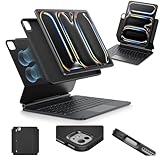
- Compatibility: only for iPad Pro 13" (M5/M4, 2025/2024); Model: A2925, A2926, A3007,A3360,A3361,A3362
- Work from Anywhere: upgrade your iPad to getting-stuff-done mode by transforming it into a portable productivity machine and be ready to work wherever
- Quick-Set Magnetic Stand: ultra-strong magnets seamlessly combine case and tablet to let you easily open the floating cantilever stand to the angle for typing or browsing
- Multiple View Modes: back case detaches for instant hands-on access with full-body protection and can be set up in raised screen view, for better posture during use, and portrait mode, for the way to FaceTime
- Quick and Easy Navigation: use every millimeter of the extended, ultra-sensitive multi-touch trackpad to tap, pinch, and swipe with precision and navigate your iPad in a whole new way
The M4 processor has more than enough power for many tablet workflows. The limitation is whether iPadOS provides the software behavior and file-management model a particular job requires. Users who depend on specialist desktop software, extensive windowing, complex local file management, unusual peripherals, or a broad range of desktop utilities may be more productive with a Mac.
The Magic Keyboard makes document editing, email, cursor navigation, and spreadsheets more practical. The keyboard does not change the underlying operating system, and the floating design is less comfortable when the iPad is detached and used as a handheld tablet. The right comparison is therefore not M4 iPad Pro versus MacBook performance; the right comparison is iPadOS workflow versus macOS workflow.
What battery life can you expect?
Apple’s published battery estimate for the 11-inch M4 iPad Pro is up to 10 hours of Wi-Fi web use or video playback. The figure is a manufacturer test claim, not independent battery testing or a guarantee of observed runtime in creative applications, gaming, cellular use, or keyboard-heavy work. Apple’s M4 iPad Pro technical specifications provide the published estimate.
Quick wins for a faster PC:
Scan for outdated or missing drivers - takes under a minuteDriver Scan →Repair Windows errors before they cause bigger problemsFix Now →Battery expectations should therefore be based on workload rather than the M4 label. Video editing, 3D rendering, gaming, high display brightness, external peripherals, and sustained wireless activity can produce different results from Apple’s web-browsing or video-playback test conditions.
How does the M4 iPad Pro compare with the current M5 iPad Pro?
The M4 iPad Pro is the previous-generation iPad Pro, while the M5 iPad Pro is the current generation as of August 12, 2026. Apple introduced the M5 iPad Pro on October 15, 2025, with the M5 chip, faster storage, and iPadOS 26 capabilities. Apple’s M5 iPad Pro announcement establishes the current-generation context.
| Consideration | M4 iPad Pro | M5 iPad Pro |
|---|---|---|
| Generation status on August 12, 2026 | Previous generation | Current generation |
| Introduction date | May 7, 2024; store availability began May 15, 2024 | October 15, 2025 |
| Processor generation | M4 | M5 |
| Storage and software context | Strong M4 performance, tandem OLED, Thunderbolt/USB 4, and Apple Pencil Pro support | Faster storage and iPadOS 26 capabilities identified in Apple’s launch announcement |
| Keyboard compatibility | M4 Magic Keyboard works with the M4 family; Apple’s compatibility information also lists the M5 keyboard with M4 models | M5 Magic Keyboard works with the M5 family and is listed as compatible with M4 models in the matching sizes |
| Best buying case | Discounted high-end tablet with the OLED display and thin chassis | Buyer who specifically wants the newest iPad Pro generation |
The M5’s arrival does not erase the M4’s strongest attributes. The M4 still offers the tandem-OLED display, exceptionally thin chassis, Thunderbolt/USB 4 connectivity, Face ID, Apple Pencil Pro support, and a capable Magic Keyboard ecosystem. The M4 becomes most attractive when a verified discount is large enough to compensate for buying the prior generation and when the buyer does not need the newest chip or storage platform.
Who should buy the M4 iPad Pro and Magic Keyboard?
The M4 iPad Pro and Magic Keyboard combination makes sense for a specific type of buyer: someone who wants a premium tablet display and portability but also spends enough time typing or using a cursor to justify the accessory.
Outdated Drivers Are Slowing You Down
One free scan finds every outdated or missing driver and matches the right update for your exact hardware.Free scan · exact hardware matchWindows Errors? Fix Them Before They Spread
Repair common Windows errors and clear accumulated junk for a smoother, more stable PC - no reinstall needed.Free scan · no reinstall| Buyer profile | Recommendation | Reason |
|---|---|---|
| Display-focused professional | Consider the M4 if discounted | The tandem OLED, ProMotion, HDR capability, and thin chassis remain standout hardware |
| Video editor, artist, photographer, or 3D user | Consider the M4 with the appropriate storage and optional Pencil Pro or external peripherals | The M4 and 10-core GPU provide substantial headroom for demanding iPadOS applications |
| Frequent typist | Consider the matching Magic Keyboard | The function row, larger haptic trackpad, adjustable hinge, and pass-through charging improve desk-based work |
| Reader, media viewer, or occasional tablet user | Skip the Magic Keyboard | The accessory’s cost and added weight provide little benefit when typing is infrequent |
| MacBook replacement seeker | Buy only after checking every required application and file workflow | iPadOS can remain the limiting factor even though the M4 hardware is extremely powerful |
| Owner of an older iPad Pro keyboard or second-generation Pencil | Budget for compatible replacements | Older accessories do not carry over to the M4 iPad Pro |
| Buyer seeking the newest iPad Pro | Choose the M5 generation | The M5 iPad Pro is current as of August 12, 2026 |
What is the final verdict?
The M4 iPad Pro remains outstanding hardware, but it is expensive and software-limited. The tandem-OLED display, unusually thin design, powerful M4 chip, Face ID, Thunderbolt connectivity, and improved Magic Keyboard make the M4 generation unusually compelling as a tablet-plus-keyboard system.
The best case for the M4 in 2026 is a substantial discount on a new, clearance, used, or properly warrantied refurbished configuration. The M4 is not the best current iPad Pro because the M5 generation now holds that position. Buyers who want the newest model should choose M5; buyers who want the best display and thin tablet design at a lower prior-generation price should consider M4 after checking the exact configuration, warranty, and accessory costs.
The Bottom Line
Bottom line: The M4 iPad Pro is an exceptional high-end tablet and a strong choice at a meaningful discount, especially for display-focused creatives and users whose work fits iPadOS. The 11-inch model is the better handheld tablet, the 13-inch model is the better work canvas, and the redesigned Magic Keyboard is worthwhile mainly for frequent typists. As of August 12, 2026, choose the M5 if you want Apple’s newest iPad Pro, and choose the M4 only when its lower price outweighs its previous-generation status.

