
Zapya
Zapya: A low-cost option for offline transfers, phone backup, and simple online sharing. Ranked #35 of 47 in File Sharing Software by our editors (5.7/10); pricing: Free plan; best for low-cost offline and mobile transfers.
At a glance
- Editor score5.7 / 10
- PricingFree plan
- Best forLow-cost offline and mobile transfers
- Free planYes
- Paid from$1/mo
- Facts checked22 Sep 2026
Where it wins
- Offline Wi-Fi transfers work across phones and computers
- Bulk transfers, QR groups, USB support, and phone backup
- Pro adds password protection and transfers up to 10GB
Where it doesn't
- No integrations for broader software ecosystems
- No file versioning for tracking document changes
- Pro annual billing is listed at $60 per year
Our verdict on Zapya
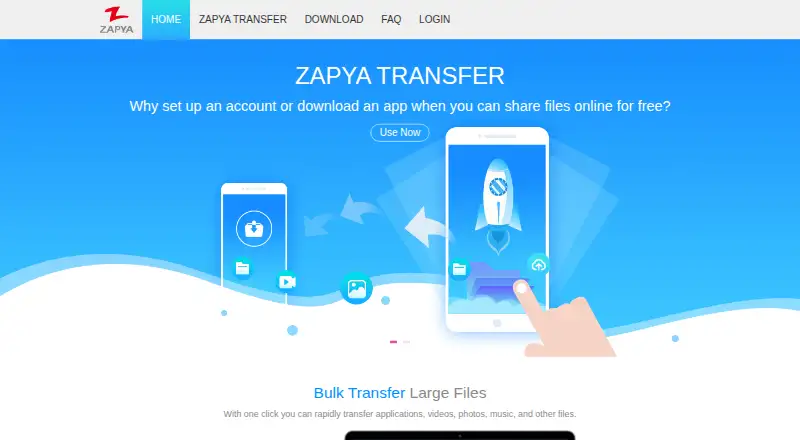
Zapya is a cross-platform file-sharing application for consumers and general-purpose transfers. It supports Android, iOS, Windows, macOS, and web browsers, giving users several ways to move files between phones, computers, and online recipients. Its focus is practical file movement rather than managed enterprise collaboration: users can transfer files over local Wi-Fi connections, share through Zapya Transfer, connect with QR codes, and access phone contents through a browser. Phone-content backup, USB-drive support, and APK or AAB sharing extend it beyond simple one-file transfers.
The free plan covers file sharing across supported devices, and online Zapya Transfer is free to use. Zapya Transfer Pro costs $1 per month or $60 per year. The paid tier allows transfers up to 10GB, password-protected files, download limits, availability periods, ZIP files and folders, image and video previews, and transfer history. That makes Pro more suitable when a transfer needs basic access controls or when sending larger grouped files. Buyers should check the selected billing option carefully, since the monthly and annual prices differ substantially.
Zapya is strongest when offline connectivity, mobile-to-desktop movement, or quick group sharing matters. Wi-Fi tethering and hotspot connections can support transfers without relying on a conventional online file-sharing workflow, while WebShare provides browser access to phone contents. The trade-off is a narrower ecosystem: integrations and file versioning are not part of the product’s positioning. Choose Zapya for low-cost personal transfers, phone migration, USB workflows, and occasional remote sharing. Organizations seeking managed collaboration, connected business applications, or document history should choose a more specialized alternative.
Your product? Our editors can test Zapya in depth and publish a review, labelled as paid · from $149/mo →
Zapya pricing
All 2 Zapya plans and prices →
Zapya fact sheet
| Free plan | Yes |
|---|---|
| Paid from | $1/mo |
| Included storage | Not verified |
| Maximum file size | 10 GB |
| Password-protected links | Yes |
| Guest uploads | Not verified |
| Version history | Not verified |
| Link expiry | Not verified |
| App coverage | Desktop_mobile |
| Deployment | Cloud, Desktop, Mobile |
| Platforms | Web, Windows, macOS, iOS, Android |
| Support | Email, Docs |
| Built for | Solo, Small business (editorial estimate) |
| Pricing | Free plan (source) |
| Website | izapya.com |
| Facts checked | 22 Sep 2026 |
Alternatives to Zapya
- Microsoft OneDriveA flexible cloud storage choice for Microsoft 365 users across personal and business devices.9.1
- BoxA broad file-sharing platform that adds e-signatures, workflows, AI, and administration.9.0
- Google DriveA flexible file-sharing hub for teams already working in Google Workspace.8.9



Used Zapya? Be the first to review it
The editor score above is our own research. What this page doesn't have yet is a reader's view — what you used Zapya for, what worked and what didn't. No stars are seeded and no review is paid for; an editor reads every one before it appears.
Write a reviewTwo minutes · verified accounts only · read by an editor before it appears
Featured on iTechGuides

Zapya is listed in our File Sharing Software directory. Add the badge to your site — it links back to this page.
<a href="https://www.itechguides.com/products/zapya/"><img src="https://www.itechguides.com/best/badge/zapya.svg" alt="Featured on iTechGuides" width="230" height="46"></a>
Reviewed by iTechGuides Editors · Editorial team · Updated Oct 2026
Advertiser disclosure: iTechGuides is reader-supported. Vendors can pay for top positions in our rankings and for a place on other products' pages, and we may earn a commission when you click some links. Bought places stand at the number bought; this page and our disclosure say so. Paying vendors may get a fuller, more detailed review from our editors, and that review can change their score. How we rank.
Last updated · How we research and update