Yanado
Yanado: A Gmail-centered workspace for teams that turn email into structured, delegated work. Ranked #35 of 46 in Workflow Management Software by our editors (5.9/10); pricing: Free plan · 14-day trial; best for gmail-centric small and midsize teams.
At a glance
- Editor score5.9 / 10
- PricingFree plan · 14-day trial
- Best forGmail-centric small and midsize teams
- Free planYes
- Paid from$6/user/mo
- Facts checked22 Sep 2026
Where it wins
- Turns Gmail emails into tasks with delegation and shared emails
- Combines Kanban, list views, reminders, and recurring work
- Adds reports, automation, Google tools, Slack, Zapier, and an API
Where it doesn't
- Platform coverage centers on Gmail, Google, and browser-based workflows
- Advanced automation and reporting require the Premium plan
- Key workflow controls such as intake forms are not part of the listed feature set
Our verdict on Yanado
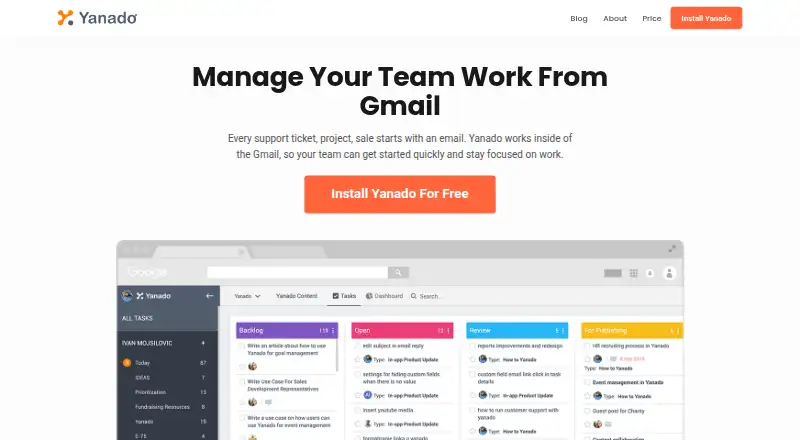
Yanado is workflow and task management software built around Gmail. It helps small and midsize teams convert emails into tasks, organize work in Kanban card or list views, assign responsibilities, and manage due dates, reminders, subtasks, tags, and custom statuses. Its stated use cases include sales, marketing, customer support, operations, and project management. The product is available on the web, through a Chrome extension, and via a REST API, making it particularly suited to teams that already keep operational work in Gmail and Google Workspace tools.
Pricing is organized into Free, Startup, and Premium plans, with annual billing shown at $0, $6, and $15 per user per month. Free includes unlimited tasks and TO-DO lists, card and list views, reminders, and Google Drive integration. Startup adds Slack and Zapier integrations, team collaboration and management, task and list templates, CSV export, and a 14-day free trial. Premium adds custom automated workflows, free guest users, reports, custom fields, and a project management specialist. The paid plans include a 14-day free trial, and trial signup does not require a card.
Yanado’s strongest fit is a Gmail-centric team that wants email capture, delegation, recurring work, Google Calendar synchronization, and structured project views without moving away from its inbox. Reports for team and individual performance, custom fields, automation, and the API give larger workflows more room to grow, while Google Drive, Slack, Zapier, and Calendar extend its connections. Teams seeking broad platform coverage or workflow features outside its Gmail-and-browser focus should compare alternatives before choosing it. Yanado is a practical choice for email-driven coordination, but less suitable when a team needs a wider ecosystem or highly specialized intake and dependency controls.
Your product? Our editors can test Yanado in depth and publish a review, labelled as paid · from $149/mo →
Yanado pricing
All 3 Yanado plans and prices →
Yanado fact sheet
| Free plan | Yes |
|---|---|
| Paid from | $6/user/mo |
| Automation runs | Not verified |
| Approval workflows | Not verified |
| Intake forms | Not verified |
| Task dependencies | Not verified |
| Recurring work | Yes |
| Reporting level | Advanced |
| Free trial | 14 days · no card needed |
| Money-back guarantee | 30 days |
| Deployment | Cloud, Browser extension |
| Platforms | Web, Chrome extension |
| Support | Email, Docs |
| Built for | Small business, Mid-market (editorial estimate) |
| Integrations | 5 integrations: Gmail, Google Calendar, Google Drive, Slack, Zapier See all → |
| Pricing | Free plan · 14-day trial (source) |
| Website | yanado.com |
| Facts checked | 22 Sep 2026 |
Yanado integrations
Yanado lists 5 integrations on its own site.
- Gmail
- Google Calendar
- Google Drive
- Slack
- Zapier
Alternatives to Yanado
- ZapierBroad app connectivity and flexible workflows, with paid features starting at $19.99/month.9.4
- MakeVisual, multi-step automation for teams that need broad app connectivity.9.3
- Microsoft Power AutomateA Microsoft-centered automation suite with cloud flows, desktop RPA, approvals, and process mining.9.1


Used Yanado? Be the first to review it
The editor score above is our own research. What this page doesn't have yet is a reader's view — what you used Yanado for, what worked and what didn't. No stars are seeded and no review is paid for; an editor reads every one before it appears.
Write a reviewTwo minutes · verified accounts only · read by an editor before it appears
Featured on iTechGuides

Yanado is listed in our Workflow Management Software directory. Add the badge to your site — it links back to this page.
<a href="https://www.itechguides.com/products/yanado/"><img src="https://www.itechguides.com/best/badge/yanado.svg" alt="Featured on iTechGuides" width="230" height="46"></a>
Reviewed by iTechGuides Editors · Editorial team · Updated Oct 2026
Advertiser disclosure: iTechGuides is reader-supported. Vendors can pay for top positions in our rankings and for a place on other products' pages, and we may earn a commission when you click some links. Bought places stand at the number bought; this page and our disclosure say so. Paying vendors may get a fuller, more detailed review from our editors, and that review can change their score. How we rank.
Last updated · How we research and update