
Xournal++
Xournal++: A capable desktop choice for handwritten notes and PDF annotation, with no subscription cost. Ranked #104 of 214 in Note-Taking Apps by our editors (3.0/10); pricing: Free plan; best for handwritten PDF annotation on desktop.
At a glance
- Editor score3.0 / 10
- PricingFree plan
- Best forHandwritten PDF annotation on desktop
- Free planYes
- Paid fromFree
- Facts checked20 Sep 2026
Where it wins
- Pressure-sensitive stylus support with customizable writing tools
- PDF annotation plus layers, shapes, LaTeX, and audio
- Free, open-source releases for Windows, macOS, and Linux
Where it doesn't
- Desktop-focused coverage limits use across mobile devices
- Sharing and synchronization are not established features
- The associated web app is no longer available
Our verdict on Xournal++
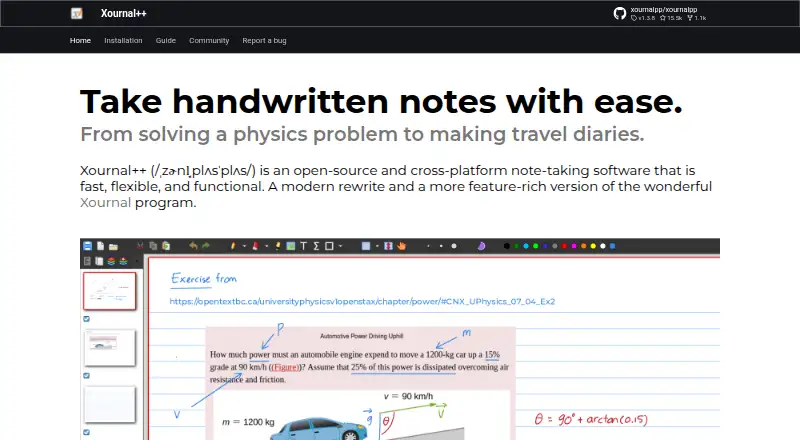
Xournal++ is an open-source desktop note-taking application for handwritten notes, drawing, and PDF annotation. It is aimed at people who work with pressure-sensitive styluses or drawing tablets and want control over pen, highlighter, and eraser tools. Its releases cover Windows, macOS, and Linux, making it suitable for desktop users who prefer a free application with editable notes, paper backgrounds, images, text, and geometric shapes. The project also supports following links in PDFs and exporting work to PDF, SVG, PNG, and other formats.
Its feature depth is strongest around handwritten documents and visual annotation. Layers and the page-preview sidebar help organize pages, while shape resizing, rotation, and grid snapping support structured diagrams and whiteboarding. The LaTeX editor includes syntax highlighting for formula-heavy work, and audio recording and playback can accompany handwritten notes. Lua plugin support and customizable toolbars add room for tailored workflows. These capabilities make Xournal++ more focused than a general-purpose notes app, particularly for annotated course material, marked-up PDFs, technical notes, and tablet-based sketching.
The trade-off is its narrow ecosystem. The product is desktop-focused, and the associated mobile project is described as stalled; Android support is provided through Xournal++ Mobile, while the web app is no longer available and iOS is not published in the Apple App Store. Sharing and synchronization are not established features in the published product details, so people who need a connected multi-device workspace should consider an alternative. Choose Xournal++ for free, open-source handwriting and PDF work on Windows, macOS, or Linux; choose elsewhere for broader mobile, web, sharing, or synchronization needs.
Your product? Our editors can test Xournal++ in depth and publish a review, labelled as paid · from $149/mo →
Xournal++ pricing
Xournal++ fact sheet
| Free plan | Yes |
|---|---|
| Paid from | Free |
| Offline access | Not verified |
| Supported platforms | windows, macos, linux |
| Note sharing | Not verified |
| Real-time collaboration | Not verified |
| Storage limit | Not verified |
| Integrations | Not verified |
| Deployment | Desktop |
| Platforms | Windows, macOS, Linux |
| Support | Community, Docs |
| Built for | Solo, Small business (editorial estimate) |
| Pricing | Free plan |
| Website | xournalpp.github.io |
| Facts checked | 20 Sep 2026 |
Alternatives to Xournal++
- Microsoft OneNoteA broad, collaborative note system with strong Microsoft integration and a capable free option.9.3
- NotionA flexible workspace for teams that want notes and knowledge bases alongside databases and collaboration.9.2
- EvernoteA broad note-taking workspace for organizing information, tasks, calendars, and documents.9.0


See all Xournal++ alternatives →
Also Ranked In
Xournal++ is ranked in 2 of our directories.
Used Xournal++? Be the first to review it
The editor score above is our own research. What this page doesn't have yet is a reader's view — what you used Xournal++ for, what worked and what didn't. No stars are seeded and no review is paid for; an editor reads every one before it appears.
Write a reviewTwo minutes · verified accounts only · read by an editor before it appears
Featured on iTechGuides

Xournal++ is listed in our Note-Taking Apps directory. Add the badge to your site — it links back to this page.
<a href="https://www.itechguides.com/products/xournal/"><img src="https://www.itechguides.com/best/badge/xournal.svg" alt="Featured on iTechGuides" width="230" height="46"></a>
Reviewed by iTechGuides Editors · Editorial team · Updated Oct 2026
Advertiser disclosure: iTechGuides is reader-supported. Vendors can pay for top positions in our rankings and for a place on other products' pages, and we may earn a commission when you click some links. Bought places stand at the number bought; this page and our disclosure say so. Paying vendors may get a fuller, more detailed review from our editors, and that review can change their score. How we rank.
Last updated · How we research and update