X-Mirage
X-Mirage: A focused, affordable receiver for AirPlay and Google Cast mirroring and recording. Ranked #21 of 30 in Screen Sharing Software by our editors (6.8/10); pricing: 15-day trial; best for simple AirPlay and Google Cast recording.
At a glance
- Editor score6.8 / 10
- Pricing15-day trial
- Best forSimple AirPlay and Google Cast recording
- Free planNo
- Paid from$19.99/device one-time
- Facts checked21 Sep 2026
Where it wins
- Supports AirPlay, Google Cast, and multiple mobile devices
- Records mirrored screens with microphone voiceover and export
- $19.99 one-time license includes free updates and lifetime support
Where it doesn't
- Available only on Windows and macOS
- No free plan after the 15-day trial
- Mirroring requires devices to share the same Wi-Fi network
Our verdict on X-Mirage
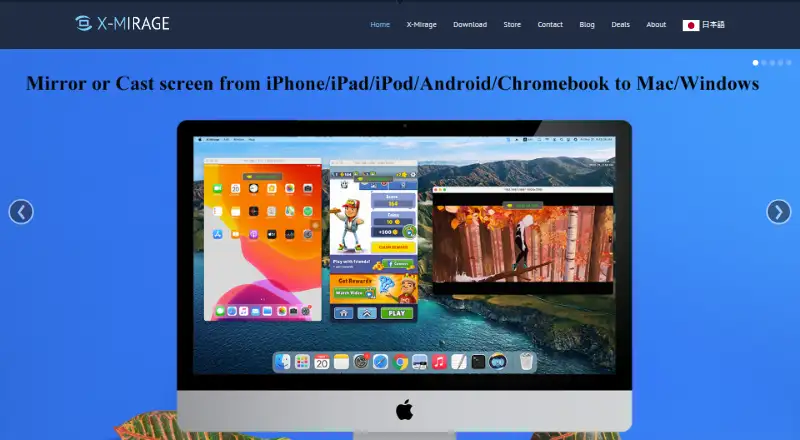
X-Mirage turns a Mac or Windows PC into an AirPlay and Google Cast receiver. It is designed for people who need to mirror iPhone, iPad, iPod touch, or compatible Android device content on a larger computer display. Its use cases include demonstrations, presentations, lessons, app tutorials, games, and viewing mobile media. The product focuses on desktop-based mobile screen sharing rather than broader meeting or collaboration workflows.
The standout feature is its combination of mirroring and recording. X-Mirage can mirror multiple mobile devices to one computer, stream video, music, photos, games, and slideshows, and record the mirrored screen for export. Microphone voiceover recording adds a practical option for tutorials, demonstrations, and narrated presentations. AirPlay password protection is available, and the product supports 4K Quad Full HD mirroring. These capabilities make it a focused choice for recording mobile content or presenting it from a computer.
Pricing is straightforward: X-Mirage for Mac and X-Mirage for Windows each cost $19.99 as a one-time purchase. Each plan provides a single-user license for one Mac or one PC, with use forever, free updates, and lifetime technical support. A 15-day trial provides time to evaluate the desktop receiver before purchasing. The main trade-off is platform coverage: X-Mirage is limited to Windows and macOS, and mirroring operates over the same Wi-Fi network. Choose it for simple AirPlay and Google Cast recording with a low one-time cost; choose another option if you need broader platform coverage or a more expansive collaboration tool.
Your product? Our editors can test X-Mirage in depth and publish a review, labelled as paid · from $149/mo →
X-Mirage pricing
All 2 X-Mirage plans and prices →
X-Mirage fact sheet
| Free plan | No |
|---|---|
| Paid from | $19.99/device one-time |
| Maximum participants | Not verified |
| Session duration limit | Not verified |
| Screen recording | Yes |
| Annotation tools | Not verified |
| Mobile screen sharing | Yes |
| Sharing mode | Desktop |
| Free trial | 15 days |
| Money-back guarantee | 14 days |
| Deployment | Desktop |
| Platforms | Windows, macOS |
| Support | Email, Docs |
| Built for | Solo, Small business (editorial estimate) |
| Pricing | 15-day trial (source) |
| Website | x-mirage.com |
| Facts checked | 21 Sep 2026 |
Alternatives to X-Mirage
- ScreenleapA flexible browser-first meeting tool with useful paid upgrades and clear free-plan limits.9.4
- AirDroid CastA budget-friendly choice for mirroring phones and computers across many device types.9.2
- CrankWheelA sales-focused screen-sharing platform with engagement tracking, recording, and CRM integrations.8.9



See all X-Mirage alternatives →
Used X-Mirage? Be the first to review it
The editor score above is our own research. What this page doesn't have yet is a reader's view — what you used X-Mirage for, what worked and what didn't. No stars are seeded and no review is paid for; an editor reads every one before it appears.
Write a reviewTwo minutes · verified accounts only · read by an editor before it appears
Featured on iTechGuides

X-Mirage is listed in our Screen Sharing Software directory. Add the badge to your site — it links back to this page.
<a href="https://www.itechguides.com/products/x-mirage/"><img src="https://www.itechguides.com/best/badge/x-mirage.svg" alt="Featured on iTechGuides" width="230" height="46"></a>
Reviewed by iTechGuides Editors · Editorial team · Updated Oct 2026
Advertiser disclosure: iTechGuides is reader-supported. Vendors can pay for top positions in our rankings and for a place on other products' pages, and we may earn a commission when you click some links. Bought places stand at the number bought; this page and our disclosure say so. Paying vendors may get a fuller, more detailed review from our editors, and that review can change their score. How we rank.
Last updated · How we research and update