
Screenleap
Screenleap: A flexible browser-first meeting tool with useful paid upgrades and clear free-plan limits. Ranked #1 of 30 in Screen Sharing Software by our editors (9.4/10); pricing: Free plan; best for browser-based meetings and screen sharing.
At a glance
- Editor score9.4 / 10
- PricingFree plan
- Best forBrowser-based meetings and screen sharing
- Free planYes
- Paid from$15/mo
- Maximum participants30 participants
- Founded2011 · San Carlos, California, United States
- Facts checked20 Sep 2026
Where it wins
- Viewers join in a browser without installing software
- Works across web, Windows, macOS, iOS, and Android
- Supports audio, video, recording, control sharing, and CRM export
Where it doesn't
- Free plan allows 40 minutes per day and up to 8 viewers
- Website integration and control sharing begin with Basic
- Larger audiences and recording require higher-tier plans
Our verdict on Screenleap
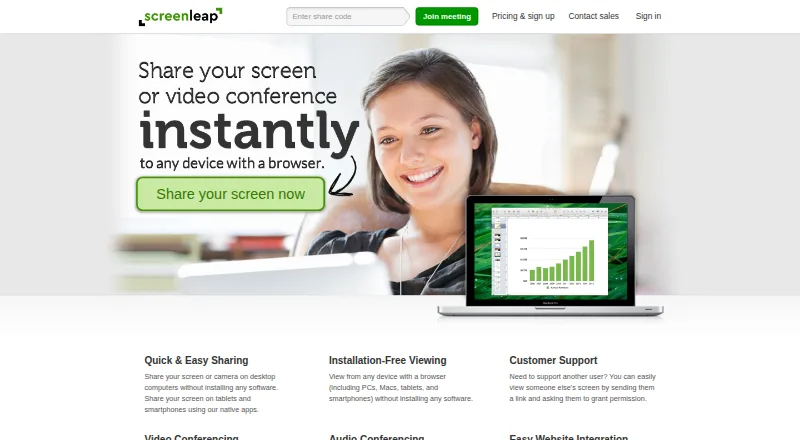
Screenleap is a screen-sharing and online meeting service for individuals, educators, support teams, and organizations. Presenters can share from Chrome, Edge, Firefox, and Safari without installing software, or use Windows, Mac, iOS, and Android apps. Viewers join through a browser, while supported plans add audio and video conferencing, viewer controls, scheduled meetings, recording, registration, and CRM export. It fits teams that want browser access without giving up desktop and mobile options.
Pricing is structured around a free entry point and progressively broader meeting capabilities. Free includes 40 minutes per day, up to 8 viewers, and 2 scheduled meetings, but excludes website integration and control sharing. Basic costs $15 per month with monthly billing and adds 8 hours per day, up to 30 viewers, unlimited meetings, website integration, and control sharing. Pro costs $31 per month and adds unlimited sharing and up to 150 viewers. Premium costs $39 per month and adds screen recording, custom branding, and an embeddable viewer. The vendor also states that annual billing saves 20% on Basic, Pro, and Premium.
Screenleap’s main strength is platform coverage combined with a focused browser-based experience. Screen sharing is available from browsers, desktop apps, and mobile apps, while viewers avoid software installation. Two-way computer audio, video conferencing, viewer mouse pointing, viewer control sharing, cloud recording, website integration, and CRM export extend it beyond basic one-way presenting. It should suit organizations that value accessible meetings, embedded viewing, and cross-device participation. Teams that need more than 8 viewers, website integration, control sharing, or 40 minutes per day should move to a paid tier; those needs are less compatible with the Free plan.
Your product? Our editors can test Screenleap in depth and publish a review, labelled as paid · from $149/mo →
Screenleap pricing
All 5 Screenleap plans and prices →
Screenleap fact sheet
| Free plan | Yes |
|---|---|
| Paid from | $15/mo |
| Maximum participants | 30 participants |
| Session duration limit | 40 minutes |
| Screen recording | Yes |
| Annotation tools | Not verified |
| Mobile screen sharing | Yes |
| Sharing mode | Browser and desktop |
| Deployment | Cloud, Desktop, Mobile |
| Platforms | Web, Windows, macOS, iOS, Android |
| Support | Email, Tickets, Docs |
| Built for | Solo, Small business, Mid-market, Enterprise (editorial estimate) |
| Integrations | 2 integrations: Website integration, CRM export See all → |
| Pricing | Free plan (source) |
| Website | screenleap.com |
| Facts checked | 20 Sep 2026 |
Screenleap integrations
Screenleap lists 2 integrations on its own site.
- Website integration
- CRM export
See all Screenleap integrations →
Alternatives to Screenleap
- AirDroid CastA budget-friendly choice for mirroring phones and computers across many device types.9.2
- CrankWheelA sales-focused screen-sharing platform with engagement tracking, recording, and CRM integrations.8.9
- Dead Simple Screen SharingA free, no-login meeting tool with unlimited sharing and participant capacity.8.7


See all Screenleap alternatives →
Screenleap vs the competition
- Screenleap vs AirDroid Cast
- Screenleap vs CrankWheel
- Screenleap vs Dead Simple Screen Sharing
- Screenleap vs LetsView
- Screenleap vs ScreenBeam
- Screenleap vs Extron ShareLink Pro



Compare Screenleap with any tool side by side →
Used Screenleap? Be the first to review it
The editor score above is our own research. What this page doesn't have yet is a reader's view — what you used Screenleap for, what worked and what didn't. No stars are seeded and no review is paid for; an editor reads every one before it appears.
Write a reviewTwo minutes · verified accounts only · read by an editor before it appears
Featured on iTechGuides

Screenleap is listed in our Screen Sharing Software directory. Add the badge to your site — it links back to this page.
<a href="https://www.itechguides.com/products/screenleap/"><img src="https://www.itechguides.com/best/badge/screenleap.svg" alt="Featured on iTechGuides" width="230" height="46"></a>
Reviewed by iTechGuides Editors · Editorial team · Updated Oct 2026
Advertiser disclosure: iTechGuides is reader-supported. Vendors can pay for top positions in our rankings and for a place on other products' pages, and we may earn a commission when you click some links. Bought places stand at the number bought; this page and our disclosure say so. Paying vendors may get a fuller, more detailed review from our editors, and that review can change their score. How we rank.
Last updated · How we research and update