
Workzone
Workzone: A broad project hub with strong proofing and capacity planning, but no free plan. Ranked #33 of 188 in Project Management Software by our editors (6.1/10); pricing: 14-day trial; best for teams prioritizing proofing and capacity planning.
At a glance
- Editor score6.1 / 10
- Pricing14-day trial
- Best forTeams prioritizing proofing and capacity planning
- Free planNo
- Facts checked20 Sep 2026
Where it wins
- Proofing, markups, and approval workflows support review-heavy projects.
- Workload and capacity planning help teams balance assignments.
- List, Gantt, Kanban, calendar, and portfolio views cover varied planning needs.
Where it doesn't
- No free plan is available.
- Platform coverage is limited to the web.
- Enterprise pricing is custom, making costs harder to compare.
Our verdict on Workzone
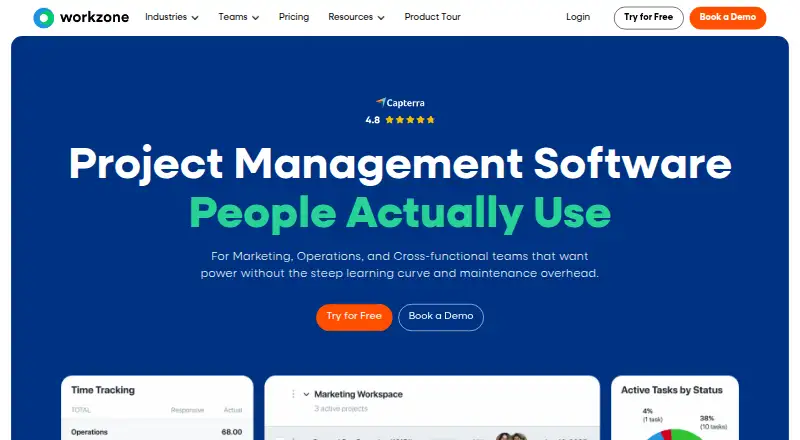
Workzone is a web-based project management platform for marketing, creative, operations, and IT teams. It brings project planning, task dependencies, templates, collaboration, proofing, approvals, reporting, workload planning, time tracking, and expense tracking into one workspace. Its range of views—list, Gantt, Kanban, calendar, and portfolio—makes it suitable for teams coordinating multiple projects and workstreams rather than managing a simple task list.
Pricing is structured across Starter, Team, and Enterprise. Starter costs $8 per user per month when billed annually and supports 1–25 users, unlimited tasks, up to 100 active projects, up to 3 workspaces, and 250 GB of storage. Team costs $20 per user per month when billed annually and adds unlimited projects and tasks, portfolio view, intake forms, proofing and markups, and time and expense tracking. Enterprise uses custom pricing and adds unlimited free guests and reviewers, advanced proofing, cross-project dependencies, integrations and APIs, plus SSO and MFA. A 14-day free trial is available, but there is no free plan.
The strongest fit is for teams that need structured review cycles alongside resource planning. Document proofing, markups, approval workflows, reports, dashboards, workload views, and capacity planning address the operational needs behind creative and cross-functional delivery. Integrations include Microsoft Teams, Slack, Google Drive, Microsoft OneDrive, Notion, Jira, GitHub, and other listed services, while REST API access supports broader integration work. The trade-off is platform scope: Workzone is web-only, and its extensive feature set may exceed the needs of teams seeking a lightweight task manager. Choose it for coordinated project portfolios, approvals, and capacity visibility; consider a simpler tool if those requirements are unnecessary.
Your product? Our editors can test Workzone in depth and publish a review, labelled as paid · from $149/mo →
Workzone pricing
All 3 Workzone plans and prices →
Workzone fact sheet
| Free plan | No |
|---|---|
| Paid from | Not verified |
| Task views | Not verified |
| Automation rules | Not verified |
| Time tracking | Yes |
| Guest access | Yes |
| Free-plan user limit | Not verified |
| Native integrations | 4 integrations |
| Free trial | 14 days · no card needed |
| Deployment | Cloud, Mobile |
| Platforms | Web |
| Compliance & security | SOC 2, GDPR, HIPAA, 2FA |
| Support | Email, Live chat, Phone, Docs |
| Built for | Small business, Mid-market, Enterprise (editorial estimate) |
| Integrations | 1,000+ integrations: Microsoft Teams, Slack, Google Drive, OneDrive, Microsoft SharePoint, Microsoft Excel … See all → |
| Pricing | 14-day trial (source) |
| Website | workzone.com |
| Facts checked | 20 Sep 2026 |
Workzone integrations
Workzone lists 1,000+ integrations on its own site — the 8 named here are the ones its pages call out.
- Microsoft Teams
- Slack
- Google Drive
- OneDrive
- Microsoft SharePoint
- Microsoft Excel
- Zoom
- Zapier
See all Workzone integrations →
Alternatives to Workzone
- ClickUpBroad project control with tasks, Docs, automations, reporting, time tracking, and AI.9.4
- JiraA mature choice for agile delivery teams needing boards, backlogs, workflows, and automation.9.3
- AsanaA mature project hub with flexible views, automation, reporting, and AI features.9.2


See all Workzone alternatives →
Also Ranked In
Workzone is ranked in 7 of our directories.
Used Workzone? Be the first to review it
The editor score above is our own research. What this page doesn't have yet is a reader's view — what you used Workzone for, what worked and what didn't. No stars are seeded and no review is paid for; an editor reads every one before it appears.
Write a reviewTwo minutes · verified accounts only · read by an editor before it appears
Featured on iTechGuides

Workzone is listed in our Project Management Software directory. Add the badge to your site — it links back to this page.
<a href="https://www.itechguides.com/products/workzone/"><img src="https://www.itechguides.com/best/badge/workzone.svg" alt="Featured on iTechGuides" width="230" height="46"></a>
Reviewed by iTechGuides Editors · Editorial team · Updated Oct 2026
Advertiser disclosure: iTechGuides is reader-supported. Vendors can pay for top positions in our rankings and for a place on other products' pages, and we may earn a commission when you click some links. Bought places stand at the number bought; this page and our disclosure say so. Paying vendors may get a fuller, more detailed review from our editors, and that review can change their score. How we rank.
Last updated · How we research and update