
Workrave
Workrave: A focused open-source reminder for managing breaks during computer work. Ranked #31 of 34 in Time Management Apps by our editors (6.2/10); pricing: Free plan; best for desktop break and computer-use reminders.
At a glance
- Editor score6.2 / 10
- PricingFree plan
- Best forDesktop break and computer-use reminders
- Free planYes
- Paid fromFree
- Facts checked22 Sep 2026
Where it wins
- Configurable microbreak and longer rest-break reminders
- Tracks keyboard and mouse activity with usage statistics
- Free, open-source software for Windows and GNU/Linux
Where it doesn't
- No task scheduling or calendar management
- No recurring task planning features
- Limited to Windows and GNU/Linux desktops
Our verdict on Workrave
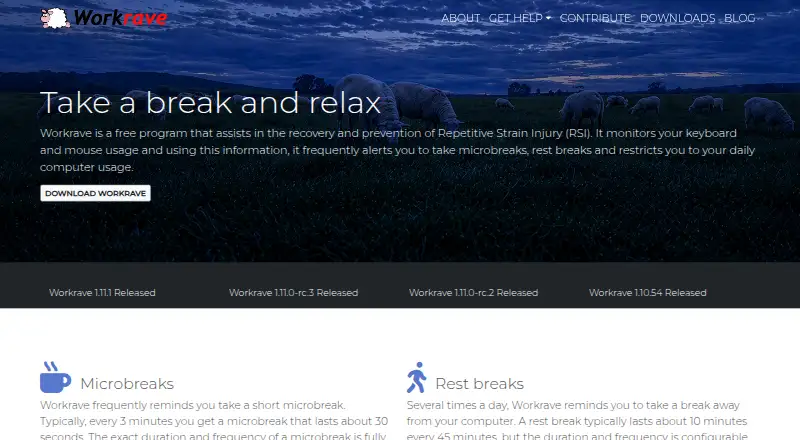
Workrave is a free, open-source desktop program for Microsoft Windows and GNU/Linux. It is designed for people who spend extended periods at a computer and want structured prompts to pause, rest, and monitor computer use. Its focus is narrow: break timing, activity monitoring, daily limits, and related statistics rather than general time or task management.
Its strongest feature set centers on configurable breaks. Workrave can remind users to take short microbreaks and longer rest breaks, with adjustable timing and duration. Warnings include postpone and skip controls, while rest breaks can include exercise prompts. Users can also set a daily computer-use limit and review daily, weekly, and monthly statistics covering usage and break compliance. Quiet and suspended operation modes, along with taskbar or panel applet support, give the reminder system control over when it operates.
Workrave suits users who want a dedicated desktop intervention for prolonged computer use, especially those who value open-source software and do not need a broader productivity suite. It is available for Windows and GNU/Linux, but its scope stops at break management and computer-use tracking. People looking for task scheduling, calendar management, or recurring task planning should choose a time-management app built around those workflows instead. For focused break reminders, activity monitoring, configurable limits, and usage reporting, Workrave is a direct fit.
Your product? Our editors can test Workrave in depth and publish a review, labelled as paid · from $149/mo →
Workrave pricing
Workrave fact sheet
| Free plan | Yes |
|---|---|
| Paid from | Free |
| Time blocking | Not verified |
| Calendar sync | Not verified |
| Recurring tasks | Not verified |
| Task views | Not verified |
| Workload planning | Not verified |
| Review reports | Yes |
| Supported platforms | GNU/Linux, Microsoft Windows |
| Deployment | Desktop |
| Platforms | Windows, Linux |
| Support | Community, Docs |
| Built for | Solo (editorial estimate) |
| Pricing | Free plan |
| Website | workrave.org |
| Facts checked | 22 Sep 2026 |
Alternatives to Workrave
- FlowSavvyA focused planner for turning deadlines and priorities into calendar time.9.3
- RoutineA cross-platform planner that combines time blocking, calendars, tasks, notes, and AI.9.2
- Reclaim AIA flexible AI scheduler with a free plan, team booking, and web-only access.9.1



See all Workrave alternatives →
Used Workrave? Be the first to review it
The editor score above is our own research. What this page doesn't have yet is a reader's view — what you used Workrave for, what worked and what didn't. No stars are seeded and no review is paid for; an editor reads every one before it appears.
Write a reviewTwo minutes · verified accounts only · read by an editor before it appears
Featured on iTechGuides

Workrave is listed in our Time Management Apps directory. Add the badge to your site — it links back to this page.
<a href="https://www.itechguides.com/products/workrave/"><img src="https://www.itechguides.com/best/badge/workrave.svg" alt="Featured on iTechGuides" width="230" height="46"></a>
Reviewed by iTechGuides Editors · Editorial team · Updated Oct 2026
Advertiser disclosure: iTechGuides is reader-supported. Vendors can pay for top positions in our rankings and for a place on other products' pages, and we may earn a commission when you click some links. Bought places stand at the number bought; this page and our disclosure say so. Paying vendors may get a fuller, more detailed review from our editors, and that review can change their score. How we rank.
Last updated · How we research and update