
Routine
Routine: A cross-platform planner that combines time blocking, calendars, tasks, and focus timers. Ranked #6 of 137 in Daily Planner Apps by our editors (8.4/10); pricing: Free plan; best for all-platform time-blocking users.
At a glance
- Editor score8.4 / 10
- PricingFree plan
- Best forAll-platform time-blocking users
- Free planYes
- Planning methodHybrid
- Founded2020 · Paris, France
- Facts checked22 Sep 2026
Where it wins
- Time blocking, recurring tasks, timers, and daily agenda views
- Available on web, desktop, iOS, and Android
- Integrates with Google, Microsoft, Slack, Notion, and Zapier
Where it doesn't
- No free plan
- AI features begin with the Professional plan
- Business and Enterprise features target team administration
Our verdict on Routine
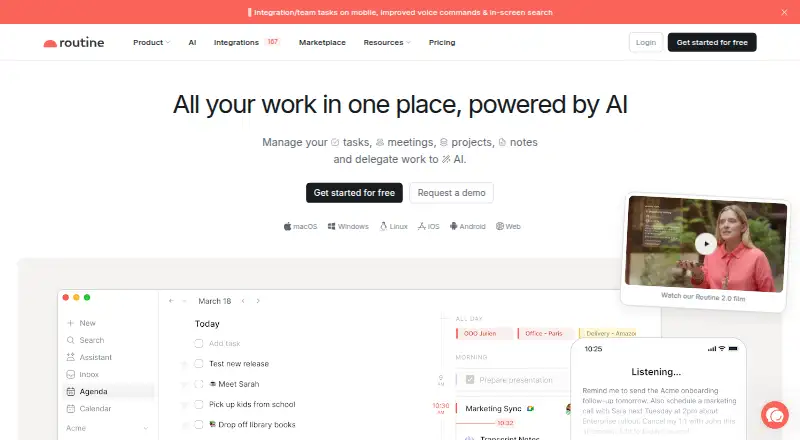
Routine brings tasks, calendar events, notes, contacts, projects, and integrations into one daily-planning workspace. Its agenda is built for selecting and focusing on daily work, while calendar layouts, drag-and-drop time blocking, recurring tasks, priorities, labels, subtasks, and assignees support more structured planning. Pomodoro and task-specific timers add focus sessions, and offline access extends the workflow beyond an internet connection. It suits individuals who want a time-blocked day across web, Windows, macOS, Linux, iOS, and Android, as well as teams that need shared workspaces and access controls.
Pricing is straightforward across the paid tiers. Personal costs $5 per month and includes time blocking, time boxing, event coloring, exporting, unlimited file uploads, and 10 integrations. Professional costs $10 per month and adds AI meeting notes, AI agents, AI automations, a menu bar widget, time tracking, and contextual capture. Business costs $15 per seat per month, adding organization features, workspaces, access control, versioning, consolidated billing, and priority support. Enterprise adds unlimited history, compliance, audit logs, analytics, user provisioning, and a success manager. The lack of a free plan makes Personal the entry point rather than a no-cost starting tier.
Routine’s ecosystem is a notable part of its appeal. Bidirectional calendar synchronization works alongside Google Calendar, while integrations include Gmail, Google Tasks, Google Meet, Google Contacts, Microsoft Outlook, Slack, Notion, Todoist, Apple Reminders, and Zapier. The universal inbox can bring together meetings, integrations, and tasks, and AI meeting transcription and summaries extend the workspace beyond basic scheduling. Choose Routine if you want one cross-platform system for calendar-led planning, recurring work, and focus sessions. It is less suited to people seeking a free planner or a narrowly focused task list without paid tiers and team-oriented administration.
Your product? Our editors can test Routine in depth and publish a review, labelled as paid · from $149/mo →
Routine pricing
All 5 Routine plans and prices →
Routine fact sheet
| Free plan | Yes |
|---|---|
| Paid from | Not verified |
| Planning method | Hybrid |
| Calendar sync | Yes |
| Recurring tasks | Yes |
| Mobile platforms | Both |
| Daily task limit | Not verified |
| Focus sessions | Yes |
| Deployment | Cloud, Desktop, Mobile |
| Platforms | Web, Windows, macOS, Linux, iOS, Android |
| Compliance & security | SOC 2, GDPR |
| Support | Email, Community, Docs |
| Built for | Solo, Small business, Mid-market, Enterprise (editorial estimate) |
| Integrations | 8 integrations: Google Calendar, Gmail, Google Meet, Microsoft Teams, Slack, Zoom … See all → |
| Pricing | Free plan (source) |
| Website | routine.co |
| Facts checked | 22 Sep 2026 |
Routine integrations
Routine lists 8 integrations on its own site.
- Google Calendar
- Gmail
- Google Meet
- Microsoft Teams
- Slack
- Zoom
- Notion
- GitHub
See all Routine integrations →
Alternatives to Routine
- SunsamaA guided daily planner for turning tasks, calendars, and workload limits into a focused workday.8.9
- Amazing MarvinA flexible planner for people who want structured days without a fixed workflow.8.8
- MotionA broad AI planner for scheduling, booking, calendars, and project work.8.7


See all Routine alternatives →
Routine vs the competition


Compare Routine with any tool side by side →
Also Ranked In
Routine is ranked in 7 of our directories.
Used Routine? Be the first to review it
The editor score above is our own research. What this page doesn't have yet is a reader's view — what you used Routine for, what worked and what didn't. No stars are seeded and no review is paid for; an editor reads every one before it appears.
Write a reviewTwo minutes · verified accounts only · read by an editor before it appears
Featured on iTechGuides

Routine is listed in our Daily Planner Apps directory. Add the badge to your site — it links back to this page.
<a href="https://www.itechguides.com/products/routine/"><img src="https://www.itechguides.com/best/badge/routine.svg" alt="Featured on iTechGuides" width="230" height="46"></a>
Reviewed by iTechGuides Editors · Editorial team · Updated Oct 2026
Advertiser disclosure: iTechGuides is reader-supported. Vendors can pay for top positions in our rankings and for a place on other products' pages, and we may earn a commission when you click some links. Bought places stand at the number bought; this page and our disclosure say so. Paying vendors may get a fuller, more detailed review from our editors, and that review can change their score. How we rank.
Last updated · How we research and update