
FlowSavvy
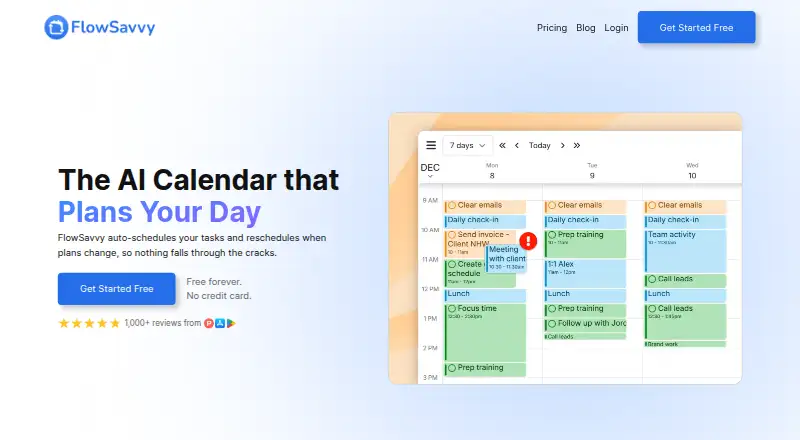
FlowSavvy: A flexible daily planner for people who want calendars to arrange tasks automatically. Ranked #5 of 137 in Daily Planner Apps by our editors (8.5/10); pricing: Free plan · 7-day trial; best for people wanting automatic daily scheduling.
At a glance
- Editor score8.5 / 10
- PricingFree plan · 7-day trial
- Best forPeople wanting automatic daily scheduling
- Free planYes
- Planning methodHybrid
- Facts checked22 Sep 2026
Where it wins
- Automatically schedules and reschedules tasks around calendar events
- Two-way sync with Google, Outlook.com, and iCloud calendars
- Supports dependencies, recurring rules, task splitting, and locked time blocks
Where it doesn't
- Free auto-scheduling extends only up to 2 weeks out
- Free includes 3 repeating auto-scheduled tasks and 5 task lists
- Pro costs $14 monthly, compared with $10 monthly when billed annually
Our verdict on FlowSavvy
FlowSavvy is a daily-planning and calendar application for busy individuals who want tasks placed into available calendar time automatically. It schedules around existing Google Calendar, Outlook.com, and iCloud events, then recalculates plans when tasks are missed or circumstances change. Users can organize work in lists, set priorities and deadlines, create recurring tasks, define scheduling-hours profiles, and manually adjust or lock time blocks. FlowSavvy is available on the web, iOS, and Android, making it a fit for people who want one planning method across browser and mobile use.
Pricing is structured around a useful free entry point and a paid expansion tier. The Free plan is free forever and includes unlimited auto-reschedules, scheduling up to 2 weeks out, calendar sync, 3 repeating auto-scheduled tasks, and 5 task lists. Pro adds scheduling up to 8 weeks out, external-calendar syncing for FlowSavvy tasks, unlimited scheduling-hours profiles, unlimited repeating auto-scheduled tasks, unlimited task lists, and priority levels. The published plans show Pro at $14 per user per month when billed monthly or $10 per user per month when billed annually; a 7-day free trial is also available.
The main strength is the depth of its scheduling model: automatic placement, rescheduling, dependencies, custom recurrence rules, task splitting, minimum block duration, and manual drag-and-drop control all support changing workdays. Integrations with Todoist and Zapier, plus an API and MCP, extend its ecosystem beyond calendar connections. Choose FlowSavvy if automatic calendar-based planning is the central need and the Free limits fit your routine, or if Pro features justify the recurring cost. It is less suitable for someone who wants only a lightweight task list without calendar-driven scheduling.
Your product? Our editors can test FlowSavvy in depth and publish a review, labelled as paid · from $149/mo →
FlowSavvy pricing
All 2 FlowSavvy plans and prices →
FlowSavvy fact sheet
| Free plan | Yes |
|---|---|
| Paid from | Not verified |
| Planning method | Hybrid |
| Calendar sync | Yes |
| Recurring tasks | Yes |
| Mobile platforms | Both |
| Daily task limit | Not verified |
| Focus sessions | Not verified |
| Free trial | 7 days · no card needed |
| Money-back guarantee | 30 days |
| Deployment | Cloud, Mobile |
| Platforms | Web, iOS, Android |
| Support | Email, Live chat, Docs |
| Built for | Solo, Small business (editorial estimate) |
| Integrations | 7 integrations: Google Calendar, Outlook.com Calendar, iCloud Calendar, Todoist, Zapier, API … |
| Pricing | Free plan · 7-day trial (source) |
| Website | flowsavvy.app |
| Facts checked | 22 Sep 2026 |
FlowSavvy integrations
FlowSavvy lists 7 integrations on its own site.
- Google Calendar
- Outlook.com Calendar
- iCloud Calendar
- Todoist
- Zapier
- API
- MCP
Alternatives to FlowSavvy
- SunsamaA guided daily planner for turning tasks, calendars, and workload limits into a focused workday.8.9
- Amazing MarvinA flexible planner for people who want structured days without a fixed workflow.8.8
- MotionA broad AI planner for scheduling, booking, calendars, and project work.8.7


See all FlowSavvy alternatives →
FlowSavvy vs the competition
- FlowSavvy vs Sunsama
- FlowSavvy vs Amazing Marvin
- FlowSavvy vs Motion
- FlowSavvy vs Reclaim AI
- FlowSavvy vs Routine
- FlowSavvy vs Akiflow



Compare FlowSavvy with any tool side by side →
Also Ranked In
FlowSavvy is ranked in 5 of our directories.
Used FlowSavvy? Be the first to review it
The editor score above is our own research. What this page doesn't have yet is a reader's view — what you used FlowSavvy for, what worked and what didn't. No stars are seeded and no review is paid for; an editor reads every one before it appears.
Write a reviewTwo minutes · verified accounts only · read by an editor before it appears
Featured on iTechGuides

FlowSavvy is listed in our Daily Planner Apps directory. Add the badge to your site — it links back to this page.
<a href="https://www.itechguides.com/products/flowsavvy/"><img src="https://www.itechguides.com/best/badge/flowsavvy.svg" alt="Featured on iTechGuides" width="230" height="46"></a>
Reviewed by iTechGuides Editors · Editorial team · Updated Oct 2026
Advertiser disclosure: iTechGuides is reader-supported. Vendors can pay for top positions in our rankings and for a place on other products' pages, and we may earn a commission when you click some links. Bought places stand at the number bought; this page and our disclosure say so. Paying vendors may get a fuller, more detailed review from our editors, and that review can change their score. How we rank.
Last updated · How we research and update