
WorkMonitor
WorkMonitor: A monitoring suite with a free tier and adjustable screenshot and activity controls. Ranked #9 of 17 in Employee Monitoring Software by our editors (7.9/10); pricing: Free plan; best for teams wanting free monitoring with configurable capture.
At a glance
- Editor score7.9 / 10
- PricingFree plan
- Best forTeams wanting free monitoring with configurable capture
- Free planYes
- Paid from$6.67/user/mo
- ScreenshotsYes
- Facts checked24 Sep 2026
Where it wins
- Free plan covers up to 2 users and requires no card.
- Configurable screenshots, activity timelines, idle detection, and alerts.
- Windows, macOS, Linux, web, and browser extension access.
Where it doesn't
- Team starts at $8 per user monthly; analytics history is unlimited on paid plans.
- Monitoring breadth may exceed what teams seeking only time tracking need.
- Vendor describes the service as pre-launch and says it holds no security certifications.
Our verdict on WorkMonitor
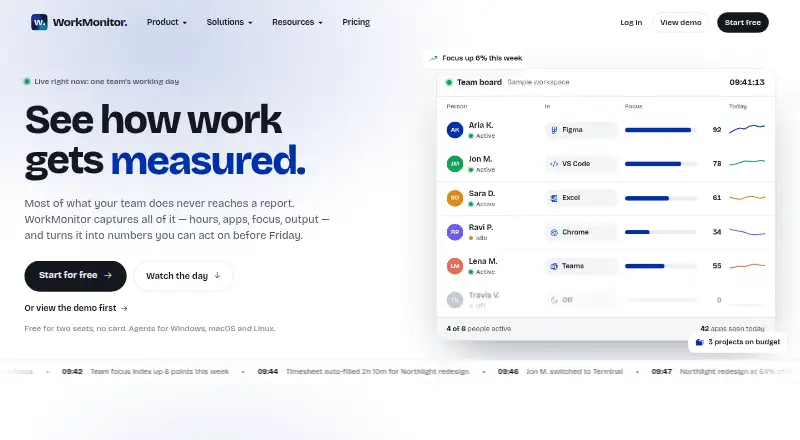
WorkMonitor is a workforce monitoring and analytics product for organizations that want visibility into app and website activity, time, attendance, and productivity. Managers can review activity timelines and live activity boards, with screenshot capture governed by configurable policies. Automatic time tracking, timesheets, idle detection, and analytics extend it beyond screen capture. Its free plan is aimed at very small teams, while paid tiers add greater capture frequency and longer screenshot retention. The vendor describes the service as pre-launch, so teams should weigh that status when evaluating operational readiness.
Pricing is per user per month. Free covers up to 2 users and requires no card. Team costs $8 monthly, or $6.67 per user per month with annual billing; it captures screenshots every 5 minutes, keeps them for 180 days, and includes unlimited analytics history. Business is $14 monthly or $11.67 with annual billing; screenshots are taken every 1 minute, retention is 365 days, and payroll export and invoicing are included. Enterprise offers custom retention, SSO, and SCIM. Teams should compare the screenshot cadence and retention they need against the plan cost, rather than treating the free tier as equivalent to paid plans.
The breadth of controls is a defining consideration: capture policies, app deny lists, and on-device blurring let organizations configure monitoring, while productivity, focus, and deep-work analytics, alerts, and an AI Copilot support review of workforce activity. Access spans web, Windows, macOS, Linux, a Chrome extension, and API. The vendor lists 36 integrations, including HR and identity systems such as Workday, ADP, Okta, and Google Workspace, plus project tools such as Jira and Asana. This may suit teams wanting monitoring tied to workforce systems; organizations that do not need detailed activity capture, or require certified security posture, should consider alternatives.
Your product? Our editors can test WorkMonitor in depth and publish a review, labelled as paid · from $149/mo →
WorkMonitor pricing
All 4 WorkMonitor plans and prices →
WorkMonitor fact sheet
| Free plan | Yes |
|---|---|
| Paid from | $6.67/user/mo |
| Screenshots | Yes |
| Activity tracking | Not verified |
| Productivity analytics | Yes |
| Time tracking | Yes |
| Supported platforms | Windows, macOS, Linux |
| Data retention | 180 days |
| Deployment | Cloud, Desktop, Browser extension |
| Platforms | Web, Windows, macOS, Linux, Chrome extension |
| Built for | Small business, Mid-market, Enterprise (editorial estimate) |
| Integrations | 36+ integrations: Workday, ADP, SAP SuccessFactors, Oracle HCM, Deel, Finch … See all → |
| Pricing | Free plan (source) |
| Website | workmonitor.ai |
| Facts checked | 24 Sep 2026 |
WorkMonitor integrations
WorkMonitor lists 36+ integrations on its own site — the 20 named here are the ones its pages call out.
- Workday
- ADP
- SAP SuccessFactors
- Oracle HCM
- Deel
- Finch
- Okta
- Microsoft Entra ID
- Google Workspace
- Jira
- Asana
- ClickUp
- Trello
- GitHub
- Linear
- Slack
- Microsoft Teams
- Zoom
- QuickBooks
- Xero
See all WorkMonitor integrations →
Alternatives to WorkMonitor
- InterGuardDetailed workforce activity monitoring with cloud and self-hosted deployment options.8.8
- CleverControlA broad monitoring toolkit for organizations overseeing authorized Windows and macOS devices.8.6
- EmpMonitorBroad monitoring and attendance tools, with annual plans starting at $3 per user monthly.8.5


See all WorkMonitor alternatives →
Used WorkMonitor? Be the first to review it
The editor score above is our own research. What this page doesn't have yet is a reader's view — what you used WorkMonitor for, what worked and what didn't. No stars are seeded and no review is paid for; an editor reads every one before it appears.
Write a reviewTwo minutes · verified accounts only · read by an editor before it appears
Featured on iTechGuides

WorkMonitor is listed in our Employee Monitoring Software directory. Add the badge to your site — it links back to this page.
<a href="https://www.itechguides.com/products/workmonitor/"><img src="https://www.itechguides.com/best/badge/workmonitor.svg" alt="Featured on iTechGuides" width="230" height="46"></a>
Reviewed by iTechGuides Editors · Editorial team · Updated Oct 2026
Advertiser disclosure: iTechGuides is reader-supported. Vendors can pay for top positions in our rankings and for a place on other products' pages, and we may earn a commission when you click some links. Bought places stand at the number bought; this page and our disclosure say so. Paying vendors may get a fuller, more detailed review from our editors, and that review can change their score. How we rank.
Last updated · How we research and update