WindoWriter
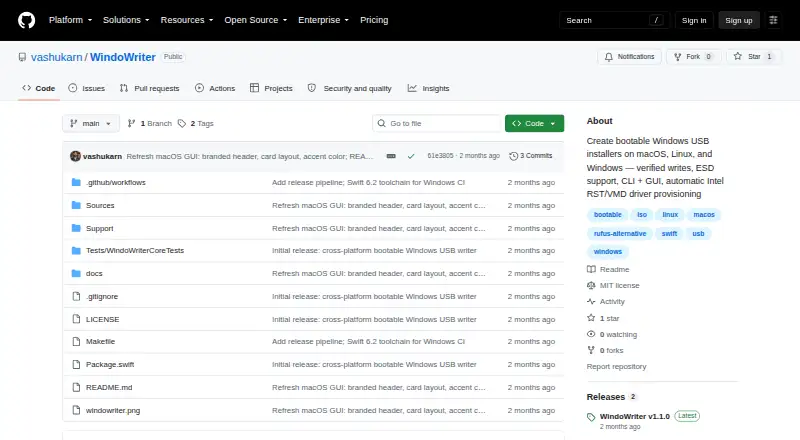
WindoWriter: A focused open-source tool for preparing Windows installation media across three host platforms. Ranked #23 of 38 in Bootable USB Software by our editors (6.5/10); pricing: Open source; best for windows installers across three host platforms.
At a glance
- Editor score6.5 / 10
- PricingOpen source
- Best forWindows installers across three host platforms
- Paid fromFree
- Facts checked21 Sep 2026
Where it wins
- Supports macOS, Linux, and Windows with command-line workflows
- Verifies written media with file-size checks and SHA-256
- Handles ESD conversion, WIM splitting, and MBR or GPT schemes
Where it doesn't
- The graphical application is available only on macOS
- Requires Windows ISO files stored locally
- Focused on Windows installation media rather than broader boot media
Our verdict on WindoWriter
WindoWriter is an open-source utility for creating UEFI-bootable Windows USB installers from Windows ISO files. It is suited to users who need to prepare Windows installation media on macOS, Linux, or Windows, including people working with ARM64, x64, or x86 media. Command-line interfaces are available across all three platforms, while macOS also has a SwiftUI graphical application. The workflow is local, with no image-download feature described, so the starting point is a locally available ISO file.
Its strongest technical value is the range of Windows-media handling built into the write process. WindoWriter can automatically convert ESD images and split oversized WIM files, while supporting both MBR and GPT partition schemes. It detects ARM64, x64, and x86 media, and can provision Intel RST/VMD drivers when needed. After writing, the tool performs file-size and SHA-256 verification. Pre-format checks and safeguards against selecting a boot disk add protections around the preparation process, making the feature set more substantial than a basic ISO-to-USB writer.
The platform coverage is broad, but the interface options are not identical across hosts: macOS has the documented SwiftUI application, whereas macOS, Linux, and Windows are covered by the command-line interface. WindoWriter is therefore a strong fit for users who want a focused, open-source Windows installer creator with partitioning, image handling, driver provisioning, and verification in one utility. Users looking for a general-purpose bootable-media tool, or a graphical application on Linux or Windows, should choose an alternative better aligned with those needs.
Your product? Our editors can test WindoWriter in depth and publish a review, labelled as paid · from $149/mo →
WindoWriter pricing
WindoWriter fact sheet
| Free plan | Not verified |
|---|---|
| Paid from | Free |
| Windows app | Yes |
| macOS app | Yes |
| Linux app | Yes |
| Multiboot support | Not verified |
| Persistent storage | Not verified |
| Image downloads | Local_only |
| Partition schemes | Both |
| Deployment | Desktop |
| Platforms | macOS, Linux, Windows |
| Support | Docs |
| Built for | Solo, Small business (editorial estimate) |
| Pricing | Open source |
| Website | github.com |
| Facts checked | 21 Sep 2026 |
Alternatives to WindoWriter
- VentoyA free, open-source multiboot USB utility with broad image and boot-mode support.9.4
- Universal USB InstallerA free, broad USB creation toolkit with multiboot, persistence, downloads, and QEMU testing.9.2
- Easy2BootA free, format-flexible choice for advanced multiboot USB and hard-disk setups.9.1


See all WindoWriter alternatives →
Used WindoWriter? Be the first to review it
The editor score above is our own research. What this page doesn't have yet is a reader's view — what you used WindoWriter for, what worked and what didn't. No stars are seeded and no review is paid for; an editor reads every one before it appears.
Write a reviewTwo minutes · verified accounts only · read by an editor before it appears
Featured on iTechGuides

WindoWriter is listed in our Bootable USB Software directory. Add the badge to your site — it links back to this page.
<a href="https://www.itechguides.com/products/windowriter/"><img src="https://www.itechguides.com/best/badge/windowriter.svg" alt="Featured on iTechGuides" width="230" height="46"></a>
Reviewed by iTechGuides Editors · Editorial team · Updated Oct 2026
Advertiser disclosure: iTechGuides is reader-supported. Vendors can pay for top positions in our rankings and for a place on other products' pages, and we may earn a commission when you click some links. Bought places stand at the number bought; this page and our disclosure say so. Paying vendors may get a fuller, more detailed review from our editors, and that review can change their score. How we rank.
Last updated · How we research and update