WIE
WIE: A focused, open-source way to run selected 64-bit Windows apps on Apple silicon. Ranked #23 of 26 in Windows Compatibility Layers by our editors (6.4/10); pricing: Free plan; best for apple silicon users testing lightweight Windows apps.
At a glance
- Editor score6.4 / 10
- PricingFree plan
- Best forApple silicon users testing lightweight Windows apps
- Free planYes
- Paid fromFree
- macOS supportYes
- Facts checked20 Sep 2026
Where it wins
- Runs 64-bit Windows binaries without Windows, Wine, or a virtual machine
- Provides native macOS windows and dialogs for GUI applications
- Supports console apps, terminal games, and partial Direct3D 9 rendering
Where it doesn't
- 32-bit binaries are out of scope
- Full Windows compatibility is out of scope
- Graphics support is limited to partial D3D9 software rendering
Our verdict on WIE
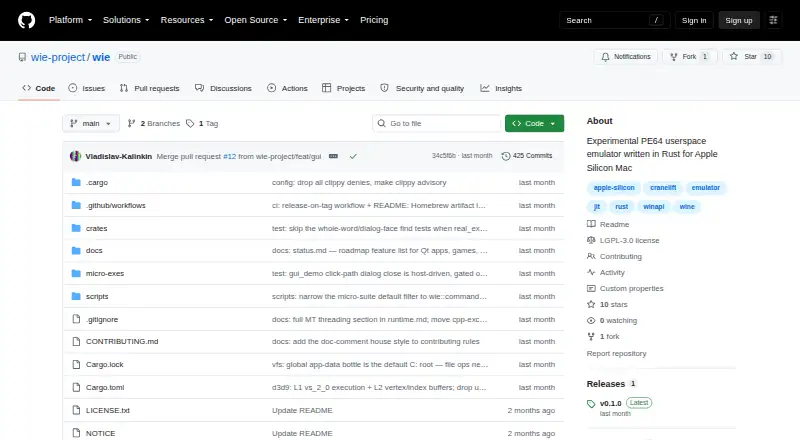
WIE is an experimental PE64 userspace emulator for Apple silicon Macs. It is designed for people who need to run selected 64-bit Windows user-mode applications on macOS without installing Windows, Wine, or a virtual machine. The project is open source, macOS-only, and supports both console and GUI applications, including terminal games. Its scope is deliberately focused rather than broad: 32-bit binaries and full Windows compatibility are outside the project’s stated scope.
Its standout feature is the translation path from Windows x86-64 to Apple silicon ARM64. WIE uses a Cranelift block JIT, intercepts selected Windows API calls, and handles those calls in Rust. For GUI software, it provides real macOS windows and native dialogs. It also resolves DLL imports, supports multithreading primitives, and maps guest C:\ file operations to an application-data bottle. These capabilities make WIE relevant for lightweight applications whose required Windows APIs fit the implemented coverage.
Graphics and compatibility define the main boundaries. WIE includes partial Direct3D 9 software rendering, while the category specifications identify graphics acceleration as unavailable. That makes it a poor fit for software that depends on broad Windows compatibility, 32-bit support, or accelerated graphics. Choose WIE for focused evaluation of 64-bit Windows applications on Apple silicon; choose an alternative when you need wider application coverage or a fuller Windows environment.
Your product? Our editors can test WIE in depth and publish a review, labelled as paid · from $149/mo →
WIE pricing
WIE fact sheet
| Free plan | Yes |
|---|---|
| Paid from | Free |
| macOS support | Yes |
| Linux support | Not verified |
| Apple silicon support | Yes |
| Graphics acceleration | None |
| Compatibility database | Not verified |
| Prefix management | Yes |
| Deployment | Desktop |
| Platforms | macOS |
| Support | Docs |
| Built for | Solo, Small business (editorial estimate) |
| Pricing | Free plan |
| Website | github.com |
| Facts checked | 20 Sep 2026 |
Alternatives to WIE
- WineWine is a free, broad foundation for running Windows applications on Linux and macOS.9.4
- BottlesA free, open-source choice for organizing and running Windows apps across platforms.9.2
- CrossOverA paid compatibility layer with application recipes, bottles, ratings, and graphics options.9.0


Used WIE? Be the first to review it
The editor score above is our own research. What this page doesn't have yet is a reader's view — what you used WIE for, what worked and what didn't. No stars are seeded and no review is paid for; an editor reads every one before it appears.
Write a reviewTwo minutes · verified accounts only · read by an editor before it appears
Featured on iTechGuides

WIE is listed in our Windows Compatibility Layers directory. Add the badge to your site — it links back to this page.
<a href="https://www.itechguides.com/products/wie/"><img src="https://www.itechguides.com/best/badge/wie.svg" alt="Featured on iTechGuides" width="230" height="46"></a>
Reviewed by iTechGuides Editors · Editorial team · Updated Oct 2026
Advertiser disclosure: iTechGuides is reader-supported. Vendors can pay for top positions in our rankings and for a place on other products' pages, and we may earn a commission when you click some links. Bought places stand at the number bought; this page and our disclosure say so. Paying vendors may get a fuller, more detailed review from our editors, and that review can change their score. How we rank.
Last updated · How we research and update