WakeMeOnLan
WakeMeOnLan: A focused free utility for discovering Windows devices and waking them remotely. Ranked #19 of 31 in Network Management Software by our editors (5.6/10); pricing: Free plan; best for simple Windows Wake-on-LAN tasks.
At a glance
- Editor score5.6 / 10
- PricingFree plan
- Best forSimple Windows Wake-on-LAN tasks
- Free planYes
- Paid fromNone
- Deployment modelOn-premises
- Facts checked22 Sep 2026
Where it wins
- Scans networks for computer names, IP addresses, and MAC addresses
- Wakes selected, multiple, all listed, or IP-range computers
- Exports device lists to text, CSV, HTML, XML, and other formats
Where it doesn't
- Windows-only platform support
- No verified configuration management or device backups
- No policy automation, API access, or broader network operations
Our verdict on WakeMeOnLan
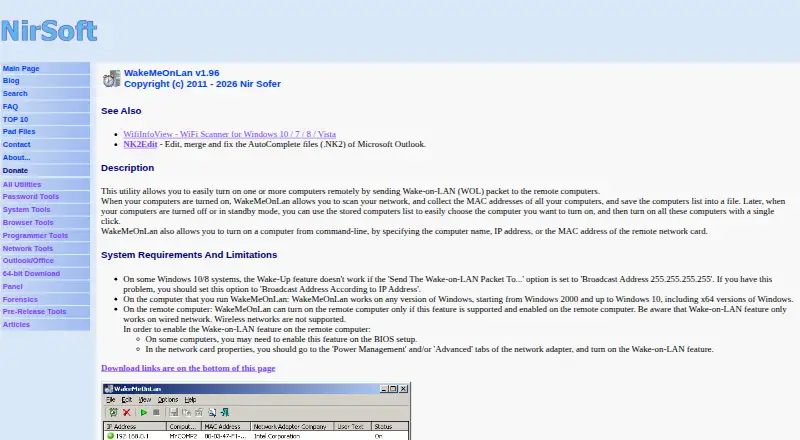
WakeMeOnLan is a portable, free Windows utility for discovering computers on a network and sending Wake-on-LAN packets to power them on remotely. It suits individuals and small teams that need a focused way to identify devices, maintain a saved computer list, and wake one or more machines without adopting a broader network-management system. Network scanning collects computer names, IP addresses, and MAC addresses, while saved configuration files support later use.
The utility’s strongest fit is its focused set of network discovery and wake-up controls. Users can wake a selected computer, multiple computers, all listed computers, or devices across an IP address range. Ports and broadcast addresses are configurable, and NetBIOS scanning can locate computers on other network segments. Command-line operation adds a practical option for repeatable tasks, including waking computers by name, IP address, or MAC address. Device information can also be exported to text, CSV, HTML, XML, and other formats.
WakeMeOnLan is less suitable when network management requires verified configuration control, backups, policy automation, API access, or broader operational coverage. Its deployment model is on-premises and its platform scope is Windows, with the official documentation listing support through Windows 10. Choose it when the requirement is straightforward network scanning and Wake-on-LAN activity; choose a broader network-management product when discovery must connect to configuration, policy, or ongoing infrastructure operations.
WakeMeOnLan pricing
WakeMeOnLan fact sheet
| Free plan | Yes |
|---|---|
| Paid from | None |
| Deployment model | On-premises |
| Managed device limit | Not verified |
| Network discovery | Yes |
| Configuration management | Not verified |
| Configuration backup | Not verified |
| Policy automation | Not verified |
| API access | Not verified |
| Deployment | Desktop |
| Platforms | Windows |
| Support | |
| Built for | Solo, Small business (editorial estimate) |
| Pricing | Free plan |
| Website | nirsoft.net |
| Facts checked | 22 Sep 2026 |
Alternatives to WakeMeOnLan
- Cisco Catalyst CenterA broad Cisco network operations platform for large campus and branch environments.9.0
- Arista CloudVisionA broad enterprise network operations platform with strong automation and integration depth.8.2
- Cisco Meraki DashboardA focused cloud control plane for centralized management of Cisco Meraki infrastructure.7.7

See all WakeMeOnLan alternatives →
Used WakeMeOnLan? Be the first to review it
The editor score above is our own research. What this page doesn't have yet is a reader's view — what you used WakeMeOnLan for, what worked and what didn't. No stars are seeded and no review is paid for; an editor reads every one before it appears.
Write a reviewTwo minutes · verified accounts only · read by an editor before it appears
Featured on iTechGuides

WakeMeOnLan is listed in our Network Management Software directory. Add the badge to your site — it links back to this page.
<a href="https://www.itechguides.com/products/wakemeonlan/"><img src="https://www.itechguides.com/best/badge/wakemeonlan.svg" alt="Featured on iTechGuides" width="230" height="46"></a>
Guides on network management software
- 4 Open-Source Network Management Tools Compared (2026)Aug 2026
- How to Consolidate Network Management Tools Without Losing Critical CapabilitiesOct 2026
- AI-Managed Network Controllers vs. Traditional Network Management ToolsOct 2026
Reviewed by iTechGuides Editors · Editorial team · Updated Sep 2026
Advertiser disclosure: iTechGuides is reader-supported. We may earn a commission when you click some links. How we rank.
Last updated · How we research and update