
VisualNote AI
VisualNote AI: A focused study tool for converting source material into editable maps and flashcards. Ranked #18 of 28 in AI Mind Map Tools by our editors (7.2/10); pricing: Free plan; best for study visuals from pasted notes and PDFs.
At a glance
- Editor score7.2 / 10
- PricingFree plan
- Best forStudy visuals from pasted notes and PDFs
- Free planYes
- Paid from$13.99/mo
- Facts checked20 Sep 2026
Where it wins
- Converts text and PDFs into editable mind maps
- Creates flashcards from the same source material
- Offers multiple layouts, styles and aspect ratios
Where it doesn't
- Exports mind maps as PNG images only
- Free plan limits visuals, PDFs, links and retention
- Monthly Plus costs $13.99 per month
Our verdict on VisualNote AI
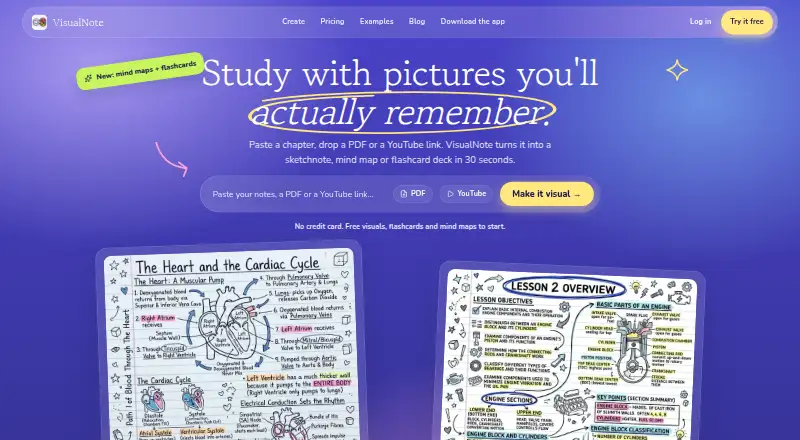
VisualNote AI turns pasted text, notes and uploaded documents into visual summaries, sketchnotes and editable mind maps. It is aimed at students, teachers, researchers, creators and professionals who want to reorganize source material visually. Supported uploads include PDF, DOC, DOCX and TXT files up to 10MB, while pasted text can also be converted into a map. The product is available on the web and iOS, and it can generate flashcard decks from the same material.
Its strongest fit is study and review. Users can rename nodes, add branches and prune branches, then choose left-to-right, top-to-bottom or radial layouts. VisualNote AI also provides multiple visual styles and aspect ratios, helping users adapt a map to different presentation or study needs. Flashcards extend the workflow beyond a single visual summary. However, exports are limited to PNG images, so users looking for broader export formats should consider another tool.
The pricing structure covers light use through either a free plan or paid visual credits. Notebook Free includes 3 visuals a month with flashcards, 1 PDF, 3 links, 15 minutes of YouTube, 10 chat messages a day, free styles, square format, 7-day creation retention and watermarked exports. Monthly Plus costs $13.99 per month and adds 50 visuals, 20 PDFs, unlimited chat and quizzes within fair use, 4 hours of YouTube, unlimited links, all 40 styles and aspect ratios, no watermark and retained library access. One-time packs cost $4.99 for 10 visuals or $9.99 for 30; credits never expire, and the 10-visual pack is final sale with no refunds. Pick VisualNote AI for source-to-study workflows; avoid it if you need non-PNG exports.
Your product? Our editors can test VisualNote AI in depth and publish a review, labelled as paid · from $149/mo →
VisualNote AI pricing
All 4 VisualNote AI plans and prices →
VisualNote AI fact sheet
| Free plan | Yes |
|---|---|
| Paid from | $13.99/mo |
| Document to map | Yes |
| Image to map | Not verified |
| OPML export | Not verified |
| PDF export | Not verified |
| Real-time collaboration | Not verified |
| Supported platforms | Web, iOS |
| Export formats | PNG |
| Deployment | Cloud, Mobile |
| Platforms | Web, iOS |
| Support | |
| Built for | Solo, Small business, Mid-market (editorial estimate) |
| Pricing | Free plan (source) |
| Website | visualnoteai.space |
| Facts checked | 20 Sep 2026 |
Alternatives to VisualNote AI
- XmindA broad AI mind-mapping workspace with strong exports, collaboration, and device coverage.9.4
- MindomoA broad mapping workspace with AI assistance, offline editing, and project-planning tools.9.2
- EdrawMindAn affordable, broad mind-mapping workspace with AI, planning, and collaboration tools.9.0



See all VisualNote AI alternatives →
Used VisualNote AI? Be the first to review it
The editor score above is our own research. What this page doesn't have yet is a reader's view — what you used VisualNote AI for, what worked and what didn't. No stars are seeded and no review is paid for; an editor reads every one before it appears.
Write a reviewTwo minutes · verified accounts only · read by an editor before it appears
Featured on iTechGuides

VisualNote AI is listed in our AI Mind Map Tools directory. Add the badge to your site — it links back to this page.
<a href="https://www.itechguides.com/products/visualnote-ai/"><img src="https://www.itechguides.com/best/badge/visualnote-ai.svg" alt="Featured on iTechGuides" width="230" height="46"></a>
Reviewed by iTechGuides Editors · Editorial team · Updated Oct 2026
Advertiser disclosure: iTechGuides is reader-supported. Vendors can pay for top positions in our rankings and for a place on other products' pages, and we may earn a commission when you click some links. Bought places stand at the number bought; this page and our disclosure say so. Paying vendors may get a fuller, more detailed review from our editors, and that review can change their score. How we rank.
Last updated · How we research and update