VirtualC64
VirtualC64: A focused, free C64 emulator with accurate PAL/NTSC support and developer tools. Ranked #8 of 31 in Commodore 64 Emulators by our editors (7.9/10); pricing: Free plan; best for mac users wanting accurate C64 emulation.
At a glance
- Editor score7.9 / 10
- PricingFree plan
- Best forMac users wanting accurate C64 emulation
- Free planYes
- Paid fromFree
- Supported platformsmacOS
- Facts checked21 Sep 2026
Where it wins
- Cycle-accurate PAL and NTSC emulation
- Supports D64, T64, PRG, P00, G64, TAP, and CRT images
- Includes a CPU debugger, warp mode, and a public C++ API
Where it doesn't
- Distributed only as macOS desktop software
- Its advanced debugger and API may exceed casual needs
- Input is limited to keyboard and USB joystick controls
Our verdict on VirtualC64
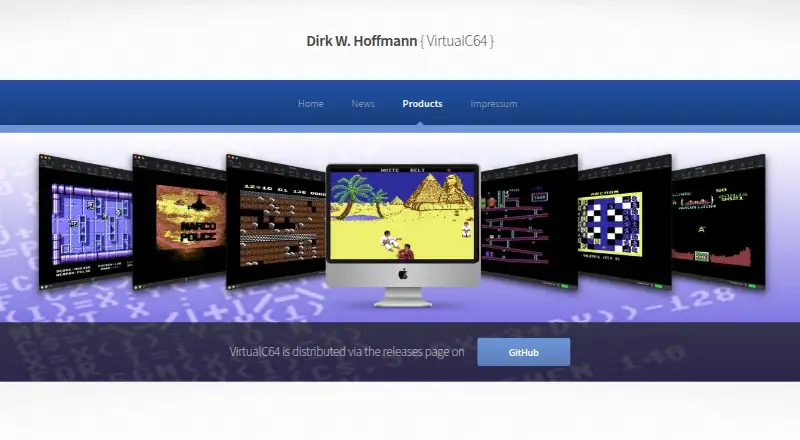
VirtualC64 is a free, open-source Commodore 64 emulator for Apple Macintosh computers. It is aimed at Mac users who want accurate emulation of PAL and NTSC systems, support for common software and cartridge images, and additional tools for examining or developing around the emulator. The supported variants include PAL C64, NTSC C64, C64 II PAL, and C64 II NTSC.
Its strongest practical advantage is the combination of accuracy and media coverage. VirtualC64 supports D64, T64, PRG, P00, G64, TAP, and CRT formats, covering disk, tape, program, and cartridge images. Keyboard and USB joystick input support familiar control options, while warp mode and run-ahead configuration provide ways to adjust execution and display behavior. The CPU debugger adds single-step and step-over controls, making the product more suitable for debugging and technical exploration than a basic launcher. Free Mega65 ROM replacements and a public C++ emulator API extend its usefulness for developers and advanced users.
The main trade-off is platform scope: VirtualC64 is distributed as desktop software for macOS, so it is a focused choice rather than a cross-platform emulator. Its open-source, free model keeps access straightforward, but the debugger, ROM replacement support, and API are most relevant to users who want more than straightforward game loading. Choose VirtualC64 if you use a Mac and value cycle accuracy, broad image support, or developer-oriented controls. Users seeking an emulator for another desktop platform should choose a product built for that operating system instead.
Your product? Our editors can test VirtualC64 in depth and publish a review, labelled as paid · from $149/mo →
VirtualC64 pricing
VirtualC64 fact sheet
| Free plan | Yes |
|---|---|
| Paid from | Free |
| Supported platforms | macOS |
| Disk and tape formats | D64, T64, PRG, P00, G64, TAP, CRT |
| Built-in debugger | Yes |
| Netplay support | Not verified |
| Emulated C64 variants | PAL C64, NTSC C64, C64 II PAL, C64 II NTSC |
| Bundled software library | Not verified |
| Deployment | Desktop |
| Platforms | macOS |
| Support | Docs |
| Built for | Solo, Small business (editorial estimate) |
| Pricing | Free plan |
| Website | dirkwhoffmann.github.io |
| Facts checked | 21 Sep 2026 |
Alternatives to VirtualC64
- VICEFree, open-source C64 emulation with cycle accuracy, debugging, media support and network play.9.4
- Breadbin466A free, open-source C64 emulator built for accurate hardware behavior and debugging.9.0
- C64 ForeverA Windows-focused C64 package with bundled titles, broad emulation, and preservation tools.8.8


See all VirtualC64 alternatives →
VirtualC64 vs the competition
- VirtualC64 vs VICE
- VirtualC64 vs Breadbin466
- VirtualC64 vs C64 Forever
- VirtualC64 vs TRX64
- VirtualC64 vs Z64K
- VirtualC64 vs CCS64

Compare VirtualC64 with any tool side by side →
Used VirtualC64? Be the first to review it
The editor score above is our own research. What this page doesn't have yet is a reader's view — what you used VirtualC64 for, what worked and what didn't. No stars are seeded and no review is paid for; an editor reads every one before it appears.
Write a reviewTwo minutes · verified accounts only · read by an editor before it appears
Featured on iTechGuides

VirtualC64 is listed in our Commodore 64 Emulators directory. Add the badge to your site — it links back to this page.
<a href="https://www.itechguides.com/products/virtualc64/"><img src="https://www.itechguides.com/best/badge/virtualc64.svg" alt="Featured on iTechGuides" width="230" height="46"></a>
Reviewed by iTechGuides Editors · Editorial team · Updated Oct 2026
Advertiser disclosure: iTechGuides is reader-supported. Vendors can pay for top positions in our rankings and for a place on other products' pages, and we may earn a commission when you click some links. Bought places stand at the number bought; this page and our disclosure say so. Paying vendors may get a fuller, more detailed review from our editors, and that review can change their score. How we rank.
Last updated · How we research and update