
Virtual Desktop
Virtual Desktop: A focused VR desktop streamer for remote PC access, media, monitors, and PCVR games. Ranked #130 of 134 in Remote Desktop Software by our editors (5.4/10); pricing: Paid; best for VR users accessing PCs remotely.
At a glance
- Editor score5.4 / 10
- PricingPaid
- Best forVR users accessing PCs remotely
- Free planNo
- Facts checked22 Sep 2026
Where it wins
- Access Windows and Mac computers through supported VR headsets
- Streams PCVR games, movies, web browsing, and 3D or 360-degree video
- Supports multi-monitor use and end-to-end encrypted internet connections
Where it doesn't
- No file transfer features
- No support-management features for service teams
- Paid product with no free plan
Our verdict on Virtual Desktop
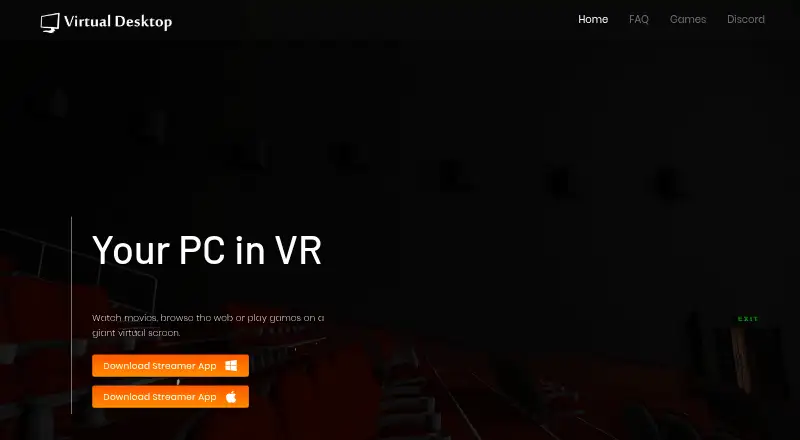
Virtual Desktop is a paid remote computer-streaming application for people who want to access a Windows or Mac computer through a virtual-reality headset. Its focus is individual use rather than conventional remote-support operations. Users can browse the web, watch movies, play games on a virtual screen, use multiple monitors, and view 3D side-by-side or 360-degree video. The product supports desktop and mobile deployment, with a Streamer application for Windows and macOS and standalone headset editions for platforms including Meta Quest, Pico, and HTC Vive.
The published plan is Virtual Desktop Classic, with a starting price of 24.99. Its listed capabilities include using a computer in VR, browsing the web and watching movies, and playing games on a virtual screen. The product also supports PCVR game streaming and integrates with SteamVR and Oculus Rift. Remote connections over the internet extend access beyond the local network, while the vendor states that traffic uses end-to-end encryption. Supported platforms also include Play for Dream MR, Samsung Galaxy XR, and Android, and mobile apps are available.
Virtual Desktop is a strong fit for solo users and small teams whose priority is immersive access to a personal computer, especially VR gaming, media playback, and multi-monitor workflows. Its narrow focus is also its main boundary: it is a VR computer-streaming application rather than a general remote-support product. The absence of file transfer and support-management features makes it less suitable for technicians, help desks, or organizations managing remote assistance. Choose it for VR-centered PC access and entertainment; choose another category of tool when support operations or broader remote administration are central requirements.
Your product? Our editors can test Virtual Desktop in depth and publish a review, labelled as paid · from $149/mo →
Virtual Desktop pricing
All 1 Virtual Desktop plans and prices →
Virtual Desktop fact sheet
| Free plan | No |
|---|---|
| Paid from | Not verified |
| Access mode | Not verified |
| Supported platforms | Windows, macOS, Meta Quest, Pico, HTC Vive, Play for Dream MR, Samsung Galaxy XR, Android |
| File transfer | Not verified |
| Session recording | Not verified |
| Managed devices | Not verified |
| Mobile apps | Yes |
| Deployment | Desktop, Mobile |
| Platforms | Windows, macOS, Android |
| Support | Email, Community, Docs |
| Built for | Solo, Small business (editorial estimate) |
| Integrations | 2 integrations: SteamVR, Oculus Rift |
| Pricing | Paid (source) |
| Website | vrdesktop.net |
| Facts checked | 22 Sep 2026 |
Virtual Desktop integrations
Virtual Desktop lists 2 integrations on its own site.
- SteamVR
- Oculus Rift
Alternatives to Virtual Desktop
- StarDeskA remote desktop app: reach your own Windows PC or Mac from Windows, macOS, Android or iOS.9.7
- TeamViewer RemoteA mature remote support platform with broad coverage, integrations, and AI features.9.4
- SplashtopA paid remote-access suite with low entry pricing, broad platforms, and deep integrations.9.2


See all Virtual Desktop alternatives →
Used Virtual Desktop? Be the first to review it
The editor score above is our own research. What this page doesn't have yet is a reader's view — what you used Virtual Desktop for, what worked and what didn't. No stars are seeded and no review is paid for; an editor reads every one before it appears.
Write a reviewTwo minutes · verified accounts only · read by an editor before it appears
Featured on iTechGuides

Virtual Desktop is listed in our Remote Desktop Software directory. Add the badge to your site — it links back to this page.
<a href="https://www.itechguides.com/products/virtual-desktop/"><img src="https://www.itechguides.com/best/badge/virtual-desktop.svg" alt="Featured on iTechGuides" width="230" height="46"></a>
Reviewed by iTechGuides Editors · Editorial team · Updated Oct 2026
Advertiser disclosure: iTechGuides is reader-supported. Vendors can pay for top positions in our rankings and for a place on other products' pages, and we may earn a commission when you click some links. Bought places stand at the number bought; this page and our disclosure say so. Paying vendors may get a fuller, more detailed review from our editors, and that review can change their score. How we rank.
Last updated · How we research and update