
VHD Attach
VHD Attach: A focused, free Windows tool for mounting VHD, VHDX, and ISO files. Ranked #12 of 24 in Virtual Drive Software by our editors (8.1/10); pricing: Free plan; best for free Windows VHD/VHDX auto-mounting.
At a glance
- Editor score8.1 / 10
- PricingFree plan
- Best forFree Windows VHD/VHDX auto-mounting
- Free planYes
- Paid fromNone
- Founded2009
- Facts checked20 Sep 2026
Where it wins
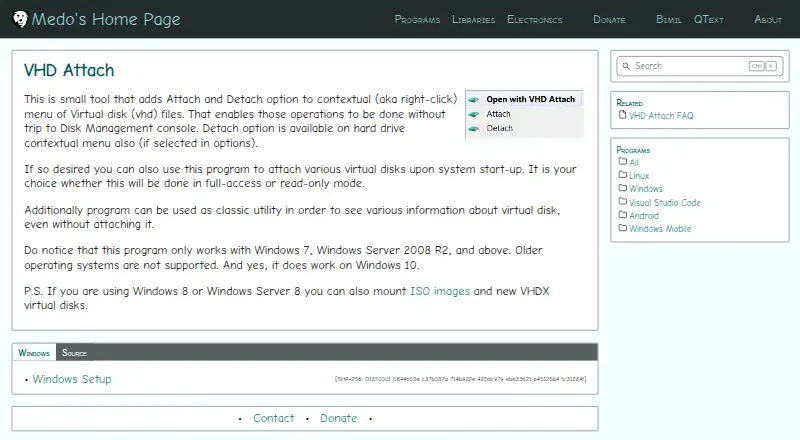
- Context-menu attachment and detachment for virtual disk files
- Startup automounting with configurable persistent mounts
- Read-only, full-access, ISO, VHDX, and command-line support
Where it doesn't
- Windows-only platform support
- Narrow format coverage: VHD, VHDX, and ISO
- No write-image support
Our verdict on VHD Attach
VHD Attach is a Windows desktop utility for attaching, detaching, and auto-mounting virtual disk files. It is aimed at people who work with VHD or VHDX files and want file-level commands, startup attachment, or read-only access without relying on a broader virtualization platform. The utility can also display virtual disk information without attaching the file and supports ISO image mounting. Its documented operating-system support covers Windows 7, Windows Server 2008 R2, and later systems, while ISO and VHDX mounting are available on Windows 8 and later.
The pricing model is straightforward: VHD Attach is free and open source, with an MIT license reference. The published product information describes no paid tiers or feature-gated plans. That makes it suitable for users seeking a focused utility without a commercial subscription. Its feature set includes context-menu integration, a configurable auto-mount service, command-line attach and detach operations, and full-access or read-only attachment modes. These options give both everyday desktop users and command-line workflows a clear path for managing supported images.
Its main trade-off is scope. VHD Attach is designed for Windows and concentrates on VHD, VHDX, and ISO mounting rather than presenting a broader virtual-drive ecosystem. Users who need other image formats, write-image support, or a tool for non-Windows platforms should choose an alternative. For Windows users whose work centers on supported virtual disk files, the combination of startup automounting, persistent mounts, context-menu actions, and read-only controls makes VHD Attach a practical fit; those with wider format or platform requirements should look elsewhere.
VHD Attach pricing
VHD Attach fact sheet
| Free plan | Yes |
|---|---|
| Paid from | None |
| Image formats | VHD, VHDX, ISO |
| Max virtual drives | Not verified |
| Virtual disk files | Yes |
| Optical image mounting | Yes |
| Write images | No |
| Supported platforms | Windows 7, Windows Server 2008 R2, and later |
| Persistent mounts | Yes |
| Deployment | Desktop |
| Platforms | Windows |
| Support | Docs |
| Built for | Solo, Small business (editorial estimate) |
| Pricing | Free plan |
| Website | medo64.com |
| Facts checked | 20 Sep 2026 |
Alternatives to VHD Attach
- DAEMON Tools LiteA broad Windows virtual-drive toolkit with a capable free license and four-device limit.9.3
- WinCDEmuA flexible, free Windows utility for mounting and managing optical-image files.9.2
- ImDiskA free, flexible Windows driver for mounting images and creating virtual disks.9.1


See all VHD Attach alternatives →
Used VHD Attach? Be the first to review it
The editor score above is our own research. What this page doesn't have yet is a reader's view — what you used VHD Attach for, what worked and what didn't. No stars are seeded and no review is paid for; an editor reads every one before it appears.
Write a reviewTwo minutes · verified accounts only · read by an editor before it appears
Featured on iTechGuides

VHD Attach is listed in our Virtual Drive Software directory. Add the badge to your site — it links back to this page.
<a href="https://www.itechguides.com/products/vhd-attach/"><img src="https://www.itechguides.com/best/badge/vhd-attach.svg" alt="Featured on iTechGuides" width="230" height="46"></a>
Reviewed by iTechGuides Editors · Editorial team · Updated Oct 2026
Advertiser disclosure: iTechGuides is reader-supported. Vendors can pay for top positions in our rankings and for a place on other products' pages, and we may earn a commission when you click some links. How we rank.
Last updated · How we research and update