
vcita
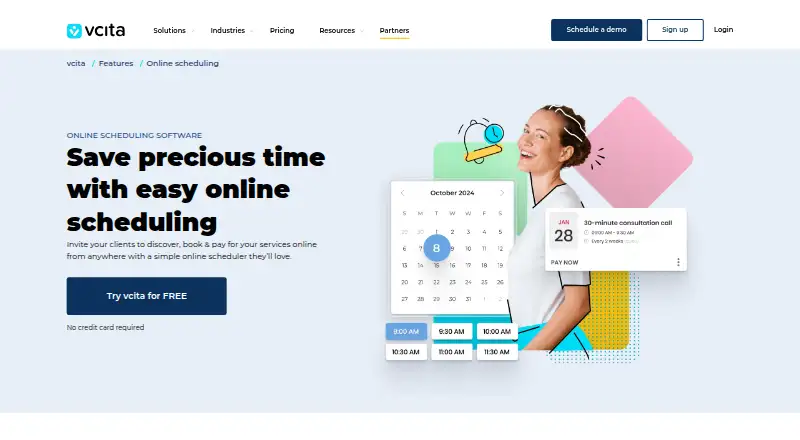
vcita: A broad scheduling suite for service businesses that need payments, waitlists, and recurring bookings. Ranked #60 of 135 in Appointment Scheduling Software by our editors (4.1/10); pricing: 14-day trial; best for service businesses needing waitlists and recurring bookings.
At a glance
- Editor score4.1 / 10
- Pricing14-day trial
- Best forService businesses needing waitlists and recurring bookings
- Free planNo
- Paid from$35/mo
- Calendar syncTwo-way
- Founded2010 · St. Petersburg, Florida, USA
- Facts checked23 Sep 2026
Where it wins
- Waitlists can automatically fill open spots
- Supports group events and round-robin scheduling
- Combines booking, payments, calendars, and client portals
Where it doesn't
- No ongoing free plan
- Entry pricing starts at $35 per user per month
- Advanced waitlists and room booking require the highest tier
Our verdict on vcita
vcita is an online scheduling and small-business management platform for service-based businesses. It supports website booking widgets, client portal bookings, centralized calendars, group events, round-robin scheduling, online payments, invoicing, recurring bookings, and automated SMS reminders. Service businesses can coordinate staff availability, synchronize Google and Outlook calendars, and give clients mobile access through web, iOS, and Android apps. Its waitlists and automatic spot filling make it particularly relevant for businesses managing recurring demand or limited appointment capacity.
The published plans show annual billing with per-user pricing. Kickstart costs $35 per user per month and includes client management, a business calendar and online scheduler, online payments and invoices, a client portal, a mobile app, and SMS notifications and reminders. Manage costs $54 per user per month and adds multiple staff members plus staff roles and permissions. Manage + Grow costs $93 per user per month and adds recurring payments, waitlist management, RSVP, and room and equipment booking. A 14-day trial is available, while the product does not have an ongoing free plan. The pricing page also states that monthly subscriptions are available.
Its ecosystem includes Google Calendar, Outlook Calendar, Zoom, QuickBooks, Zapier, and Google Analytics 4. That combination supports calendar synchronization, video meetings, accounting workflows, automation, and analytics alongside core scheduling. The product is a strong fit when booking is tied to payments, client management, staff coordination, or waitlists rather than simply publishing an appointment page. Businesses seeking recurring bookings, automatic spot filling, and operational controls should consider vcita. Those prioritizing a free ongoing plan or a lower-cost entry point may prefer a freemium scheduling alternative.
Your product? Our editors can test vcita in depth and publish a review, labelled as paid · from $149/mo →
vcita pricing
All 3 vcita plans and prices →
vcita fact sheet
| Free plan | No |
|---|---|
| Paid from | $35/mo |
| Booking pages | Yes |
| Calendar sync | Two-way |
| Group booking | Yes |
| Round-robin scheduling | Yes |
| Automated reminders | Yes |
| Payment collection | Yes |
| Free trial | 14 days · no card needed |
| Deployment | Cloud, Mobile |
| Platforms | Web, iOS, Android |
| Compliance & security | GDPR, HIPAA |
| Support | Email, Phone, Docs |
| Built for | Solo, Small business, Mid-market (editorial estimate) |
| Integrations | 9 integrations: Google Calendar, Outlook Calendar, Zoom, QuickBooks, Zapier, Google Analytics 4 … |
| Pricing | 14-day trial (source) |
| Website | vcita.com |
| Facts checked | 23 Sep 2026 |
vcita integrations
vcita lists 9 integrations on its own site.
- Google Calendar
- Outlook Calendar
- Zoom
- QuickBooks
- Zapier
- Google Analytics 4
- PayPal
- Stripe
- Square
Alternatives to vcita
- CalendlyA broad scheduler with strong team routing, payments, reminders, and integrations.9.4
- Cal.comA flexible scheduler with free basics, team routing, payments, and developer tools.9.2
- Zoho BookingsA flexible scheduler with a capable free tier and strong Zoho ecosystem fit.9.1



Also Ranked In
vcita is ranked in 5 of our directories.
Used vcita? Be the first to review it
The editor score above is our own research. What this page doesn't have yet is a reader's view — what you used vcita for, what worked and what didn't. No stars are seeded and no review is paid for; an editor reads every one before it appears.
Write a reviewTwo minutes · verified accounts only · read by an editor before it appears
Featured on iTechGuides

vcita is listed in our Appointment Scheduling Software directory. Add the badge to your site — it links back to this page.
<a href="https://www.itechguides.com/products/vcita/"><img src="https://www.itechguides.com/best/badge/vcita.svg" alt="Featured on iTechGuides" width="230" height="46"></a>
Reviewed by iTechGuides Editors · Editorial team · Updated Oct 2026
Advertiser disclosure: iTechGuides is reader-supported. Vendors can pay for top positions in our rankings and for a place on other products' pages, and we may earn a commission when you click some links. Bought places stand at the number bought; this page and our disclosure say so. Paying vendors may get a fuller, more detailed review from our editors, and that review can change their score. How we rank.
Last updated · How we research and update