USBDeview
USBDeview: A free, portable Windows utility for detailed USB inventory and device control. Ranked #10 of 33 in System Information Software by our editors (7.9/10); pricing: Free plan; best for portable Windows USB device inventory.
At a glance
- Editor score7.9 / 10
- PricingFree plan
- Best forPortable Windows USB device inventory
- Free planYes
- Paid fromFree
- Operating systemsWindows
- Founded2001
- Facts checked21 Sep 2026
Where it wins
- Tracks both current and previously used USB devices
- Provides identifiers, timestamps, power, firmware, and driver details
- Portable operation with remote inspection, exports, and command-line support
Where it doesn't
- Supports Windows only
- Focuses on USB devices rather than broader system inventory
- Remote inspection requires administrator access
Our verdict on USBDeview
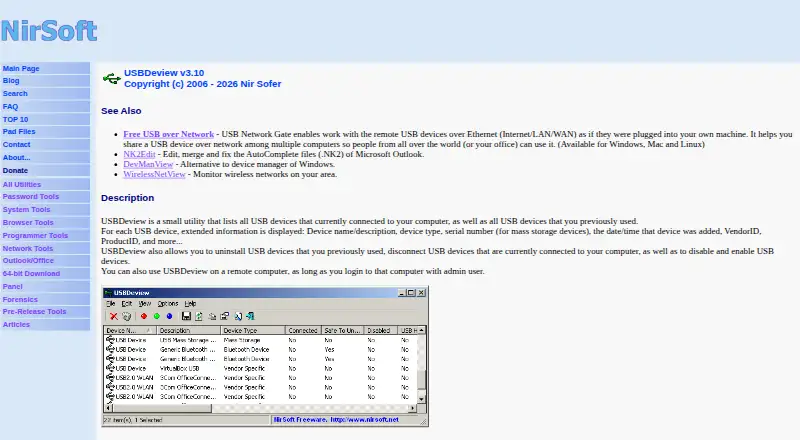
USBDeview is a free Windows utility for inventorying and managing USB devices. It lists devices currently connected to a computer as well as devices previously used on it, making it suited to administrators, support teams, and individuals who need a portable record of USB activity. The interface exposes device names, descriptions, types, serial numbers, vendor and product IDs, connection status, timestamps, drivers, power information, USB versions, and firmware revisions.
Its pricing and deployment model are straightforward: USBDeview is distributed as freeware and runs without installation. That portable format is useful when a utility needs to be carried on a USB drive or run without adding a conventional installation. It also supports command-line operations and can export device information to text, XML, or HTML files, giving technical users options for repeatable inspection and saved reports.
The product’s strongest area is USB-specific depth. It can disconnect currently connected devices, uninstall previously used devices, and disable or enable USB devices. It can also read USB information from remote computers with administrator access. That combination gives USBDeview more operational reach than a simple connected-device list, while keeping its scope narrow. Choose it when detailed USB history, hardware identifiers, firmware information, portability, or command-line access matters. It is less suitable for teams seeking a broader inventory of operating-system, application, network, or non-USB hardware assets.
Your product? Our editors can test USBDeview in depth and publish a review, labelled as paid · from $149/mo →
USBDeview pricing
USBDeview fact sheet
| Free plan | Yes |
|---|---|
| Paid from | Free |
| Operating systems | Windows |
| Firmware details | Yes |
| Installed software | Not verified |
| Portable version | Yes |
| Report export | Not verified |
| Command-line interface | Yes |
| Deployment | Desktop |
| Platforms | Windows |
| Support | Docs |
| Built for | Solo, Small business (editorial estimate) |
| Pricing | Free plan |
| Website | nirsoft.net |
| Facts checked | 21 Sep 2026 |
Alternatives to USBDeview
- AIDA64A deep monitoring and diagnostics suite for users who need benchmarks, alerts, and stress tests.9.2
- CPU-ZA focused, free utility for detailed CPU, memory, motherboard, and Android device information.8.9
- SpeccyA low-cost Windows utility for specifications, temperatures, drive health, and exports.8.7


See all USBDeview alternatives →
Used USBDeview? Be the first to review it
The editor score above is our own research. What this page doesn't have yet is a reader's view — what you used USBDeview for, what worked and what didn't. No stars are seeded and no review is paid for; an editor reads every one before it appears.
Write a reviewTwo minutes · verified accounts only · read by an editor before it appears
Featured on iTechGuides

USBDeview is listed in our System Information Software directory. Add the badge to your site — it links back to this page.
<a href="https://www.itechguides.com/products/usbdeview/"><img src="https://www.itechguides.com/best/badge/usbdeview.svg" alt="Featured on iTechGuides" width="230" height="46"></a>
Reviewed by iTechGuides Editors · Editorial team · Updated Oct 2026
Advertiser disclosure: iTechGuides is reader-supported. Vendors can pay for top positions in our rankings and for a place on other products' pages, and we may earn a commission when you click some links. Bought places stand at the number bought; this page and our disclosure say so. Paying vendors may get a fuller, more detailed review from our editors, and that review can change their score. How we rank.
Last updated · How we research and update