UNetbootin
UNetbootin: A free, open-source choice for creating Linux Live USB drives across three desktop platforms. Ranked #11 of 38 in Bootable USB Software by our editors (7.7/10); pricing: Free plan; best for cross-platform Linux Live USB creation.
At a glance
- Editor score7.7 / 10
- PricingFree plan
- Best forCross-platform Linux Live USB creation
- Free planYes
- Paid fromFree
- Facts checked21 Sep 2026
Where it wins
- Runs on Windows, macOS, and Linux
- Supports downloads and locally stored ISO images
- Offers Ubuntu persistent storage and custom kernel files
Where it doesn't
- Verified partition support is limited to MBR
- Documentation is dated
- Desktop deployment only
Our verdict on UNetbootin
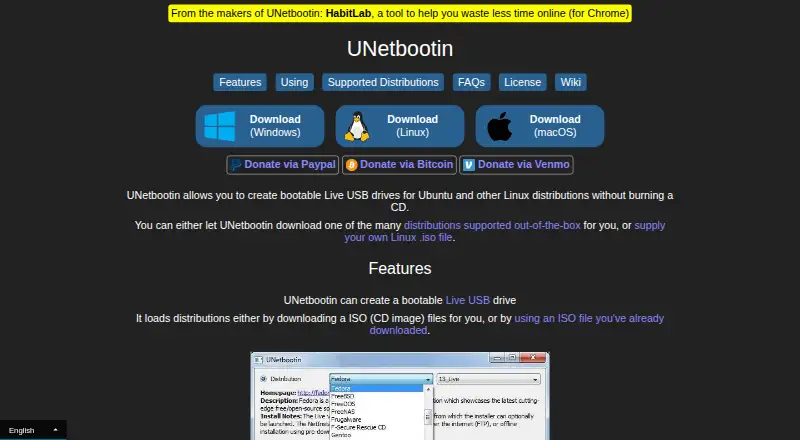
UNetbootin is open-source desktop software for creating bootable Live USB drives for Ubuntu and other Linux distributions. It is aimed at solo users and small teams working across Windows, macOS, and Linux. Users can choose a supported distribution for automatic downloading or provide a locally stored ISO image, then install it to a USB drive or hard disk. The software is licensed under the GNU General Public License and is available as a free plan.
Its feature set goes beyond writing a standard image. UNetbootin can install Linux or BSD distributions to a partition, load floppy and hard-disk images, and accept custom kernel and initrd files. For Ubuntu Live USB drives, it can reserve persistent storage space, allowing that specific workflow to retain data between sessions. This combination suits users who need several installation paths rather than only ISO-to-USB writing. Support for Windows, macOS, and Linux also makes it a practical fit for mixed desktop environments.
The main constraint is partition compatibility: the published specification lists MBR only. That narrows its fit for systems or workflows requiring other partition schemes. The support channel is documentation, and the available documentation is dated, so users who need current guidance or broader support options may prefer another bootable USB application. UNetbootin is a good choice for free, cross-platform Linux media creation, especially when Ubuntu persistence, distribution downloads, or custom boot files matter. It is less suitable when partition flexibility, current documentation, or non-desktop deployment is a priority.
Your product? Our editors can test UNetbootin in depth and publish a review, labelled as paid · from $149/mo →
UNetbootin pricing
UNetbootin fact sheet
| Free plan | Yes |
|---|---|
| Paid from | Free |
| Windows app | Yes |
| macOS app | Yes |
| Linux app | Yes |
| Multiboot support | Not verified |
| Persistent storage | Yes |
| Image downloads | Both |
| Partition schemes | Mbr_only |
| Deployment | Desktop |
| Platforms | Windows, macOS, Linux |
| Support | Docs |
| Built for | Solo, Small business (editorial estimate) |
| Pricing | Free plan |
| Website | unetbootin.github.io |
| Facts checked | 21 Sep 2026 |
Alternatives to UNetbootin
- VentoyA free, open-source multiboot USB utility with broad image and boot-mode support.9.4
- Universal USB InstallerA free, broad USB creation toolkit with multiboot, persistence, downloads, and QEMU testing.9.2
- Easy2BootA free, format-flexible choice for advanced multiboot USB and hard-disk setups.9.1


See all UNetbootin alternatives →
Used UNetbootin? Be the first to review it
The editor score above is our own research. What this page doesn't have yet is a reader's view — what you used UNetbootin for, what worked and what didn't. No stars are seeded and no review is paid for; an editor reads every one before it appears.
Write a reviewTwo minutes · verified accounts only · read by an editor before it appears
Featured on iTechGuides

UNetbootin is listed in our Bootable USB Software directory. Add the badge to your site — it links back to this page.
<a href="https://www.itechguides.com/products/unetbootin/"><img src="https://www.itechguides.com/best/badge/unetbootin.svg" alt="Featured on iTechGuides" width="230" height="46"></a>
Reviewed by iTechGuides Editors · Editorial team · Updated Oct 2026
Advertiser disclosure: iTechGuides is reader-supported. Vendors can pay for top positions in our rankings and for a place on other products' pages, and we may earn a commission when you click some links. Bought places stand at the number bought; this page and our disclosure say so. Paying vendors may get a fuller, more detailed review from our editors, and that review can change their score. How we rank.
Last updated · How we research and update