
UFS Explorer
UFS Explorer: A broad recovery suite for professional RAID, NAS, and virtual-disk work. Ranked #8 of 129 in Data Recovery Software by our editors (8.5/10); pricing: Paid; best for professional RAID, NAS, and virtual-disk recovery.
At a glance
- Editor score8.5 / 10
- PricingPaid
- Best forProfessional RAID, NAS, and virtual-disk recovery
- Free planNo
- Paid from$69.95 one-time
- Founded2008 · Kyiv, Ukraine
- Facts checked21 Sep 2026
Where it wins
- RAID detection, reconstruction, and manual RAID building
- Supports NAS, virtual-machine disks, disk images, and encrypted volumes
- Runs on Windows, macOS, and Linux with bootable recovery
Where it doesn't
- Starts at $69.95 with no free plan
- Advanced recovery capabilities require higher-priced editions
- Several licenses are limited to one operating system
Our verdict on UFS Explorer
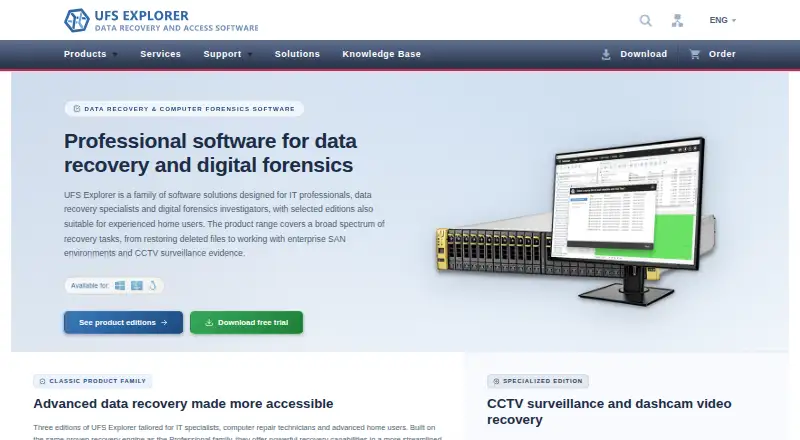
UFS Explorer is a family of data recovery and data access utilities from SysDev Laboratories. It is designed for recovery from internal and external drives, USB flash drives, memory cards, disk images, virtual disks, NAS devices, and RAID arrays. Its audience includes personal users, commercial recovery teams, and professionals handling RAID, NAS, enterprise-storage, or forensic scenarios. The software supports Windows, macOS, and Linux editions, with tools for deleted files, formatted or damaged volumes, imaging, file-system reconstruction, encrypted volumes, and file preview before copying.
Pricing is structured by edition and use case. Standard Recovery Personal costs $69.95 one-time for a perpetual license, one operating system, and personal use. Standard Recovery Commercial costs $139.95 one-time for commercial use on one operating system. RAID Recovery Personal costs $149.95 one-time and adds RAID and NAS recovery. Network RAID Personal costs $229.95 one-time for LAN-based distributed recovery. Professional Recovery Commercial costs $699.95 one-time and includes professional recovery and forensic capabilities across Windows, macOS, and Linux. The published trial terms allow scanning and previewing, while file saving is limited by edition.
Its main strength is breadth for complex storage cases. Quick, deep, and signature-based IntelliRAW scanning cover different recovery approaches, while disk imaging addresses unstable or failing drives. RAID detection, reconstruction, manual RAID building, NAS layout recognition, and support for VMware, Hyper-V, VirtualBox, QEMU, XEN, Parallels, and iSCSI make it suited to mixed physical and virtual environments. BitLocker and Apple APFS encrypted-volume access, file search and filtering, and a bootable emergency recovery environment add practical depth. Choose UFS Explorer when specialized RAID, NAS, virtual-disk, or multi-platform recovery matters; choose a simpler tool if you need inexpensive basic recovery only.
Your product? Our editors can test UFS Explorer in depth and publish a review, labelled as paid · from $149/mo →
UFS Explorer pricing
All 12 UFS Explorer plans and prices →
UFS Explorer fact sheet
| Free plan | No |
|---|---|
| Paid from | $69.95 one-time |
| Recovery sources | internal and external hard drives, SSDs, USB flash drives, SD cards, memory cards, disk images, virtual disks, NAS devices and RAID systems |
| Operating systems | Windows, macOS, Linux |
| Free recovery limit | Not verified |
| Memory card recovery | Yes |
| RAID recovery | Yes |
| Bootable recovery | Not verified |
| File preview | Yes |
| Money-back guarantee | 30 days |
| Deployment | Desktop |
| Platforms | Windows, macOS, Linux |
| Support | Email, Docs |
| Built for | Solo, Small business, Mid-market, Enterprise (editorial estimate) |
| Integrations | 6 integrations: VMware, Hyper-V, VirtualBox, QEMU, DeepSpar Disk Imager, iSCSI |
| Pricing | Paid (source) |
| Website | ufsexplorer.com |
| Facts checked | 21 Sep 2026 |
UFS Explorer integrations
UFS Explorer lists 6 integrations on its own site.
- VMware
- Hyper-V
- VirtualBox
- QEMU
- DeepSpar Disk Imager
- iSCSI
Alternatives to UFS Explorer
- R-StudioA broad recovery toolkit for professionals handling disks, RAID, images, and networks.9.3
- TestDiskA capable free choice for partition repair, filesystem recovery, and file undelete.9.1
- RecoveritA broad recovery toolkit with strong media repair and storage-device coverage.9.0


See all UFS Explorer alternatives →
UFS Explorer vs the competition
- UFS Explorer vs R-Studio
- UFS Explorer vs TestDisk
- UFS Explorer vs Recoverit
- UFS Explorer vs Disk Drill
- UFS Explorer vs PhotoRec
- UFS Explorer vs DMDE



Compare UFS Explorer with any tool side by side →
Also Ranked In
UFS Explorer is ranked in 6 of our directories.
Used UFS Explorer? Be the first to review it
The editor score above is our own research. What this page doesn't have yet is a reader's view — what you used UFS Explorer for, what worked and what didn't. No stars are seeded and no review is paid for; an editor reads every one before it appears.
Write a reviewTwo minutes · verified accounts only · read by an editor before it appears
Featured on iTechGuides

UFS Explorer is listed in our Data Recovery Software directory. Add the badge to your site — it links back to this page.
<a href="https://www.itechguides.com/products/ufs-explorer/"><img src="https://www.itechguides.com/best/badge/ufs-explorer.svg" alt="Featured on iTechGuides" width="230" height="46"></a>
Reviewed by iTechGuides Editors · Editorial team · Updated Oct 2026
Advertiser disclosure: iTechGuides is reader-supported. Vendors can pay for top positions in our rankings and for a place on other products' pages, and we may earn a commission when you click some links. Bought places stand at the number bought; this page and our disclosure say so. Paying vendors may get a fuller, more detailed review from our editors, and that review can change their score. How we rank.
Last updated · How we research and update