Translate Toolkit
Translate Toolkit: A focused, free toolkit for teams managing localization files, checks, terminology, and automation. Ranked #152 of 156 in Translation Software by our editors (3.0/10); pricing: Free plan; best for open-source localization tooling.
At a glance
- Editor score3.0 / 10
- PricingFree plan
- Best forOpen-source localization tooling
- Free planYes
- Paid fromNone
- API accessYes
- Facts checked22 Sep 2026
Where it wins
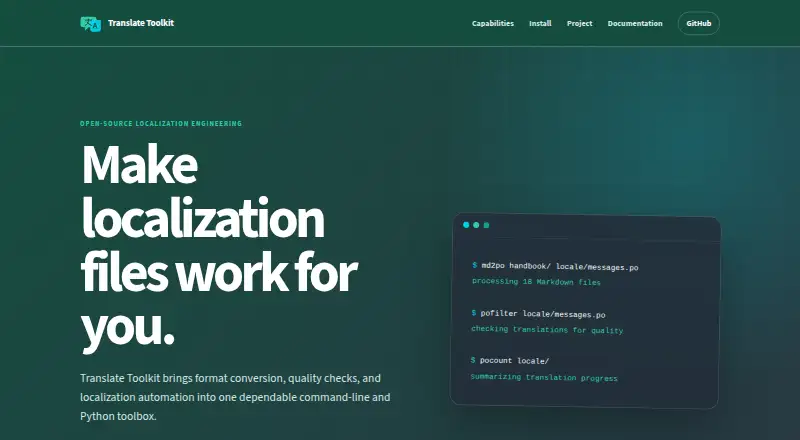
- Converts and manages PO, XLIFF, Android, Fluent, Qt TS, Markdown, and JSON files
- Adds language-aware quality checks, terminology extraction, and conflict detection
- Provides Python APIs and command-line utilities for automation
Where it doesn't
- It is a workflow toolkit rather than a complete translation service
- The command-line and Python focus may require technical localization skills
- Runs on Windows and Linux, with no listed support for other platforms
Our verdict on Translate Toolkit
Translate Toolkit is an open-source toolbox for localization engineers and software teams that need to move, inspect, and automate translation assets. It supports localization file format conversion, PO and XLIFF management, language-aware quality checks, terminology extraction, conflict detection, translation progress counting, and translation-memory format conversion and segmentation. Workflows can cover PO, XLIFF, Android resources, Fluent, Qt TS, Markdown, JSON, and other formats.
The toolkit’s strongest fit is technical localization work built around repeatable processes. Command-line utilities support localization workflows, while Python APIs can connect the toolkit with localization systems. These capabilities make it suitable for teams that need format conversion, automated checks, terminology review, progress measurement, or custom scripting rather than a single-purpose translation editor. Its local installation model also suits workflows that keep processing within a Windows or Linux environment.
Translate Toolkit is free and open source, with no paid tiers described. Its scope is deliberately focused: it provides the tools around localization content and translation assets, not a complete translation service. Teams looking for file handling, quality checks, terminology tooling, memory conversion, and programmable automation should find a strong match in its feature set. Teams seeking an end-to-end service, a primarily visual interface, or broader platform coverage should consider a different type of translation product.
Translate Toolkit pricing
Translate Toolkit fact sheet
| Free plan | Yes |
|---|---|
| Paid from | None |
| Document translation | Not verified |
| Website translation | Not verified |
| Translation memory | Not verified |
| Glossary tools | Yes |
| API access | Yes |
| Supported languages | Not verified |
| Deployment | Desktop |
| Platforms | Windows, Linux |
| Support | Docs |
| Built for | Solo, Small business, Mid-market, Enterprise (editorial estimate) |
| Pricing | Free plan |
| Website | toolkit.translatehouse.org |
| Facts checked | 22 Sep 2026 |
Alternatives to Translate Toolkit
- Google Cloud TranslationA broad Google Cloud translation stack for developers building multilingual systems.9.4
- DeepL TranslatorA broad translation service spanning everyday use, workplace tools, and developer workflows.9.3
- Google TranslateA free, multi-device translator covering everyday text, media, documents, and websites.9.2


See all Translate Toolkit alternatives →
Also listed in
Used Translate Toolkit? Be the first to review it
The editor score above is our own research. What this page doesn't have yet is a reader's view — what you used Translate Toolkit for, what worked and what didn't. No stars are seeded and no review is paid for; an editor reads every one before it appears.
Write a reviewTwo minutes · verified accounts only · read by an editor before it appears
Featured on iTechGuides

Translate Toolkit is listed in our Translation Software directory. Add the badge to your site — it links back to this page.
<a href="https://www.itechguides.com/products/translate-toolkit/"><img src="https://www.itechguides.com/best/badge/translate-toolkit.svg" alt="Featured on iTechGuides" width="230" height="46"></a>
Guides on translation software
- 10 best translation apps for AndroidAug 2026
- 9 Best WordPress Translation Plugins for Multilingual WebsitesAug 2026
- Best Live Translation Earbuds [2025]: Instant Language Translation in Your EarsAug 2026
Reviewed by iTechGuides Editors · Editorial team · Updated Oct 2026
Advertiser disclosure: iTechGuides is reader-supported. Vendors can pay for top positions in our rankings and for a place on other products' pages, and we may earn a commission when you click some links. How we rank.
Last updated · How we research and update