
TouchCursor
TouchCursor: A free Windows utility for moving the cursor from the home row while typing. Ranked #96 of 105 in Keyboard and Mouse Customization Software by our editors (5.3/10); pricing: Free plan; best for windows users navigating with home-row keys.
At a glance
- Editor score5.3 / 10
- PricingFree plan
- Best forWindows users navigating with home-row keys
- Free planYes
- Paid fromFree
- Supported operating systemsWindows
- Facts checked23 Sep 2026
Where it wins
- Maps home-row keys to cursor navigation while an activation key is held
- Customizable bindings and selected-program restrictions
- Includes training mode and can run at Windows login
Where it doesn't
- The vendor site lists only legacy Windows versions: 2000, XP, 2003 and Vista
- Focused on keyboard navigation, not broad keyboard and mouse customization
- Space is the default hold-to-activate key, so setup may require changing typing habits
Our verdict on TouchCursor
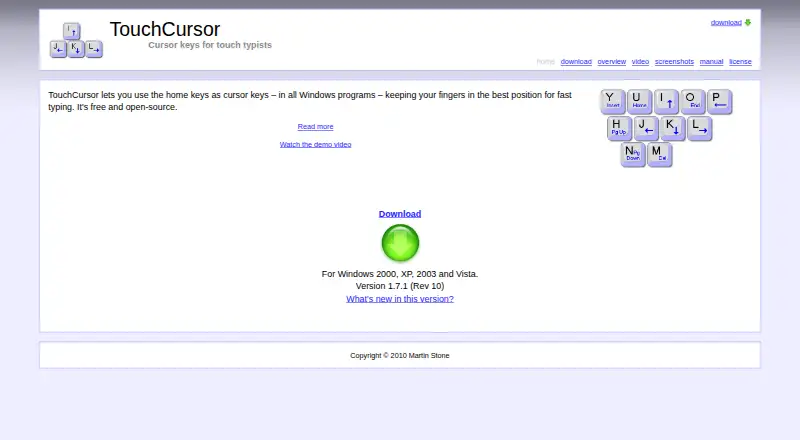
TouchCursor is a free, open-source Windows utility for people who want cursor navigation without moving their hands away from the home row. Hold an activation key—Space by default—and home-row keys act as cursor keys. It is aimed at solo users and small setups that prioritize keyboard navigation while touch typing, rather than people seeking a broad keyboard and mouse customization suite.
Its controls are focused but configurable: users can change key bindings, choose a different activation key, and restrict the utility to selected programs. A training mode is included, and TouchCursor can run automatically at Windows login. These features offer ways to learn the mapping and limit where it applies. The trade-off is that the core interaction changes how the home row behaves while the activation key is held, so it suits users willing to adapt to that approach.
Compatibility deserves careful consideration. The vendor’s site offers version 1.7.1 and names Windows 2000, XP, 2003 and Vista as supported systems. TouchCursor is therefore a fit for someone specifically seeking this lightweight, open-source home-row navigation approach on a listed Windows version. Users who need broader customization or support for newer Windows versions should look for an alternative whose stated scope matches those needs.
Your product? Our editors can test TouchCursor in depth and publish a review, labelled as paid · from $149/mo →
TouchCursor pricing
TouchCursor fact sheet
| Free plan | Yes |
|---|---|
| Paid from | Free |
| Supported operating systems | Windows |
| Macro support | Not verified |
| Per-app profiles | Not verified |
| Onboard device memory | Not verified |
| Polling rate control | Not verified |
| Sensitivity controls | Not verified |
| Profile slots | Not verified |
| Deployment | Desktop |
| Platforms | Windows |
| Built for | Solo, Small business (editorial estimate) |
| Pricing | Free plan |
| Website | martin-stone.github.io |
| Facts checked | 23 Sep 2026 |
Alternatives to TouchCursor
- Razer SynapseA free Razer-focused hub for remapping, macros, profiles, and Chroma lighting.9.2
- Logi Options+A broad free toolkit for remapping, automation, profiles, and multi-computer control.9.1
- Logitech G HUBA free desktop suite for Logitech G lighting, profiles, and device settings.9.0



See all TouchCursor alternatives →
Used TouchCursor? Be the first to review it
The editor score above is our own research. What this page doesn't have yet is a reader's view — what you used TouchCursor for, what worked and what didn't. No stars are seeded and no review is paid for; an editor reads every one before it appears.
Write a reviewTwo minutes · verified accounts only · read by an editor before it appears
Featured on iTechGuides

TouchCursor is listed in our Keyboard and Mouse Customization Software directory. Add the badge to your site — it links back to this page.
<a href="https://www.itechguides.com/products/touchcursor/"><img src="https://www.itechguides.com/best/badge/touchcursor.svg" alt="Featured on iTechGuides" width="230" height="46"></a>
Reviewed by iTechGuides Editors · Editorial team · Updated Oct 2026
Advertiser disclosure: iTechGuides is reader-supported. Vendors can pay for top positions in our rankings and for a place on other products' pages, and we may earn a commission when you click some links. Bought places stand at the number bought; this page and our disclosure say so. Paying vendors may get a fuller, more detailed review from our editors, and that review can change their score. How we rank.
Last updated · How we research and update