ToDesk
ToDesk: A feature-rich remote access option with a capable free personal tier. Ranked #43 of 134 in Remote Desktop Software by our editors (5.4/10); pricing: Free plan; best for users wanting feature-rich free remote access.
At a glance
- Editor score5.4 / 10
- PricingFree plan
- Best forUsers wanting feature-rich free remote access
- Free planYes
- Access modeBoth
- Facts checked20 Sep 2026
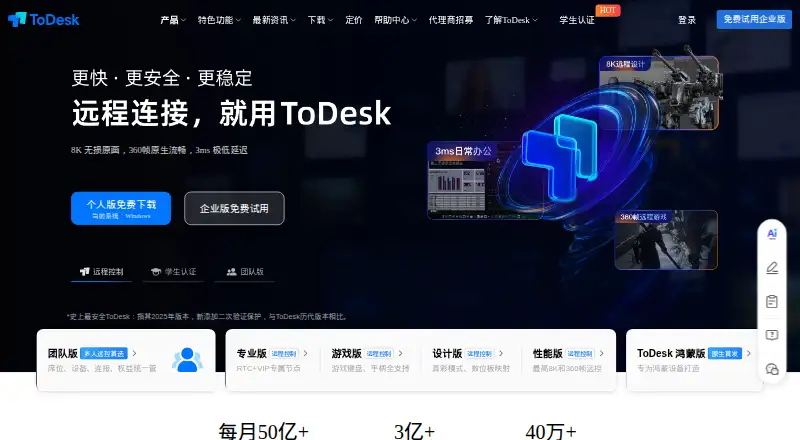
Where it wins
- Free access includes unattended startup, file transfer, and recording
- Supports Windows, macOS, Linux, Android, and iOS
- Offers virtual displays, terminal access, cameras, and AI audit reports
Where it doesn't
- The free tier is positioned for personal use
- Paid pricing is presented in Chinese yuan
- Advanced administration and auditing are reserved for enterprise offerings
Our verdict on ToDesk
ToDesk is remote desktop software for personal users, teams, and enterprises that need remote control across Windows, macOS, Linux, Android, and iOS. Its free personal tier is the main attraction, combining unattended access and automatic startup with file transfer, session recording, remote camera access, terminal access, privacy controls, and device-list management. Secondary verification through a mobile device adds another access-control option, while AI audit reports extend the product beyond basic screen sharing.
The published plans show a progression from personal remote access to higher-performance and more specialized use. Personal supports 1080p resolution, 30 FPS, up to 100 devices, a basic file server, and a privacy screen. Professional raises the ceiling to 2K, 60 FPS, up to 150 devices, an accelerated file server, one Android controlled device, and one virtual display. Game goes to 4K, 240 FPS, up to 200 devices, a high-speed file server, two Android controlled devices, and two virtual displays. Design adds true-color mode, tablet mapping, and multi-screen control. The cheapest advertised paid equivalent is ¥13.2 per month when Professional is billed annually; continuous-monthly and single-month prices are also listed.
ToDesk fits users who want broad platform coverage and more than basic remote control, particularly when unattended access, file movement, multi-screen work, recording, or remote peripherals matter. Enterprise offerings add administrative controls, auditing, recording, and controlled file transfer for managed deployments. The product is less compelling for organizations that need a clearly simple plan structure or for users seeking only occasional personal connections without the added device, display, and performance tiers. Choose ToDesk for a generous free starting point and feature breadth; consider an alternative when enterprise governance or pricing clarity is the primary requirement.
Your product? Our editors can test ToDesk in depth and publish a review, labelled as paid · from $149/mo →
ToDesk pricing
All 5 ToDesk plans and prices →
ToDesk fact sheet
| Free plan | Yes |
|---|---|
| Paid from | Not verified |
| Access mode | Both |
| Supported platforms | Windows, macOS, Linux, Android, iOS |
| File transfer | Yes |
| Session recording | Yes |
| Managed devices | 150 devices |
| Mobile apps | Yes |
| Deployment | Cloud, Desktop, Mobile |
| Platforms | Windows, macOS, Linux, iOS, Android |
| Compliance & security | 2FA |
| Support | Live chat, Docs |
| Built for | Solo, Small business, Mid-market, Enterprise (editorial estimate) |
| Pricing | Free plan (source) |
| Website | todesk.com |
| Facts checked | 20 Sep 2026 |
Alternatives to ToDesk
- StarDeskA remote desktop app: reach your own Windows PC or Mac from Windows, macOS, Android or iOS.9.7
- TeamViewer RemoteA mature remote support platform with broad coverage, integrations, and AI features.9.4
- SplashtopA paid remote-access suite with low entry pricing, broad platforms, and deep integrations.9.2

Used ToDesk? Be the first to review it
The editor score above is our own research. What this page doesn't have yet is a reader's view — what you used ToDesk for, what worked and what didn't. No stars are seeded and no review is paid for; an editor reads every one before it appears.
Write a reviewTwo minutes · verified accounts only · read by an editor before it appears
Featured on iTechGuides

ToDesk is listed in our Remote Desktop Software directory. Add the badge to your site — it links back to this page.
<a href="https://www.itechguides.com/products/todesk/"><img src="https://www.itechguides.com/best/badge/todesk.svg" alt="Featured on iTechGuides" width="230" height="46"></a>
Reviewed by iTechGuides Editors · Editorial team · Updated Oct 2026
Advertiser disclosure: iTechGuides is reader-supported. Vendors can pay for top positions in our rankings and for a place on other products' pages, and we may earn a commission when you click some links. Bought places stand at the number bought; this page and our disclosure say so. Paying vendors may get a fuller, more detailed review from our editors, and that review can change their score. How we rank.
Last updated · How we research and update