Timelab
Timelab: A free web planner for building and sharing conflict-free multi-stage timetables. Ranked #30 of 34 in Event Scheduling Software by our editors (5.9/10); pricing: Free plan; best for teams needing a free, simple timetable grid.
At a glance
- Editor score5.9 / 10
- PricingFree plan
- Best forTeams needing a free, simple timetable grid
- Free planYes
- Paid fromFree
- Facts checked24 Sep 2026
Where it wins
- Drag-and-drop slots, with resizing to adjust session duration
- Conflict checking and color coding help organize stage schedules
- Read-only public links let viewers open a timetable without an account
Where it doesn't
- The site labels the product as alpha
- No speaker management or event registration features are listed
- Integrations are not listed
Our verdict on Timelab
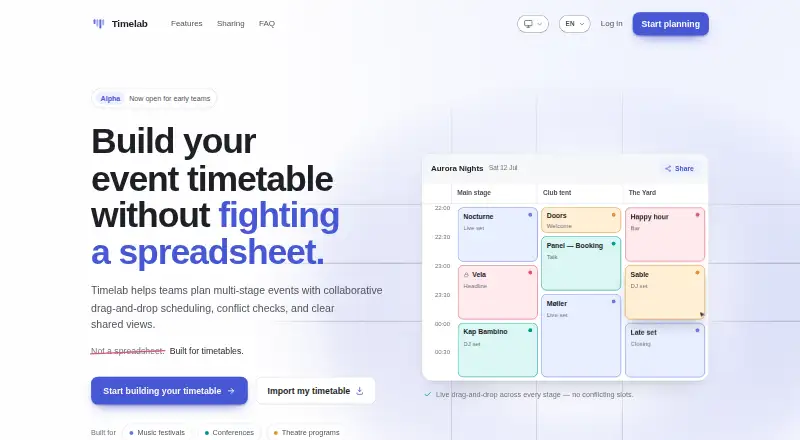
Timelab is a web-based timetable planner for teams coordinating multi-stage events, including festivals, conferences, theatre programs and other performances. Its grid organizes sessions by stage and time, with drag-and-drop placement, adjustable slot lengths, conflict checking and color coding. It is aimed at teams that need a shared schedule rather than a broader event-management system, and its free availability makes it accessible for straightforward planning needs.
The timetable controls cover several practical scheduling decisions. Teams can configure the event date range and time granularity, then place sessions across stages and adjust their duration by resizing slots. Conflict-free placement helps avoid overlapping sessions in the schedule, while colors provide another way to distinguish timetable slots. These capabilities suit organizers whose main task is arranging a program across rooms or stages; the product description does not present speaker management or registration tools, so teams needing those workflows should look elsewhere.
Sharing is a central part of the workflow: timetables can be private, publicly editable or publicly read-only. Public read-only links can be opened without an account, which gives attendees or other viewers a way to consult the schedule without editing access. Timelab is currently available for free, and the published Free plan highlights multi-stage timetable planning and collaborative sharing. The site labels Timelab as an alpha product, a relevant consideration for teams weighing its current status. Choose it for a free, focused timetable grid and simple sharing; consider another option if your event process depends on registration, speaker management or integrations.
Your product? Our editors can test Timelab in depth and publish a review, labelled as paid · from $149/mo →
Timelab pricing
All 1 Timelab plans and prices →
Timelab fact sheet
| Free plan | Yes |
|---|---|
| Paid from | Free |
| Attendee limit | Not verified |
| Session tracks | Yes |
| Room scheduling | Yes |
| Speaker management | Not verified |
| Attendee mobile app | Not verified |
| Hybrid event support | Not verified |
| Deployment | Cloud |
| Platforms | Web |
| Built for | Small business, Mid-market (editorial estimate) |
| Pricing | Free plan (source) |
| Website | timelab.now |
| Facts checked | 24 Sep 2026 |
Alternatives to Timelab
- Zoho BackstageA broad event platform covering registration, programming, engagement, and hybrid delivery.9.2
- FourwavesA strong fit for research conferences needing submissions, scheduling, and hybrid event tools.8.8
- SchedA feature-rich event platform for schedules, reservations, check-in, and mobile apps.8.7



See all Timelab alternatives →
Used Timelab? Be the first to review it
The editor score above is our own research. What this page doesn't have yet is a reader's view — what you used Timelab for, what worked and what didn't. No stars are seeded and no review is paid for; an editor reads every one before it appears.
Write a reviewTwo minutes · verified accounts only · read by an editor before it appears
Featured on iTechGuides

Timelab is listed in our Event Scheduling Software directory. Add the badge to your site — it links back to this page.
<a href="https://www.itechguides.com/products/timelab/"><img src="https://www.itechguides.com/best/badge/timelab.svg" alt="Featured on iTechGuides" width="230" height="46"></a>
Reviewed by iTechGuides Editors · Editorial team · Updated Oct 2026
Advertiser disclosure: iTechGuides is reader-supported. Vendors can pay for top positions in our rankings and for a place on other products' pages, and we may earn a commission when you click some links. Bought places stand at the number bought; this page and our disclosure say so. Paying vendors may get a fuller, more detailed review from our editors, and that review can change their score. How we rank.
Last updated · How we research and update