ThinkComposer
ThinkComposer: A flexible Windows desktop tool for nested diagrams, concept maps, and structured models. Ranked #42 of 44 in Diagramming Software by our editors (5.1/10); pricing: Free plan; best for windows users building nested concept diagrams.
At a glance
- Editor score5.1 / 10
- PricingFree plan
- Best forWindows users building nested concept diagrams
- Free planYes
- Paid fromFree
- Facts checked20 Sep 2026
Where it wins
- Supports multilevel nested diagrams with reusable shortcuts between ideas and views
- Covers concept maps, mind maps, flowcharts, UML-style diagrams, and more
- Generates PDF, XPS, and HTML reports plus template-based files and code
Where it doesn't
- Runs on Windows only
- Does not provide collaboration features
- Its broad modeling system may require more planning than simple diagram tools
Our verdict on ThinkComposer
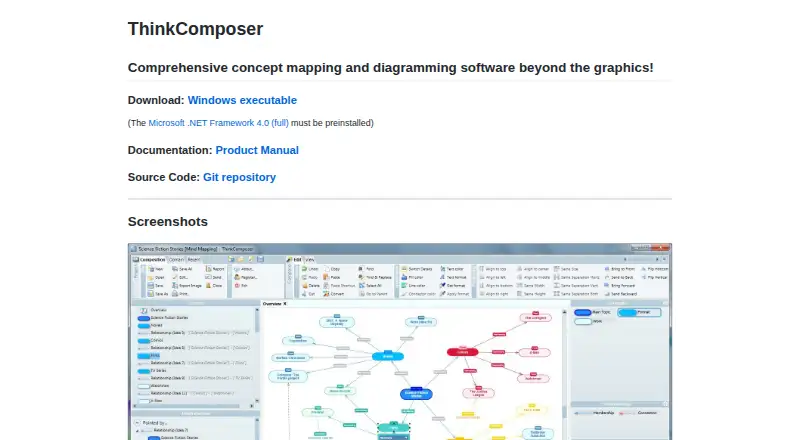
ThinkComposer is an open-source Windows desktop application for creating nested diagrams, concept maps, mind maps, models, and general-purpose visualizations. It is aimed at users who need more structure than a basic whiteboard or flowchart editor, including people documenting relationships, organizing complex ideas, or modeling systems across multiple diagram domains. The software supports flowcharts, use case diagrams, class diagrams, sequence diagrams, timelines, data models, organizational charts, business models, genealogy trees, and custom visualizations.
The free open-source model is a central part of ThinkComposer’s appeal. Its feature set extends beyond drawing shapes: users can define custom concepts, relationships, and diagram domains, then add attachments, links, tables, and custom fields to diagram content. Reusable shortcuts can connect ideas and views, while report generation supports PDF, XPS, and HTML output. Import and export options also include TSV, CSV, XML, and TXT. Template-based file and code generation adds value for structured documentation workflows, although the breadth of these capabilities is more relevant to modeling-heavy projects than to quick sketches.
Platform fit is the main practical constraint. ThinkComposer is available as a Windows executable, so it suits desktop users who work within that environment but not teams that need browser access or cross-platform support. Collaboration is not part of the product’s positioning, which makes shared real-time diagramming a poor match. Users who want detailed, nested concept structures, multiple modeling domains, and reportable outputs should consider ThinkComposer; those prioritizing collaborative editing, broad platform availability, or a simpler drag-and-drop workflow should choose an alternative.
Your product? Our editors can test ThinkComposer in depth and publish a review, labelled as paid · from $149/mo →
ThinkComposer pricing
ThinkComposer fact sheet
| Free plan | Yes |
|---|---|
| Paid from | Free |
| Real-time collaboration | Not verified |
| Diagram types | concept maps, mind maps, flowcharts, use case diagrams, class diagrams, sequence diagrams, timelines, data models, organizational charts, business models, genealogy trees |
| Desktop apps | Yes |
| Offline editing | Not verified |
| Import/export formats | TSV, CSV, PDF, XPS, HTML, XML, TXT |
| Editor seat limit | Not verified |
| Deployment | Desktop |
| Platforms | Windows |
| Support | Email, Docs |
| Built for | Solo, Small business (editorial estimate) |
| Pricing | Free plan |
| Website | thinkcomposer.com |
| Facts checked | 20 Sep 2026 |
Alternatives to ThinkComposer
- draw.ioA broad, free diagramming editor with strong format support and collaboration options.9.4
- LucidchartA broad, collaborative diagramming workspace for business and technical teams.9.3
- Microsoft VisioA mature Microsoft-focused diagramming suite with web, Teams, and desktop options.9.1


See all ThinkComposer alternatives →
Used ThinkComposer? Be the first to review it
The editor score above is our own research. What this page doesn't have yet is a reader's view — what you used ThinkComposer for, what worked and what didn't. No stars are seeded and no review is paid for; an editor reads every one before it appears.
Write a reviewTwo minutes · verified accounts only · read by an editor before it appears
Featured on iTechGuides

ThinkComposer is listed in our Diagramming Software directory. Add the badge to your site — it links back to this page.
<a href="https://www.itechguides.com/products/thinkcomposer/"><img src="https://www.itechguides.com/best/badge/thinkcomposer.svg" alt="Featured on iTechGuides" width="230" height="46"></a>
Reviewed by iTechGuides Editors · Editorial team · Updated Oct 2026
Advertiser disclosure: iTechGuides is reader-supported. Vendors can pay for top positions in our rankings and for a place on other products' pages, and we may earn a commission when you click some links. Bought places stand at the number bought; this page and our disclosure say so. Paying vendors may get a fuller, more detailed review from our editors, and that review can change their score. How we rank.
Last updated · How we research and update