
Tempr
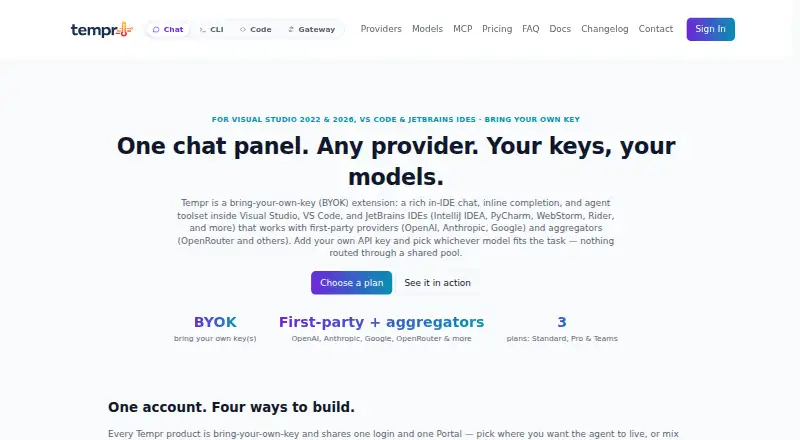
Tempr: A broad BYOK toolkit for IDE coding, terminal agents, and OpenAI-compatible API access. Ranked #52 of 103 in AI Coding Assistants by our editors (4.2/10); pricing: Free plan · 7-day trial; best for IDE users wanting gateway access.
At a glance
- Editor score4.2 / 10
- PricingFree plan · 7-day trial
- Best forIDE users wanting gateway access
- Free planYes
- Paid from$15/mo
- Coding agentYes
- Facts checked22 Sep 2026
Where it wins
- Combines chat, completion, agents, search, CLI, MCP, and delegation
- Supports Visual Studio, VS Code, and IntelliJ Platform IDEs
- Gateway offers OpenAI-compatible API access with logs and analytics
Where it doesn't
- Chat and CLI require users to supply a provider API key
- Standard delays access to new models
- Gateway API plans are separate from IDE and CLI plans
Our verdict on Tempr
Tempr is a bring-your-own-key AI coding assistant for developers working in Visual Studio, Visual Studio Code, JetBrains IDEs, terminals, and API workflows. Its IDE features include Markdown chat with code actions, ghost-text inline completion, semantic code search, autonomous multi-step agents, personas, MCP servers, and multi-agent delegation. The Tempr CLI extends the same agent to terminal and script workflows, while Gateway provides an OpenAI-compatible API. It suits individual developers and teams that want one interface across multiple AI providers and coding environments.
Pricing is split between IDE and CLI plans and separate Gateway plans. Standard costs $15 per month and includes the full model catalog with delayed access to new models, chat, inline completion, agent tools, built-in personas, and the Tempr CLI. Pro costs $20 per month and adds immediate access to new models, custom personas and models, multiple saved sessions, and higher agent-turn limits. Teams costs $35 per seat per month and adds centralized billing, seat management, shared configuration, admin controls, SSO using SAML/OIDC, and organization-managed virtual keys. Gateway Free costs $0 per month; Gateway Pro costs $49 per month with 250,000 requests included, while Gateway Scale costs $249 per month with 2,000,000 requests included. Gateway Enterprise adds SSO with enforced domains, an uptime SLA, priority support, VPC deployment or self-hosting, and volume pricing.
The product’s main strength is breadth: coding assistance, terminal tooling, workspace search, external MCP servers, delegation, and an API gateway sit in one offering. The trade-off is that chat and CLI depend on a provider API key, so model access involves an additional provider relationship outside Tempr. Standard also places new-model access behind a delay, while Gateway is priced and managed separately. Choose Tempr if your workflow spans IDEs, terminals, and API-based applications; consider another tool if you want provider access bundled directly into the coding subscription or need a narrower, simpler assistant.
Your product? Our editors can test Tempr in depth and publish a review, labelled as paid · from $149/mo →
Tempr pricing
All 7 Tempr plans and prices →
Tempr fact sheet
| Free plan | Yes |
|---|---|
| Paid from | $15/mo |
| Code completion | Yes |
| Chat assistance | Yes |
| Coding agent | Yes |
| Supported IDEs | Visual Studio 2022, Visual Studio 2026, Visual Studio Code, IntelliJ IDEA, PyCharm, WebStorm, Rider, and other IntelliJ Platform IDEs |
| Codebase indexing | Yes |
| Terminal access | Yes |
| Free trial | 7 days |
| Deployment | Cloud, Desktop |
| Platforms | Web, Windows |
| Compliance & security | SSO/SAML |
| Support | Email, Docs |
| Built for | Solo, Small business, Mid-market, Enterprise (editorial estimate) |
| Pricing | Free plan · 7-day trial (source) |
| Website | temprhq.io |
| Facts checked | 22 Sep 2026 |
Alternatives to Tempr
- GitHub CopilotA broad coding assistant with a free entry point and agent workflows.9.3
- Claude CodeA strong fit for multi-step coding work across codebases, tools, and pull requests.9.2
- DevinA broad autonomous coding workspace with usage-based plan differences.9.1


Also Ranked In
Tempr is ranked in 2 of our directories.
Used Tempr? Be the first to review it
The editor score above is our own research. What this page doesn't have yet is a reader's view — what you used Tempr for, what worked and what didn't. No stars are seeded and no review is paid for; an editor reads every one before it appears.
Write a reviewTwo minutes · verified accounts only · read by an editor before it appears
Featured on iTechGuides

Tempr is listed in our AI Coding Assistants directory. Add the badge to your site — it links back to this page.
<a href="https://www.itechguides.com/products/tempr/"><img src="https://www.itechguides.com/best/badge/tempr.svg" alt="Featured on iTechGuides" width="230" height="46"></a>
Reviewed by iTechGuides Editors · Editorial team · Updated Oct 2026
Advertiser disclosure: iTechGuides is reader-supported. Vendors can pay for top positions in our rankings and for a place on other products' pages, and we may earn a commission when you click some links. Bought places stand at the number bought; this page and our disclosure say so. Paying vendors may get a fuller, more detailed review from our editors, and that review can change their score. How we rank.
Last updated · How we research and update