StatPlus
StatPlus: Broad statistical procedures in a spreadsheet-friendly desktop package. Ranked #31 of 106 in Statistical Analysis Software by our editors (6.4/10); pricing: 30-day trial; best for spreadsheet users needing common statistical analyses.
At a glance
- Editor score6.4 / 10
- Pricing30-day trial
- Best forSpreadsheet users needing common statistical analyses
- Free planNo
- Paid from$60/unit one-time
- DeploymentBoth
- Facts checked25 Sep 2026
Where it wins
- Covers tests, ANOVA, regression, multivariate and survival analysis
- Works as an Excel add-in or standalone spreadsheet on Windows and Mac
- One-time licenses include commercial, student and academic/non-profit options
Where it doesn't
- Desktop deployment limits access to Windows and macOS computers
- No scripting support or Bayesian analysis
- No free plan; commercial licensing starts at $160 one time
Our verdict on StatPlus
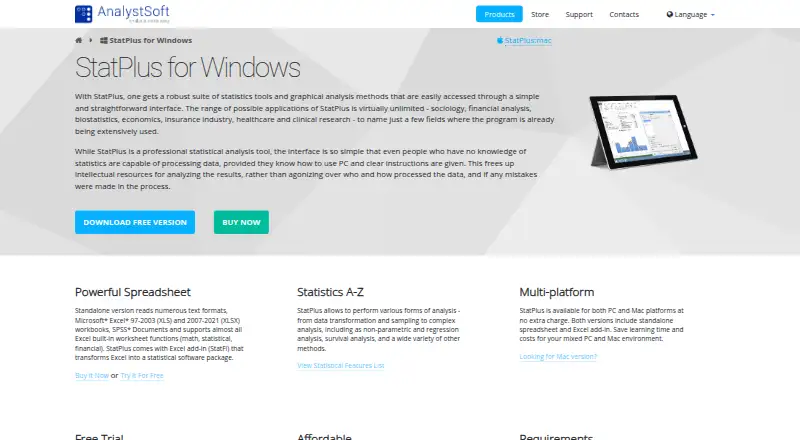
StatPlus is desktop statistical analysis software for Windows and Mac, available as a standalone spreadsheet and an Excel add-in. It suits spreadsheet users in fields such as sociology, finance, biostatistics, economics, insurance, healthcare and clinical research. The software combines descriptive statistics, hypothesis tests, ANOVA, multivariate and nonparametric analysis, regression, time-series procedures, survival analysis, data processing and charting. Users can import supported spreadsheet and text data, select variables for analysis, and produce reports in workbooks or worksheets.
Pricing is license-based rather than subscription-based. The Commercial Package costs $160 for a single license and includes a permanent license with no annual fee. The Student Package costs $60 for a single license and is fully functional, with eligibility restrictions. The Academic/Non-Profit Package costs $100 for a single license and also has eligibility restrictions. A 30-day free trial is available, giving prospective buyers time to assess the workflow before purchasing. The published plans make StatPlus a relatively straightforward fit for individuals and small teams that prefer a one-time desktop purchase.
Its strongest fit is spreadsheet-centered analysis. Microsoft Excel and Apple Numbers are supported, while data import includes text formats, XLS, XLSX and SPSS documents. The procedure range extends from t-tests, z-tests, F-tests, normality and chi-square tests to one-, two- and three-way ANOVA with post-hoc comparisons; principal component, factor, discriminant-function and cluster analysis; several regression types; time-series diagnostics; and Kaplan-Meier and Cox regression. Statistical charts include histograms, scatterplots, box plots and control charts. Organizations needing scripting, Bayesian methods, AI features or web deployment should consider another product, while spreadsheet users seeking broad conventional procedures should find the scope well aligned.
Your product? Our editors can test StatPlus in depth and publish a review, labelled as paid · from $149/mo →
StatPlus pricing
All 3 StatPlus plans and prices →
StatPlus fact sheet
| Free plan | No |
|---|---|
| Paid from | $60/unit one-time |
| Deployment | Both |
| Statistical tests | Yes |
| Regression models | Yes |
| Scripting support | No |
| Bayesian analysis | No |
| Data import formats | Text formats, XLS, XLSX, SPSS documents; Excel and Numbers data sources |
| Free trial | 30 days |
| Deployment | Desktop |
| Platforms | Windows, macOS |
| Support | Phone, Docs |
| Built for | Solo, Small business, Mid-market (editorial estimate) |
| Integrations | 2 integrations: Microsoft Excel, Apple Numbers |
| Pricing | 30-day trial (source) |
| Website | analystsoft.com |
| Facts checked | 25 Sep 2026 |
StatPlus integrations
StatPlus lists 2 integrations on its own site.
- Microsoft Excel
- Apple Numbers
Alternatives to StatPlus
- RA free, programmable environment for statistical analysis, modeling, visualization, and data import.9.4
- StataA broad, scriptable desktop environment for professional and reproducible applied analysis.9.3
- IBM SPSS StatisticsA broad desktop statistics suite with testing, modeling, forecasting, reporting, and R/Python integration.9.2


See all StatPlus alternatives →
Used StatPlus? Be the first to review it
The editor score above is our own research. What this page doesn't have yet is a reader's view — what you used StatPlus for, what worked and what didn't. No stars are seeded and no review is paid for; an editor reads every one before it appears.
Write a reviewTwo minutes · verified accounts only · read by an editor before it appears
Featured on iTechGuides

StatPlus is listed in our Statistical Analysis Software directory. Add the badge to your site — it links back to this page.
<a href="https://www.itechguides.com/products/statplus/"><img src="https://www.itechguides.com/best/badge/statplus.svg" alt="Featured on iTechGuides" width="230" height="46"></a>
Reviewed by iTechGuides Editors · Editorial team · Updated Oct 2026
Advertiser disclosure: iTechGuides is reader-supported. Vendors can pay for top positions in our rankings and for a place on other products' pages, and we may earn a commission when you click some links. Bought places stand at the number bought; this page and our disclosure say so. Paying vendors may get a fuller, more detailed review from our editors, and that review can change their score. How we rank.
Last updated · How we research and update