Stata
Stata: A broad, scriptable desktop environment for professional and reproducible applied analysis. Ranked #2 of 106 in Statistical Analysis Software by our editors (9.3/10); pricing: Paid; best for professional, reproducible applied analysis.
At a glance
- Editor score9.3 / 10
- PricingPaid
- Best forProfessional, reproducible applied analysis
- Free planNo
- Paid from$175/user/yr
- DeploymentDesktop
- Facts checked20 Sep 2026
Where it wins
- Broad modeling across Bayesian, time-series, panel, survival, and multilevel methods
- Command scripting, Mata programming, and reproducible reporting
- Python, Jupyter, database, and common statistical-format integration
Where it doesn't
- No free plan; published academic pricing requires university affiliation proof
- Desktop deployment may not suit browser-first or cloud-only workflows
- Higher-tier MP editions cost more as core counts increase
Our verdict on Stata
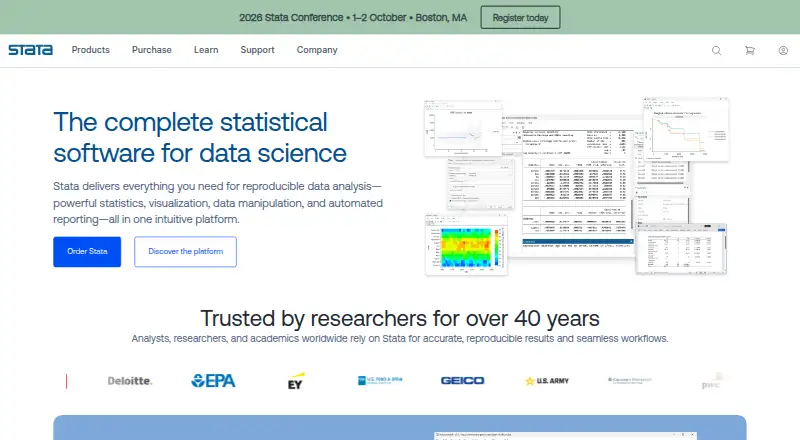
Stata is an integrated desktop application for data management, statistical modeling, visualization, reporting, and reproducible workflows. It is designed for researchers, analysts, educators, and organizations that need applied analysis spanning regression, hypothesis testing, Bayesian methods, survey methods, survival analysis, time series, causal inference, and machine learning. It runs locally on Windows, macOS, and Linux and supports command-based scripting alongside graphical analysis workflows.
Published academic Prof+ pricing starts at $175 per user per year for Stata/BE, described as a full-featured Stata/BE license. Stata/SE Prof+ costs $275 per user per year. Multiprocessor editions are priced at $395 for 2 cores, $560 for 4 cores, $675 for 6 cores, and $790 for 8 cores per user per year. These plans add progressively higher core counts, while the displayed Prof+ pricing requires proof of university affiliation. Buyers evaluating Stata should therefore match the edition to dataset and processing needs, and confirm which license type applies to their organization.
Its ecosystem supports Python, Java, Jupyter Notebook, JDBC, ODBC, H2O, and C/C++ plugins. Imports include Excel, CSV, SAS, SPSS, Parquet, dBase, SQL databases, FRED, and Haver, giving teams several paths into existing analytical workflows. The product also combines data transformation, statistical inference, visualization, and reporting rather than focusing on one method family. Stata is a strong fit for professional analysts who value reproducibility and broad model coverage; buyers seeking free software or a browser-first deployment should choose an alternative.
Your product? Our editors can test Stata in depth and publish a review, labelled as paid · from $149/mo →
Stata pricing
All 6 Stata plans and prices →
Stata fact sheet
| Free plan | No |
|---|---|
| Paid from | $175/user/yr |
| Deployment | Desktop |
| Statistical tests | Yes |
| Regression models | Yes |
| Scripting support | Yes |
| Bayesian analysis | Yes |
| Data import formats | Excel XLS/XLSX, CSV and delimited text, SAS, SPSS, Parquet, dBase, SQL databases via JDBC/ODBC, FRED, and Haver |
| Deployment | Desktop |
| Platforms | Windows, macOS, Linux |
| Support | Email, Live chat, Phone, Community, Docs |
| Built for | Solo, Small business, Mid-market, Enterprise (editorial estimate) |
| Integrations | 7 integrations: Python, Java, Jupyter Notebook, JDBC, ODBC, H2O … |
| Pricing | Paid (source) |
| Website | stata.com |
| Facts checked | 20 Sep 2026 |
Stata integrations
Stata lists 7 integrations on its own site.
- Python
- Java
- Jupyter Notebook
- JDBC
- ODBC
- H2O
- C/C++ plugins
Alternatives to Stata
- RA free, programmable environment for statistical analysis, modeling, visualization, and data import.9.4
- IBM SPSS StatisticsA broad desktop statistics suite with testing, modeling, forecasting, reporting, and R/Python integration.9.2
- SAS Advanced AnalyticsA broad SAS Viya analytics platform for enterprise modeling, forecasting and model operations.9.1



Stata vs the competition
- Stata vs R
- Stata vs IBM SPSS Statistics
- Stata vs SAS Advanced Analytics
- Stata vs JASP
- Stata vs jamovi
- Stata vs SAS/STAT


Compare Stata with any tool side by side →
Used Stata? Be the first to review it
The editor score above is our own research. What this page doesn't have yet is a reader's view — what you used Stata for, what worked and what didn't. No stars are seeded and no review is paid for; an editor reads every one before it appears.
Write a reviewTwo minutes · verified accounts only · read by an editor before it appears
Featured on iTechGuides

Stata is listed in our Statistical Analysis Software directory. Add the badge to your site — it links back to this page.
<a href="https://www.itechguides.com/products/stata/"><img src="https://www.itechguides.com/best/badge/stata.svg" alt="Featured on iTechGuides" width="230" height="46"></a>
Reviewed by iTechGuides Editors · Editorial team · Updated Oct 2026
Advertiser disclosure: iTechGuides is reader-supported. Vendors can pay for top positions in our rankings and for a place on other products' pages, and we may earn a commission when you click some links. Bought places stand at the number bought; this page and our disclosure say so. Paying vendors may get a fuller, more detailed review from our editors, and that review can change their score. How we rank.
Last updated · How we research and update