smartQ
smartQ: A low-cost workflow manager with strong ticketing features and a limited free-access path. Ranked #41 of 46 in Workflow Management Software by our editors (5.3/10); pricing: 30-day trial; best for low-cost ticket-style team workflow management.
At a glance
- Editor score5.3 / 10
- Pricing30-day trial
- Best forLow-cost ticket-style team workflow management
- Free planNo
- Paid from$7/user/mo
- Facts checked20 Sep 2026
Where it wins
- Kanban, list, and dashboard views support different workflow styles
- Email intake, external access, and automation support ticket-based work
- The $7 Basic plan includes unlimited project boards and reports
Where it doesn't
- There is no free plan
- Basic storage is limited to 0.5 GB per user
- Recurring ticket creation relies on a Zapier template rather than a native feature
Our verdict on smartQ
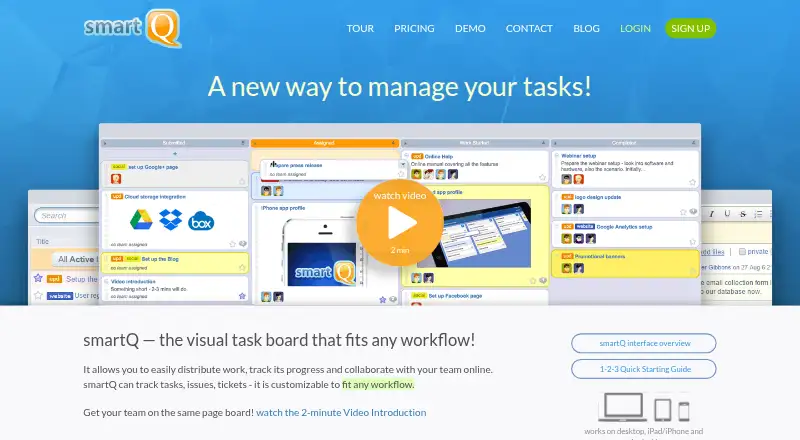
smartQ is an online workflow management and task-tracking application for teams handling projects, issues, tickets, and help-desk work. It combines Kanban-style boards with list and dashboard views, customizable workflows, ticket fields, team roles, notes, files, threaded discussions, reports, and ticket task lists. External users can access work through email or forms, while web, iOS, and Android availability supports teams working across devices. Its focus fits organizations that want ticket-style coordination without committing to a higher starting price.
Pricing is straightforward across two monthly plans. Basic costs $7 per user per month and includes unlimited project boards, 0.5 GB per user storage, unlimited external users, email notifications, and reports. Pro costs $10 per user per month and adds 1 GB per user storage and custom ticket fields while retaining the Basic features. A 30-day free trial provides an evaluation period, but there is no free plan. The paid tiers suit teams that need external participation and reporting; Pro is the more suitable choice when custom ticket fields are important.
The feature set extends beyond visual boards through rule-based workflow automation, email-based ticket creation, CSV and Excel report exports, an open API, and integrations including Office 365, Gmail, Google Drive, Dropbox, OneDrive, Box, Slack, Zapier, and Google Apps. That breadth makes smartQ a practical fit for teams connecting ticket work with communication and file services. However, teams seeking recurring ticket creation as a native capability should look elsewhere or plan around Zapier. Choose smartQ for affordable, structured ticket workflows with mobile access and external users; consider alternatives if deeper workflow maturity or broader native automation is a priority.
Your product? Our editors can test smartQ in depth and publish a review, labelled as paid · from $149/mo →
smartQ pricing
All 2 smartQ plans and prices →
smartQ fact sheet
| Free plan | No |
|---|---|
| Paid from | $7/user/mo |
| Automation runs | Not verified |
| Approval workflows | Not verified |
| Intake forms | Not verified |
| Task dependencies | Not verified |
| Recurring work | Not verified |
| Reporting level | Not verified |
| Free trial | 30 days · no card needed |
| Deployment | Cloud, Mobile |
| Platforms | Web, iOS, Android |
| Compliance & security | SOC 2 |
| Support | Email, Docs · 24/7 |
| Built for | Small business, Mid-market, Enterprise (editorial estimate) |
| Integrations | 14 integrations: Office 365, Gmail, Google Drive, Dropbox, OneDrive, Box … |
| Pricing | 30-day trial (source) |
| Website | getsmartq.com |
| Facts checked | 20 Sep 2026 |
smartQ integrations
smartQ lists 14 integrations on its own site.
- Office 365
- Gmail
- Google Drive
- Dropbox
- OneDrive
- Box
- Slack
- Amazon Alexa
- 8am
- Firefly
- SpiderScribe
- BigCommerce
- Zapier
- Google Apps
Alternatives to smartQ
- ZapierBroad app connectivity and flexible workflows, with paid features starting at $19.99/month.9.4
- MakeVisual, multi-step automation for teams that need broad app connectivity.9.3
- Microsoft Power AutomateA Microsoft-centered automation suite with cloud flows, desktop RPA, approvals, and process mining.9.1


Also Ranked In
smartQ is ranked in 2 of our directories.
Used smartQ? Be the first to review it
The editor score above is our own research. What this page doesn't have yet is a reader's view — what you used smartQ for, what worked and what didn't. No stars are seeded and no review is paid for; an editor reads every one before it appears.
Write a reviewTwo minutes · verified accounts only · read by an editor before it appears
Featured on iTechGuides

smartQ is listed in our Workflow Management Software directory. Add the badge to your site — it links back to this page.
<a href="https://www.itechguides.com/products/smartq/"><img src="https://www.itechguides.com/best/badge/smartq.svg" alt="Featured on iTechGuides" width="230" height="46"></a>
Reviewed by iTechGuides Editors · Editorial team · Updated Oct 2026
Advertiser disclosure: iTechGuides is reader-supported. Vendors can pay for top positions in our rankings and for a place on other products' pages, and we may earn a commission when you click some links. Bought places stand at the number bought; this page and our disclosure say so. Paying vendors may get a fuller, more detailed review from our editors, and that review can change their score. How we rank.
Last updated · How we research and update