Sleek
Sleek: A focused, free formatter for six SQL dialects with useful VS Code workflows. Ranked #10 of 25 in SQL Linters and Formatters by our editors (7.7/10); pricing: Free plan; best for VS Code users wanting simple multi-dialect formatting.
At a glance
- Editor score7.7 / 10
- PricingFree plan
- Best forVS Code users wanting simple multi-dialect formatting
- Free planYes
- Paid fromFree
- Supported SQL dialectsPostgreSQL, MySQL, MariaDB, SQLite, SQL Server, Oracle
- Automatic fixesYes
- Facts checked20 Sep 2026
Where it wins
- Formats six SQL dialects from the CLI or VS Code
- Supports glob patterns, standard input, and check-only mode
- Offers format-on-save and format-on-paste in VS Code
Where it doesn't
- No custom rules for project-specific formatting standards
- No CI integration
- Primarily a formatter rather than a full SQL linter
Our verdict on Sleek
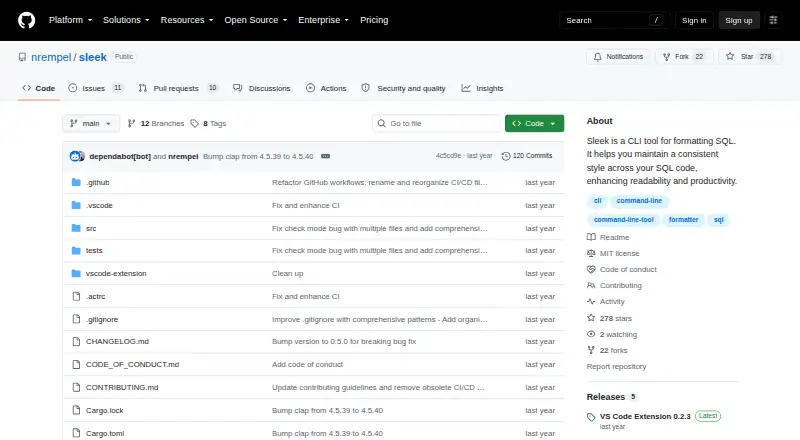
Sleek is an open-source SQL formatting tool for developers who want consistent style across SQL files and queries. Its Rust-based command-line interface formats files, glob patterns, or standard input, while check-only mode verifies formatting without changing files. Sleek supports PostgreSQL, MySQL, MariaDB, SQLite, SQL Server, and Oracle, making it a practical fit for teams working across several common SQL dialects. Windows, macOS, and Linux are supported, and the VS Code extension adds document and selection formatting.
The strongest part of Sleek is its formatting control without a large configuration surface. Developers can set indentation, keyword casing, spacing between queries, and trailing-newline behavior. Glob support helps apply formatting across multiple files, while check-only mode provides a non-modifying workflow for reviewing consistency. These capabilities suit individual developers and small teams that want predictable SQL presentation without adopting a broader linting system. Sleek has no custom rules, so it is less suitable when a project needs organization-specific checks beyond its built-in formatting options.
VS Code users get the most complete experience. The extension supports format-on-save and format-on-paste, status indicators, and automatic CLI downloading and update checking. That combination reduces the setup work required to bring command-line formatting into an editor workflow. Sleek remains a narrow tool: it focuses on formatting rather than providing a full SQL linting feature set, and it has no CI integration. Choose it for straightforward multi-dialect formatting in VS Code or scripted file workflows; choose an alternative when custom rules, broader linting, or CI-focused enforcement is required.
Your product? Our editors can test Sleek in depth and publish a review, labelled as paid · from $149/mo →
Sleek pricing
Sleek fact sheet
| Free plan | Yes |
|---|---|
| Paid from | Free |
| Supported SQL dialects | PostgreSQL, MySQL, MariaDB, SQLite, SQL Server, Oracle |
| Automatic fixes | Yes |
| Custom rules | No |
| Editor extensions | Yes |
| CI/CD integration | Not verified |
| Configuration file | Not verified |
| Deployment | Desktop |
| Platforms | Windows, macOS, Linux |
| Support | Community, Docs |
| Built for | Solo, Small business, Mid-market (editorial estimate) |
| Integrations | 1 integrations: Visual Studio Code |
| Pricing | Free plan |
| Website | github.com |
| Facts checked | 20 Sep 2026 |
Sleek integrations
Sleek lists 1 integrations on its own site.
- Visual Studio Code
Alternatives to Sleek
- SQLFluffConfigurable SQL linting with autofix, templating, plugins, and CI workflows.9.4
- SqruffA focused open-source choice for dbt teams needing linting, formatting, and CI workflows.9.1
- pgFormatterA configurable, open-source formatter for PostgreSQL-focused SQL workflows.8.8

Also Ranked In
Sleek is ranked in 2 of our directories.
Used Sleek? Be the first to review it
The editor score above is our own research. What this page doesn't have yet is a reader's view — what you used Sleek for, what worked and what didn't. No stars are seeded and no review is paid for; an editor reads every one before it appears.
Write a reviewTwo minutes · verified accounts only · read by an editor before it appears
Featured on iTechGuides

Sleek is listed in our SQL Linters and Formatters directory. Add the badge to your site — it links back to this page.
<a href="https://www.itechguides.com/products/sleek/"><img src="https://www.itechguides.com/best/badge/sleek.svg" alt="Featured on iTechGuides" width="230" height="46"></a>
Reviewed by iTechGuides Editors · Editorial team · Updated Oct 2026
Advertiser disclosure: iTechGuides is reader-supported. Vendors can pay for top positions in our rankings and for a place on other products' pages, and we may earn a commission when you click some links. Bought places stand at the number bought; this page and our disclosure say so. Paying vendors may get a fuller, more detailed review from our editors, and that review can change their score. How we rank.
Last updated · How we research and update