SkyEmu
SkyEmu: A focused, portable emulator with strong tools and beta-quality Nintendo DS support. Ranked #17 of 53 in Multi-System Emulators by our editors (5.7/10); pricing: Free plan; best for portable users needing focused handheld emulation.
At a glance
- Editor score5.7 / 10
- PricingFree plan
- Best forPortable users needing focused handheld emulation
- Free planYes
- Paid fromNone
- Supported systems4
- Facts checked20 Sep 2026
Where it wins
- Supports Game Boy, Game Boy Color, Game Boy Advance, and Nintendo DS
- Save states, shaders, cheats, debugging, rewind, and fast-forward included
- Runs across web, desktop, mobile, and API environments
Where it doesn't
- Nintendo DS emulation is identified as beta quality
- Focused on four handheld systems rather than broader system coverage
- Official BIOS and firmware are recommended for greater accuracy
Our verdict on SkyEmu
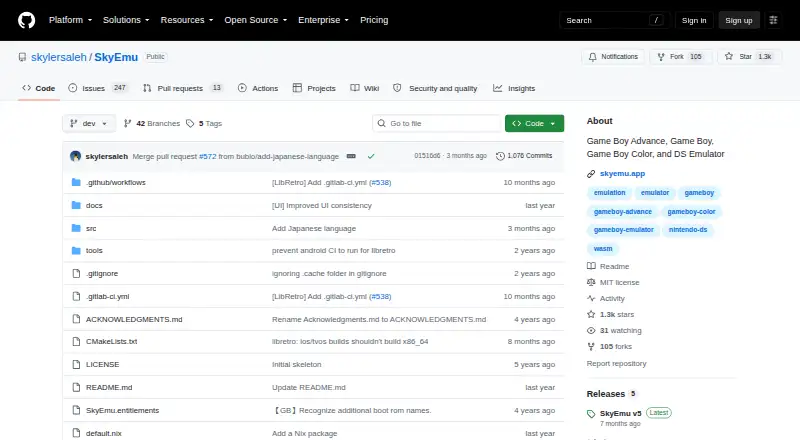
SkyEmu is a free, open-source emulator for Game Boy, Game Boy Color, Game Boy Advance, and Nintendo DS software. It is aimed at users who want focused handheld emulation across web, Windows, macOS, Linux, iOS, and Android, with an API for scripting and automation. Native desktop and mobile builds sit alongside a browser-based progressive web app, making the product suitable for portable play and multi-device access.
Its strongest area is feature depth for a focused emulator. SkyEmu supports persistent save states with screenshot previews, fast-forward and rewind, controller and rumble support, configurable keybinds, ZIP-compressed ROM loading, and display options including upscaling shaders, color correction, and screen ghosting. An Action Replay cheat engine and CPU, MMIO, and memory debugging tools add value for users who want more than basic playback. BIOS and boot-ROM loading are supported, while bundled open-source replacements mean those files are not required; official BIOS or firmware is recommended for greater accuracy.
The platform fit is also notable. Google Drive integration supports the product’s multi-device orientation, while RetroArch/libretro integration connects it with an established emulation ecosystem. The REST-like API gives technical users a path to scripting and automation beyond the graphical applications. SkyEmu is a strong choice for portable users who mainly need these four handheld systems and appreciate open-source software, display controls, saves, cheats, or debugging. It is less suitable for anyone seeking broad console coverage or relying on Nintendo DS emulation as a finished, fully mature feature, since the project identifies DS support as beta quality.
SkyEmu pricing
SkyEmu fact sheet
| Free plan | Yes |
|---|---|
| Paid from | None |
| Supported systems | 4 |
| Android support | Yes |
| Arcade support | Not verified |
| Netplay | Not verified |
| BIOS required | No |
| Shader/upscaling | Yes |
| License | Open-source |
| Deployment | Desktop, Mobile |
| Platforms | Web, Windows, macOS, Linux, iOS, Android |
| Built for | Solo, Small business (editorial estimate) |
| Integrations | 2 integrations: RetroArch/libretro, Google Drive |
| Pricing | Free plan |
| Website | github.com |
| Facts checked | 20 Sep 2026 |
SkyEmu integrations
SkyEmu lists 2 integrations on its own site.
- RetroArch/libretro
- Google Drive
Alternatives to SkyEmu
- RetroArchA broad, free emulator hub with one interface for collections, cores, controls, and play.9.0
- FoxolFoxol combines multi-system emulation, cloud saves, and multiplayer across web, desktop, and mobile.8.5
- ProvenanceA broad Apple-focused emulator with synced libraries, metadata, cheats, and multiplayer.8.0


Also listed in
Used SkyEmu? Be the first to review it
The editor score above is our own research. What this page doesn't have yet is a reader's view — what you used SkyEmu for, what worked and what didn't. No stars are seeded and no review is paid for; an editor reads every one before it appears.
Write a reviewTwo minutes · verified accounts only · read by an editor before it appears
Featured on iTechGuides

SkyEmu is listed in our Multi-System Emulators directory. Add the badge to your site — it links back to this page.
<a href="https://www.itechguides.com/products/skyemu/"><img src="https://www.itechguides.com/best/badge/skyemu.svg" alt="Featured on iTechGuides" width="230" height="46"></a>
Reviewed by iTechGuides Editors · Editorial team · Updated Sep 2026
Advertiser disclosure: iTechGuides is reader-supported. We may earn a commission when you click some links. How we rank.
Last updated · How we research and update