
Foxol
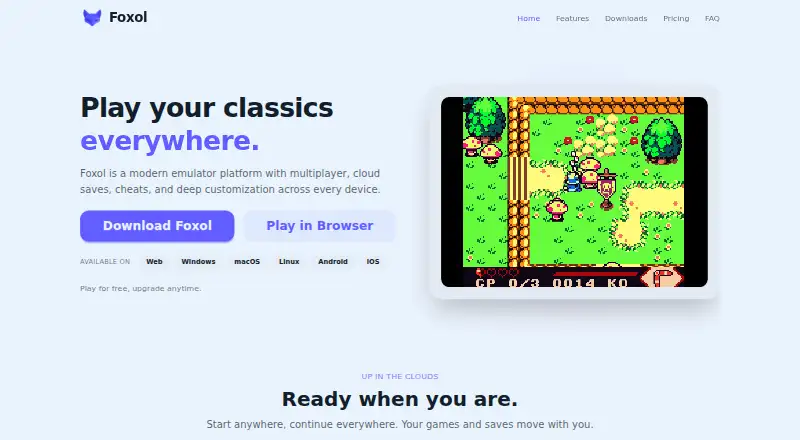
Foxol: Foxol combines multi-system emulation, cloud saves, and multiplayer across web, desktop, and mobile. Ranked #2 of 53 in Multi-System Emulators by our editors (9.1/10); pricing: Free plan; best for cross-device users wanting cloud saves and multiplayer.
At a glance
- Editor score9.1 / 10
- PricingFree plan
- Best forCross-device users wanting cloud saves and multiplayer
- Free planYes
- Supported systems20
- Facts checked20 Sep 2026
Where it wins
- Supports more than 20 classic gaming systems
- Cloud save synchronization and cross-device play
- Online multiplayer, remote co-op, and Link Cable functionality
Where it doesn't
- Requires legally obtained classic game files
- Focused on classic systems rather than current consoles
- Advanced features may suit enthusiasts more than casual players
Our verdict on Foxol
Foxol is a cross-platform emulator platform for playing legally obtained classic game files in a browser, on Windows, macOS, Linux, iOS, and Android. It supports more than 20 gaming systems, including Game Boy, Game Boy Color, Game Boy Advance, Nintendo DS, NES, SNES, Nintendo 64, Sega Genesis, and PlayStation. Its strongest fit is for players who move between devices and want cloud-synchronized progress, multiplayer options, and configurable controls rather than a single-system emulator.
Cloud saves and cross-device play are central to Foxol's appeal. The platform also provides manual and automatic save states, online multiplayer, remote co-op, and Online Link Cable functionality. Compatibility with RetroAchievements, Chromecast, Epilogue GB Operator, and Nintendo WFC adds connections to achievement tracking, casting, hardware, and network features. Shaders, visual presets, built-in and custom cheat codes, ROM patching, save editing, and controller, keyboard, and touch customization give experienced users room to adjust how games run and how controls feel.
Foxol has a freemium model with a free plan, while Foxol Plus is associated with multiplayer, cloud saves, and cross-device play. The platform's broad feature set makes it a practical choice for cross-device users who want one emulator environment across web, desktop, and mobile. It is less suitable for someone seeking modern-console emulation or a narrowly focused single-system application. Players should also expect to bring legally obtained classic game files and may find the range of configuration options more relevant if they want multiplayer, save management, achievements, or visual customization.
Your product? Our editors can test Foxol in depth and publish a review, labelled as paid · from $149/mo →
Foxol pricing
All 1 Foxol plans and prices →
Foxol fact sheet
| Free plan | Yes |
|---|---|
| Paid from | Not verified |
| Supported systems | 20 |
| Android support | Yes |
| Arcade support | Not verified |
| Netplay | Yes |
| BIOS required | Not verified |
| Shader/upscaling | Yes |
| License | Not verified |
| Deployment | Cloud, Desktop, Mobile |
| Platforms | Web, Windows, macOS, Linux, iOS, Android |
| Support | Email, Community |
| Built for | Solo, Small business (editorial estimate) |
| Integrations | 4 integrations: RetroAchievements, Chromecast, Epilogue GB Operator, Nintendo WFC |
| Pricing | Free plan (source) |
| Website | play.foxol.app |
| Facts checked | 20 Sep 2026 |
Foxol integrations
Foxol lists 4 integrations on its own site.
- RetroAchievements
- Chromecast
- Epilogue GB Operator
- Nintendo WFC
Alternatives to Foxol
- RetroArchA broad, free emulator hub with one interface for collections, cores, controls, and play.9.4
- aresA broad, free desktop emulator with preservation-focused tools and system-specific BIOS requirements.8.8
- ProvenanceA broad Apple-focused emulator with synced libraries, metadata, cheats, and multiplayer.8.7


Foxol vs the competition


Compare Foxol with any tool side by side →
Used Foxol? Be the first to review it
The editor score above is our own research. What this page doesn't have yet is a reader's view — what you used Foxol for, what worked and what didn't. No stars are seeded and no review is paid for; an editor reads every one before it appears.
Write a reviewTwo minutes · verified accounts only · read by an editor before it appears
Featured on iTechGuides

Foxol is listed in our Multi-System Emulators directory. Add the badge to your site — it links back to this page.
<a href="https://www.itechguides.com/products/foxol/"><img src="https://www.itechguides.com/best/badge/foxol.svg" alt="Featured on iTechGuides" width="230" height="46"></a>
Reviewed by iTechGuides Editors · Editorial team · Updated Oct 2026
Advertiser disclosure: iTechGuides is reader-supported. Vendors can pay for top positions in our rankings and for a place on other products' pages, and we may earn a commission when you click some links. Bought places stand at the number bought; this page and our disclosure say so. Paying vendors may get a fuller, more detailed review from our editors, and that review can change their score. How we rank.
Last updated · How we research and update