
Skanpage
Skanpage: A focused Linux scanner with ADF support, PDF output, and Tesseract OCR. Ranked #13 of 22 in Scanner Software by our editors (7.2/10); pricing: Free plan; best for free Linux OCR document scanning.
At a glance
- Editor score7.2 / 10
- PricingFree plan
- Best forFree Linux OCR document scanning
- Free planYes
- Paid fromFree
- OCR includedYes
- Facts checked20 Sep 2026
Where it wins
- Supports flatbed and automatic document feeder scanners
- Organizes, reorders, rotates, and deletes pages
- Saves documents as PDFs or image files with Tesseract OCR
Where it doesn't
- Available for Linux rather than Windows or macOS
- Output is centered on PDF and image files
- OCR is provided through the Tesseract engine
Our verdict on Skanpage
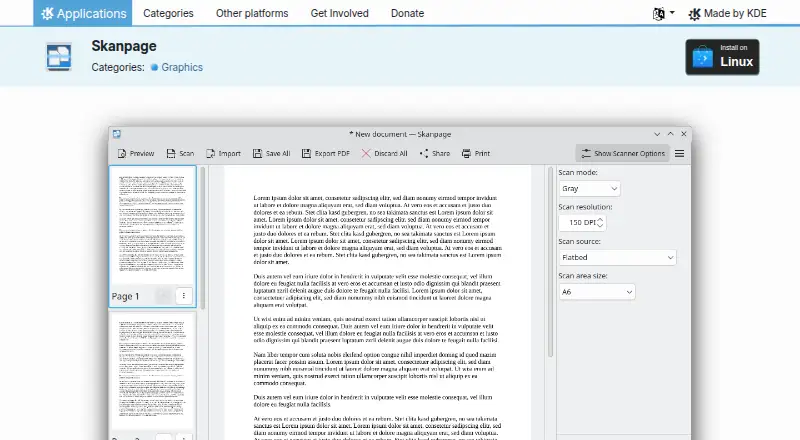
Skanpage is a Linux desktop scanning application from KDE for people who need to capture and organize multi-page documents. It supports both flatbed and automatic document feeder scanners, with configurable scanner-device options for different hardware setups. Pages can be reordered, rotated, or deleted before saving, making the workflow suitable for documents that need basic cleanup and assembly. Skanpage is open-source software distributed under the GPL-2.0-or-later license, and its free availability makes it a practical fit for Linux users seeking a document scanner without a paid plan.
Its strongest feature set is the end-to-end multi-page workflow. Users can scan a batch, arrange the pages, remove unwanted sheets, and save the result as a PDF or image file. Support for both flatbed and ADF scanners gives it more flexibility than a flatbed-only utility, while configurable scanner-device options provide control over the connected hardware. The application remains focused on scanning and document preparation rather than a broader document-management system, which suits straightforward desktop capture tasks.
OCR through the Tesseract engine adds text-recognition capability to the scanning process. That makes Skanpage more useful for users who need searchable or machine-readable scanned content alongside standard PDF and image saving. The main trade-off is its platform focus: Skanpage is designed for Linux, so organizations working across Windows or macOS will need another option for those systems. Choose it for free, open-source Linux scanning with multi-page handling, ADF support, and OCR; look elsewhere if you need a cross-platform workflow or a wider ecosystem around document storage and destinations.
Your product? Our editors can test Skanpage in depth and publish a review, labelled as paid · from $149/mo →
Skanpage pricing
Skanpage fact sheet
| Free plan | Yes |
|---|---|
| Paid from | Free |
| Supported platforms | Linux |
| OCR included | Yes |
| ADF support | Yes |
| Duplex scanning | Not verified |
| Output formats | |
| Cloud destinations | Not verified |
| Deployment | Desktop |
| Platforms | Linux |
| Support | Community, Docs |
| Built for | Solo, Small business (editorial estimate) |
| Pricing | Free plan |
| Website | apps.kde.org |
| Facts checked | 20 Sep 2026 |
Alternatives to Skanpage
- NAPS2A capable free scanner utility for searchable PDFs, batch workflows, and automation.9.4
- ScanSnap HomeA capable free companion for organizing scans across desktop and mobile.9.2
- PaperStream CaptureA capable Windows scanner workflow for batch capture, extraction, checking, and routing.8.9

See all Skanpage alternatives →
Used Skanpage? Be the first to review it
The editor score above is our own research. What this page doesn't have yet is a reader's view — what you used Skanpage for, what worked and what didn't. No stars are seeded and no review is paid for; an editor reads every one before it appears.
Write a reviewTwo minutes · verified accounts only · read by an editor before it appears
Featured on iTechGuides

Skanpage is listed in our Scanner Software directory. Add the badge to your site — it links back to this page.
<a href="https://www.itechguides.com/products/skanpage/"><img src="https://www.itechguides.com/best/badge/skanpage.svg" alt="Featured on iTechGuides" width="230" height="46"></a>
Reviewed by iTechGuides Editors · Editorial team · Updated Oct 2026
Advertiser disclosure: iTechGuides is reader-supported. Vendors can pay for top positions in our rankings and for a place on other products' pages, and we may earn a commission when you click some links. Bought places stand at the number bought; this page and our disclosure say so. Paying vendors may get a fuller, more detailed review from our editors, and that review can change their score. How we rank.
Last updated · How we research and update