PaperStream Capture
PaperStream Capture: A focused Windows capture tool for batch scanning, extraction, and document routing. Ranked #9 of 27 in Document Scanning Software by our editors (8.1/10); pricing: Free plan · 60-day trial; best for windows production scanning with advanced separation.
At a glance
- Editor score8.1 / 10
- PricingFree plan · 60-day trial
- Best forWindows production scanning with advanced separation
- Free planYes
- OCR languages28 languages
- Founded1960 · Ishikawa, Japan
- Facts checked20 Sep 2026
Where it wins
- Advanced separation using barcodes, blank pages, patch codes, page counts, and OCR
- OCR, form extraction, searchable PDFs, and image quality checking
- Broad output options including SharePoint, cloud storage, FTP/SFTP, and applications
Where it doesn't
- Windows-only deployment limits platform flexibility
- Advanced form recognition and redaction require a Pro edition
- Production workflows are centered on RICOH fi and SP Series scanners
Our verdict on PaperStream Capture
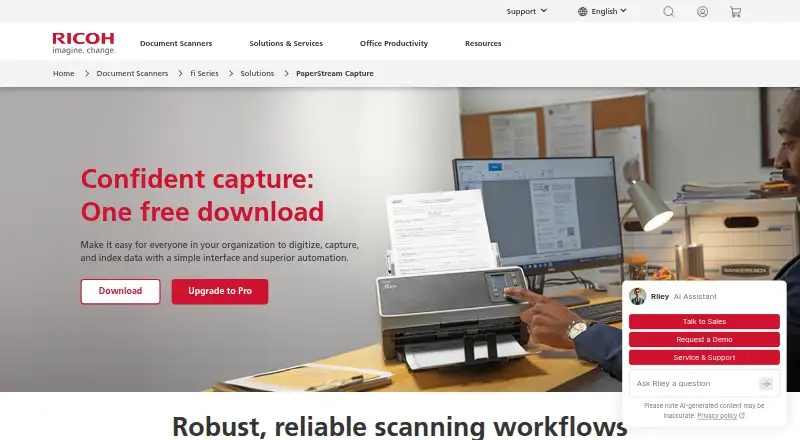
PaperStream Capture is Windows-based image capture software for organizations digitizing paper documents with RICOH fi and SP Series scanners. It supports single-button scanning, configurable scan jobs, batch processing, OCR, indexing, document separation, quality checks, searchable PDFs, and delivery to multiple destinations. The standard edition is available as a free download, while Pro and Pro Premium add capabilities for more advanced document workflows. It is best suited to teams running recurring production scans rather than occasional desktop capture.
Its strongest area is batch processing control. Separation can use barcodes, blank pages, patch codes, page counts, and OCR, while zonal OCR, barcode recognition, and form-based extraction support structured data capture. Image quality checking covers multi-feed, blank-page, and scan errors. Output options include folders, network folders, SharePoint, email, FTP/SFTP, printers, and applications, with integrations including Box, DocuWare, Laserfiche, OneDrive, Dropbox, Google Drive, and Internet FAX. Scanner Central Admin adds centralized profile management for distributed scanning environments.
The product line also creates a clear progression by workflow complexity. PaperStream Capture covers core scanning, profiles, batch work, OCR, indexing, and searchable PDF output. PaperStream Capture Pro adds advanced form recognition, OCR and barcode recognition, redaction, multi-station workflows, and subscription updates. Pro Premium includes those capabilities plus file import and production scanner compatibility. A 60-day trial applies to Pro Premium. Choose PaperStream Capture for Windows-based RICOH scanning operations that need detailed separation and routing; organizations seeking broader platform coverage or workflows independent of supported scanners should consider alternatives.
Questions about PaperStream Capture
Is there a free trial of PaperStream Capture? Yes: a 60-day free trial.
What does PaperStream Capture run on? Windows. It runs as a desktop app.
What does PaperStream Capture integrate with? 12 integrations, including SharePoint, SharePoint Online, FTP, SFTP and Box.
Who is PaperStream Capture built for? Small businesses, mid-market companies and enterprises (our editorial estimate).
Your product? Our editors can test PaperStream Capture in depth and publish a review, labelled as paid · from $149/mo →
PaperStream Capture pricing
All 3 PaperStream Capture plans and prices →
PaperStream Capture fact sheet
| Free plan | Yes |
|---|---|
| Paid from | Not verified |
| OCR languages | 28 languages |
| Scanner support | Yes |
| Camera capture | Not verified |
| Batch scanning | Yes |
| Searchable PDF | Yes |
| Supported platforms | Windows |
| Export formats | Bitmap, TIFF, Multi-TIFF, JPEG, JPEG2000, Searchable PDF, PDF, PDF/A, PNG, RTF, Word, Excel, PowerPoint |
| Free trial | 60 days |
| Deployment | Desktop |
| Platforms | Windows |
| Support | Email, Phone, Docs |
| Built for | Small business, Mid-market, Enterprise (editorial estimate) |
| Integrations | 12 integrations: SharePoint, SharePoint Online, FTP, SFTP, Box, DocuWare … |
| Pricing | Free plan · 60-day trial (source) |
| Website | pfu-us.ricoh.com |
| Facts checked | 20 Sep 2026 |
PaperStream Capture integrations
PaperStream Capture lists 12 integrations on its own site.
- SharePoint
- SharePoint Online
- FTP
- SFTP
- Box
- DocuWare
- Laserfiche
- Microsoft OneDrive
- Dropbox
- Google Drive
- Internet FAX
Alternatives to PaperStream Capture
- NAPS2A capable no-cost scanner app with broad driver support, OCR, and automation.9.4
- ScanSnap HomeA free ScanSnap companion for organized scanning, OCR, search, and cloud export.9.2
- Brother iPrint&ScanA capable free companion app for Brother owners who need everyday scanning tools.9.0
See all PaperStream Capture alternatives →
Also Ranked In
PaperStream Capture is ranked in 2 of our directories.
Used PaperStream Capture? Be the first to review it
The editor score above is our own research. What this page doesn't have yet is a reader's view — what you used PaperStream Capture for, what worked and what didn't. No stars are seeded and no review is paid for; an editor reads every one before it appears.
Write a reviewTwo minutes · verified accounts only · read by an editor before it appears
Featured on iTechGuides

PaperStream Capture is listed in our Document Scanning Software directory. Add the badge to your site — it links back to this page.
<a href="https://www.itechguides.com/products/paperstream-capture/"><img src="https://www.itechguides.com/best/badge/paperstream-capture.svg" alt="Featured on iTechGuides" width="230" height="46"></a>
Reviewed by iTechGuides Editors · Editorial team · Updated Nov 2026
Advertiser disclosure: iTechGuides is reader-supported. Vendors can pay for top positions in our rankings and for a place on other products' pages, and we may earn a commission when you click some links. Bought places stand at the number bought; this page and our disclosure say so. Paying vendors may get a fuller, more detailed review from our editors, and that review can change their score. How we rank.
Last updated · How we research and update