SideSave
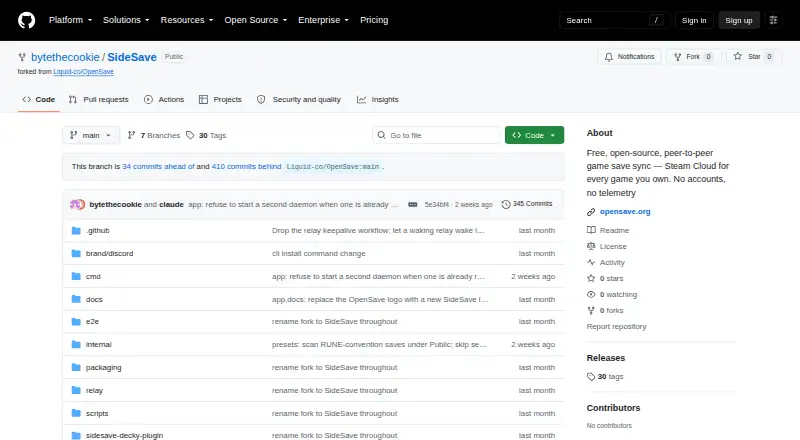
SideSave: A free Linux save manager with snapshots, branches, conflict detection, and peer-to-peer sync. Ranked #21 of 26 in Game Save Managers by our editors (7.2/10); pricing: Free plan; best for linux users needing peer-to-peer snapshots.
At a glance
- Editor score7.2 / 10
- PricingFree plan
- Best forLinux users needing peer-to-peer snapshots
- Free planYes
- Paid fromFree
- Automatic backupYes
- Facts checked20 Sep 2026
Where it wins
- Automatic snapshots preserve changes as game save data updates.
- Branches and sync-lineage conflict detection protect versioned save history.
- LAN, relay, and optional cloud mirroring support flexible synchronization.
Where it doesn't
- Linux is the only supported platform.
- Scheduled backups are not included.
- Building from source is required because releases are not published.
Our verdict on SideSave
SideSave is a free, open-source game-save synchronization tool for non-Steam games added to Steam as shortcuts. It runs on Linux and includes a desktop application, command-line client, background daemon, and Steam Deck Decky Loader plugin. Automatic game scanning and manual folder tracking let users select saves, while whole-save and single-file restoration provide manual recovery options. It is aimed at Linux users who need more control than a platform-specific cloud-save system provides.
Its strongest area is versioned synchronization. SideSave automatically creates snapshots when tracked save data changes, then organizes those snapshots with branches. Peer-to-peer synchronization works over a local network or through an internet relay room, while conflict detection uses sync lineage to identify divergent histories. This combination suits users who move saves between Linux devices and want to preserve multiple versions rather than simply overwrite one copy.
SideSave also mirrors snapshots to Google Drive, Dropbox, OneDrive, WebDAV, webhooks, or a local/NAS folder. However, scheduled backups are not included, and restoration is manual. Setup requires building the application from source because the project currently does not publish releases. The public relay is not end-to-end encrypted, according to the project privacy document. Choose SideSave if Linux support, peer-to-peer transfer, branches, and file-level recovery are priorities. Choose an alternative if you need another operating system, scheduled backup jobs, or a packaged release workflow.
Your product? Our editors can test SideSave in depth and publish a review, labelled as paid · from $149/mo →
SideSave pricing
SideSave fact sheet
| Free plan | Yes |
|---|---|
| Paid from | Free |
| Automatic backup | Yes |
| Cloud synchronization | Yes |
| Scheduled backups | No |
| Version history | Yes |
| Game detection | Both |
| Supported platforms | Linux |
| Restore options | Manual |
| Deployment | Cloud, Self-hosted, Desktop, Browser extension |
| Platforms | Linux |
| Support | Community, Docs |
| Built for | Solo, Small business (editorial estimate) |
| Integrations | 6 integrations: Google Drive, Dropbox, OneDrive, WebDAV, webhook, local/NAS folder |
| Pricing | Free plan |
| Website | github.com |
| Facts checked | 20 Sep 2026 |
SideSave integrations
SideSave lists 6 integrations on its own site.
- Google Drive
- Dropbox
- OneDrive
- WebDAV
- webhook
- local/NAS folder
Alternatives to SideSave
- LudusaviA free, open-source save manager with GUI, CLI, retention, and cloud-sync options.9.4
- Game Save GenieA free, open-source save manager with broad game detection and versioned cloud backups.9.3
- GSBSA capable open-source choice for self-hosted sync, versioning, and recovery.9.2
See all SideSave alternatives →
Used SideSave? Be the first to review it
The editor score above is our own research. What this page doesn't have yet is a reader's view — what you used SideSave for, what worked and what didn't. No stars are seeded and no review is paid for; an editor reads every one before it appears.
Write a reviewTwo minutes · verified accounts only · read by an editor before it appears
Featured on iTechGuides

SideSave is listed in our Game Save Managers directory. Add the badge to your site — it links back to this page.
<a href="https://www.itechguides.com/products/sidesave/"><img src="https://www.itechguides.com/best/badge/sidesave.svg" alt="Featured on iTechGuides" width="230" height="46"></a>
Reviewed by iTechGuides Editors · Editorial team · Updated Oct 2026
Advertiser disclosure: iTechGuides is reader-supported. Vendors can pay for top positions in our rankings and for a place on other products' pages, and we may earn a commission when you click some links. Bought places stand at the number bought; this page and our disclosure say so. Paying vendors may get a fuller, more detailed review from our editors, and that review can change their score. How we rank.
Last updated · How we research and update