Ludusavi
Ludusavi: A free, open-source save manager with GUI, CLI, retention, and cloud-sync options. Ranked #1 of 26 in Game Save Managers by our editors (9.4/10); pricing: Free plan; best for broad, free multi-platform save management.
At a glance
- Editor score9.4 / 10
- PricingFree plan
- Best forBroad, free multi-platform save management
- Free planYes
- Paid fromFree
- Automatic backupYes
- Facts checked20 Sep 2026
Where it wins
- Supports file saves, Windows registry data, Proton saves, and screenshots
- Offers both graphical and command-line interfaces
- Works with Rclone, Playnite, and major cloud and network services
Where it doesn't
- Scheduled backups require an external task-automation tool
- Cloud synchronization depends on Rclone or a cloud-backed folder
- Custom game entries may require additional configuration
Our verdict on Ludusavi
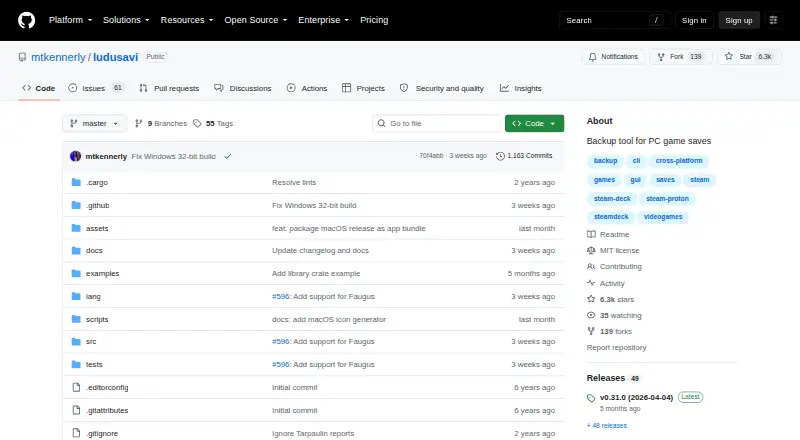
Ludusavi is a free, open-source desktop tool for backing up and restoring PC video-game saves across Windows, macOS, and Linux. It supports multiple game stores and libraries, including Steam, GOG, Epic, Heroic, and Lutris. Its coverage includes file-based saves, Windows registry data, Steam Proton saves, and Steam screenshots, making it suited to players managing saves across different launchers, systems, or storage setups. Both graphical and command-line interfaces are available, and custom game entries can extend its coverage.
Its backup controls go beyond a single copy-and-restore workflow. Ludusavi supports full and differential backup retention, automatic backup, restore options, and backup and restore wrapping around game execution. It also provides manifest-based save-location data and can connect with Playnite. For cloud and network storage, the published integrations include Rclone, Google Drive, OneDrive, Dropbox, Box, FTP, SMB, and WebDAV. Rclone-backed cloud backup and synchronization give the tool a flexible path to remote storage, while the combination of GUI and CLI workflows suits both occasional use and scripted operations.
The main operational consideration is automation: scheduled backups require invoking Ludusavi through an external task-automation tool rather than relying on a built-in scheduler. Cloud synchronization likewise uses Rclone or a cloud-backed folder. Users who want broad save coverage, retention, registry and Proton support, and control over local or remote backup destinations should find the feature set well aligned with those needs. Those seeking an all-in-one scheduler or cloud-sync system without external configuration may prefer a more self-contained alternative.
Your product? Our editors can test Ludusavi in depth and publish a review, labelled as paid · from $149/mo →
Ludusavi pricing
Ludusavi fact sheet
| Free plan | Yes |
|---|---|
| Paid from | Free |
| Automatic backup | Yes |
| Cloud synchronization | Yes |
| Scheduled backups | Yes |
| Version history | Yes |
| Game detection | Both |
| Supported platforms | Multi-platform |
| Restore options | Both |
| Deployment | Desktop |
| Platforms | Windows, macOS, Linux |
| Support | Community, Docs |
| Built for | Solo, Small business (editorial estimate) |
| Integrations | 9 integrations: Rclone, Playnite, Google Drive, OneDrive, Dropbox, Box … |
| Pricing | Free plan |
| Website | github.com |
| Facts checked | 20 Sep 2026 |
Ludusavi integrations
Ludusavi lists 9 integrations on its own site.
- Rclone
- Playnite
- Google Drive
- OneDrive
- Dropbox
- Box
- FTP
- SMB
- WebDAV
Alternatives to Ludusavi
- Game Save GenieA free, open-source save manager with broad game detection and versioned cloud backups.9.3
- GSBSA capable open-source choice for self-hosted sync, versioning, and recovery.9.2
- OpenSaveA free, open-source save manager with advanced sync, rollback, and conflict handling.9.1

See all Ludusavi alternatives →
Ludusavi vs the competition
- Ludusavi vs Game Save Genie
- Ludusavi vs GSBS
- Ludusavi vs OpenSave
- Ludusavi vs Hoard
- Ludusavi vs Gamekeeper
- Ludusavi vs Game Backup Monitor



Compare Ludusavi with any tool side by side →
Used Ludusavi? Be the first to review it
The editor score above is our own research. What this page doesn't have yet is a reader's view — what you used Ludusavi for, what worked and what didn't. No stars are seeded and no review is paid for; an editor reads every one before it appears.
Write a reviewTwo minutes · verified accounts only · read by an editor before it appears
Featured on iTechGuides

Ludusavi is listed in our Game Save Managers directory. Add the badge to your site — it links back to this page.
<a href="https://www.itechguides.com/products/ludusavi/"><img src="https://www.itechguides.com/best/badge/ludusavi.svg" alt="Featured on iTechGuides" width="230" height="46"></a>
Reviewed by iTechGuides Editors · Editorial team · Updated Oct 2026
Advertiser disclosure: iTechGuides is reader-supported. Vendors can pay for top positions in our rankings and for a place on other products' pages, and we may earn a commission when you click some links. Bought places stand at the number bought; this page and our disclosure say so. Paying vendors may get a fuller, more detailed review from our editors, and that review can change their score. How we rank.
Last updated · How we research and update