
OpenSave
OpenSave: A free, open-source save manager with advanced sync, rollback, and conflict handling. Ranked #4 of 26 in Game Save Managers by our editors (9.1/10); pricing: Free plan; best for advanced peer-to-peer save synchronization.
At a glance
- Editor score9.1 / 10
- PricingFree plan
- Best forAdvanced peer-to-peer save synchronization
- Free planYes
- Paid fromFree
- Automatic backupYes
- Facts checked7 Oct 2026
Where it wins
- Peer-to-peer, LAN, and relay-room internet synchronization
- Versioned branches with whole-save and single-file rollback
- Automatic detection across Steam, emulators, GOG, Epic, and repacks
Where it doesn't
- No mobile apps; it runs on Windows, macOS, Linux and Steam Deck
- Cloud backup is optional rather than part of the core sync model
- Advanced features may exceed the needs of simple local backups
Our verdict on OpenSave
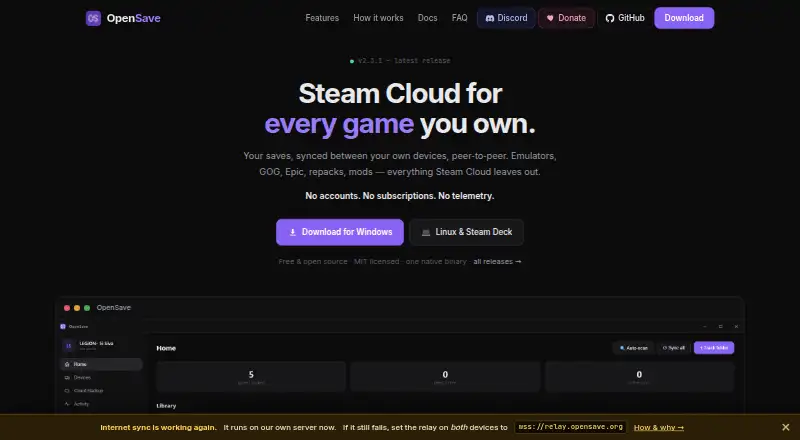
OpenSave is an open-source game-save manager for players who need to synchronize saves across devices without relying on Steam, an account, or a subscription. It automatically detects saves from Steam, emulators, GOG, Epic, and repacks, while manual tracking covers folders or individual files. The product is aimed at users managing multiple gaming environments, including Steam Deck through its official Flatpak, as well as headless systems and services through its command-line client.
Its standout capability is the combination of automatic change watching, peer-to-peer synchronization, LAN synchronization, and internet synchronization through relay rooms. Versioned snapshot history adds branches, conflict detection, and selectable resolution choices. Rollback works at both the whole-save and single-file level, giving users more control than a simple folder-copy workflow. Optional cloud backup can extend that setup to Google Drive, Dropbox, OneDrive, WebDAV, webhook destinations, or local and NAS folders.
OpenSave fits players who value local control, detailed save history, and flexible synchronization paths. Its open-source, free model also avoids a subscription requirement, while the range of tracking and restore options supports more involved libraries. Platform coverage is broad: Windows (installer or portable), macOS (one app for Apple Silicon and Intel), Linux (tarball or Flatpak) and Steam Deck, and since version 2.4.0 saves relayed between your own devices are end-to-end encrypted. Players who only want a basic, low-configuration backup tool should choose a simpler alternative; users comfortable with branches, conflict choices, and multiple sync methods should find OpenSave the more suitable fit.
Your product? Our editors can test OpenSave in depth and publish a review, labelled as paid · from $149/mo →
OpenSave pricing
OpenSave fact sheet
| Free plan | Yes |
|---|---|
| Paid from | Free |
| Automatic backup | Yes |
| Cloud synchronization | Yes |
| Scheduled backups | Not verified |
| Version history | Yes |
| Game detection | Both |
| Supported platforms | Multi-platform |
| Restore options | Manual |
| Deployment | Desktop, Self-hosted |
| Platforms | Windows, macOS, Linux |
| Support | Community, Docs |
| Built for | Solo, Small business (editorial estimate) |
| Integrations | 6 integrations: Google Drive, Dropbox, OneDrive, WebDAV, webhook, local/NAS folder |
| Pricing | Free plan |
| Website | opensave.org |
| Facts checked | 7 Oct 2026 |
OpenSave integrations
OpenSave lists 6 integrations on its own site.
- Google Drive
- Dropbox
- OneDrive
- WebDAV
- webhook
- local/NAS folder
Alternatives to OpenSave
- LudusaviA free, open-source save manager with GUI, CLI, retention, and cloud-sync options.9.4
- Game Save GenieA free, open-source save manager with broad game detection and versioned cloud backups.9.3
- GSBSA capable open-source choice for self-hosted sync, versioning, and recovery.9.2
See all OpenSave alternatives →
OpenSave vs the competition
- OpenSave vs Ludusavi
- OpenSave vs Game Save Genie
- OpenSave vs GSBS
- OpenSave vs Hoard
- OpenSave vs Gamekeeper
- OpenSave vs Game Backup Monitor



Compare OpenSave with any tool side by side →
Used OpenSave? Be the first to review it
The editor score above is our own research. What this page doesn't have yet is a reader's view — what you used OpenSave for, what worked and what didn't. No stars are seeded and no review is paid for; an editor reads every one before it appears.
Write a reviewTwo minutes · verified accounts only · read by an editor before it appears
Featured on iTechGuides

OpenSave is listed in our Game Save Managers directory. Add the badge to your site — it links back to this page.
<a href="https://www.itechguides.com/products/opensave/"><img src="https://www.itechguides.com/best/badge/opensave.svg" alt="Featured on iTechGuides" width="230" height="46"></a>
Reviewed by iTechGuides Editors · Editorial team · Updated Oct 2026
Advertiser disclosure: iTechGuides is reader-supported. Vendors can pay for top positions in our rankings and for a place on other products' pages, and we may earn a commission when you click some links. Bought places stand at the number bought; this page and our disclosure say so. Paying vendors may get a fuller, more detailed review from our editors, and that review can change their score. How we rank.
Last updated · How we research and update