
SharePoint Smart Org Chart & Directory
SharePoint Smart Org Chart & Directory: A focused, no-cost org chart for organizations built around Microsoft 365. Ranked #17 of 21 in Org Chart Software by our editors (7.1/10); pricing: Free plan; best for microsoft 365 and SharePoint organizations.
At a glance
- Editor score7.1 / 10
- PricingFree plan
- Best forMicrosoft 365 and SharePoint organizations
- Free planYes
- Paid fromFree
- Facts checked20 Sep 2026
Where it wins
- Free MIT-licensed SPFx web part with no per-user licensing
- Interactive charts, searchable directory, filters, and exports
- Microsoft Graph, Entra ID, Teams, and SharePoint integration
Where it doesn't
- Designed for SharePoint Online rather than a standalone platform
- No direct HRIS connector
- Feature set is narrower outside the Microsoft ecosystem
Our verdict on SharePoint Smart Org Chart & Directory
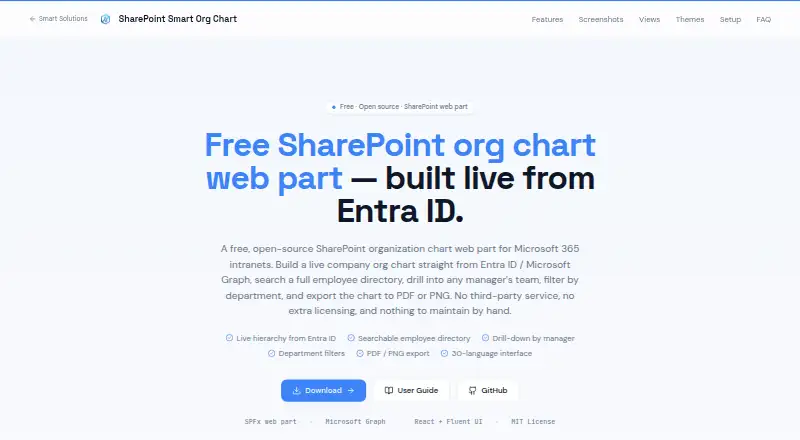
SharePoint Smart Org Chart & Directory is an open-source SPFx web part for Microsoft 365 intranets. It combines a searchable employee directory with interactive organization charts, giving employees ways to browse reporting lines, filter by department or user type, and view employee details. It is aimed at organizations that maintain employee and manager information in Microsoft Entra ID and want an org chart inside SharePoint Online rather than a separate application.
The Free plan is MIT-licensed and has no sign-up or per-user licensing, making the product a straightforward fit for teams seeking a no-cost option. Its Microsoft ecosystem coverage is focused but useful: the web part loads reporting branches through Microsoft Graph, uses Entra ID data, displays Microsoft Teams presence badges, and runs within SharePoint Online. Individual users can also save layout, card, font, and visible-field preferences, while four built-in visual themes provide basic presentation choices.
The strongest feature set is the combination of directory and chart views. Users can switch between card and list views, drill into vertical or horizontal hierarchies, and export chart or directory data as PDF, PNG, or CSV. Lazy loading helps the interface retrieve reporting branches as they are explored. The trade-off is scope: organizations outside the Microsoft ecosystem, or those needing a direct HRIS connection, should consider a broader org chart product. Choose this tool when SharePoint, Entra ID, Graph, and Teams already form the operating environment; look elsewhere when cross-platform deployment or HRIS synchronization is central.
Your product? Our editors can test SharePoint Smart Org Chart & Directory in depth and publish a review, labelled as paid · from $149/mo →
SharePoint Smart Org Chart & Directory pricing
All 1 SharePoint Smart Org Chart & Directory plans and prices →
SharePoint Smart Org Chart & Directory fact sheet
| Free plan | Yes |
|---|---|
| Paid from | Free |
| Employee limit | Not verified |
| CSV import | Not verified |
| Directory sync | Yes |
| HRIS sync | No |
| API access | Not verified |
| Custom employee fields | Not verified |
| Deployment | Cloud |
| Platforms | Web |
| Support | Community, Docs |
| Built for | Small business, Mid-market, Enterprise (editorial estimate) |
| Integrations | 4 integrations: Microsoft SharePoint Online, Microsoft Graph, Microsoft Entra ID, Microsoft Teams |
| Pricing | Free plan (source) |
| Website | sharepointsmartsolutions.com |
| Facts checked | 20 Sep 2026 |
SharePoint Smart Org Chart & Directory integrations
SharePoint Smart Org Chart & Directory lists 4 integrations on its own site.
- Microsoft SharePoint Online
- Microsoft Graph
- Microsoft Entra ID
- Microsoft Teams
Alternatives to SharePoint Smart Org Chart & Directory
- OrganimiA broad org-chart platform with imports, integrations, scenario planning, and a free entry plan.9.4
- OrgChartBuilderA privacy-focused org chart tool with strong scenario planning and limited live integrations.9.2
- FunctionlyA flexible org-planning workspace with a useful free tier and substantial paid jump.9.0


See all SharePoint Smart Org Chart & Directory alternatives →
Also Ranked In
SharePoint Smart Org Chart & Directory is ranked in 2 of our directories.
Used SharePoint Smart Org Chart & Directory? Be the first to review it
The editor score above is our own research. What this page doesn't have yet is a reader's view — what you used SharePoint Smart Org Chart & Directory for, what worked and what didn't. No stars are seeded and no review is paid for; an editor reads every one before it appears.
Write a reviewTwo minutes · verified accounts only · read by an editor before it appears
Featured on iTechGuides

SharePoint Smart Org Chart & Directory is listed in our Org Chart Software directory. Add the badge to your site — it links back to this page.
<a href="https://www.itechguides.com/products/sharepoint-smart-org-chart-directory/"><img src="https://www.itechguides.com/best/badge/sharepoint-smart-org-chart-directory.svg" alt="Featured on iTechGuides" width="230" height="46"></a>
Reviewed by iTechGuides Editors · Editorial team · Updated Oct 2026
Advertiser disclosure: iTechGuides is reader-supported. Vendors can pay for top positions in our rankings and for a place on other products' pages, and we may earn a commission when you click some links. Bought places stand at the number bought; this page and our disclosure say so. Paying vendors may get a fuller, more detailed review from our editors, and that review can change their score. How we rank.
Last updated · How we research and update