
Screencastify
Screencastify: A flexible recorder for educators and Google Workspace users, with strong interactive video tools. Ranked #7 of 131 in Screen Recording Software by our editors (8.5/10); pricing: Free plan; best for educators and Google Workspace users.
At a glance
- Editor score8.5 / 10
- PricingFree plan
- Best forEducators and Google Workspace users
- Free planYes
- Paid from$7/user/mo
- Webcam recordingYes
- Founded2014 · Chicago, Illinois, United States
- Facts checked20 Sep 2026
Where it wins
- Records tabs, full screens, webcams, microphones, and system audio
- Supports captions, transcripts, translations, voiceovers, questions, and polls
- Works across web, Windows, macOS, Linux, and Chrome
Where it doesn't
- The Free plan is limited to 10 videos
- Free recordings are limited to 30 minutes each
- System audio capture is unavailable on Mac computers
Our verdict on Screencastify
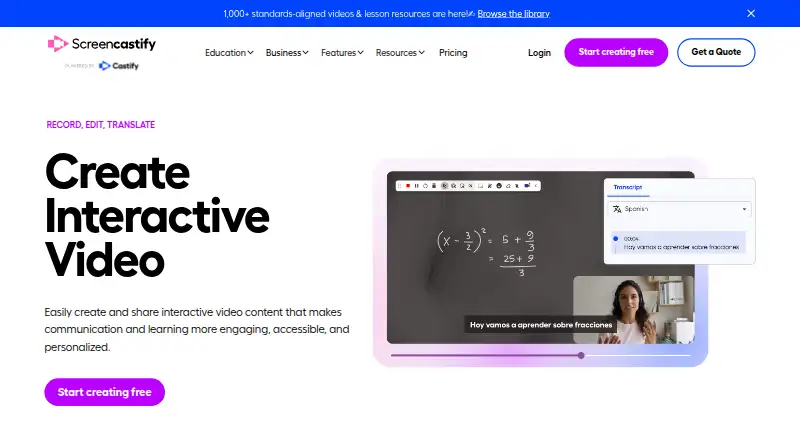
Screencastify is a browser-based video creation platform for educators, trainers, professionals, and other communicators. Its Record tool captures browser tabs, full screens, webcams, microphones, and system audio, while companion tools support editing, annotations, questions, polls, captions, transcripts, translations, sharing, and video assignments. It runs through desktop Google Chrome and supports Windows, macOS, Ubuntu Xorg, and Chromebooks, with a Chrome extension also available. Educators and Google Workspace users are the clearest fit, particularly those creating lessons, demonstrations, training materials, or interactive assignments.
Pricing follows a freemium structure. The Free plan includes up to 10 videos, recordings of up to 30 minutes, recording at up to 1080p, and video uploads with link sharing. Starter costs $7 per user per month with annual billing and adds unlimited videos, recordings of up to 60 minutes, basic editing, questions and polls, and advanced collaboration. Pro costs $10 per user per month with annual billing and adds recordings of up to 180 minutes, video quality up to 4K, AI video enhancements and editing, captions and transcripts, translations, and voiceovers. Enterprise & EDU uses custom pricing and adds central administration controls, LMS integrations, Google and Microsoft SSO, and dedicated training and support.
Its ecosystem fit is a major strength. Integrations include Google Drive, Google Slides, Gmail, Outlook, Google Classroom, Canvas, Schoology, and YouTube, while the platform also supports exports and video sharing. The feature range extends from capture and annotation to editing, accessibility, collaboration, and interactive questions, making it suitable for structured educational and workplace communication rather than simple one-off clips alone. Choose Screencastify if you need browser-centered recording with Google and education integrations. Consider another option if Mac system audio capture is essential or if the 180-minute recording limit does not suit your workflow.
Your product? Our editors can test Screencastify in depth and publish a review, labelled as paid · from $149/mo →
Screencastify pricing
All 4 Screencastify plans and prices →
Screencastify fact sheet
| Free plan | Yes |
|---|---|
| Paid from | $7/user/mo |
| Webcam recording | Yes |
| System audio | Yes |
| Microphone recording | Yes |
| Max recording length | 180 minutes |
| Maximum video quality | 4k |
| Supported platforms | web, windows, macos, linux, chrome_extension |
| Deployment | Cloud, Browser extension |
| Platforms | Web, Windows, macOS, Linux, Chrome extension |
| Compliance & security | SOC 2, GDPR |
| Support | Community, Docs |
| Built for | Solo, Small business, Mid-market, Enterprise (editorial estimate) |
| Integrations | 8 integrations: Google Drive, Google Slides, Gmail, Outlook, Google Classroom, Canvas … See all → |
| Pricing | Free plan (source) |
| Website | screencastify.com |
| Facts checked | 20 Sep 2026 |
Screencastify integrations
Screencastify lists 8 integrations on its own site.
- Google Drive
- Google Slides
- Gmail
- Outlook
- Google Classroom
- Canvas
- Schoology
- YouTube
See all Screencastify integrations →
Alternatives to Screencastify
- CamtasiaA deep desktop toolkit for training videos, tutorials, and structured learning content.9.3
- ScreenPalA feature-rich choice for budget-conscious creators who need more than basic recording.9.1
- LoomA broad screen recorder for teams that communicate through polished async video.9.0



See all Screencastify alternatives →
Screencastify vs the competition
- Screencastify vs Camtasia
- Screencastify vs ScreenPal
- Screencastify vs Loom
- Screencastify vs Wondershare DemoCreator
- Screencastify vs ScreenFlow
- Screencastify vs Zight



Compare Screencastify with any tool side by side →
Also Ranked In
Screencastify is ranked in 7 of our directories.
Used Screencastify? Be the first to review it
The editor score above is our own research. What this page doesn't have yet is a reader's view — what you used Screencastify for, what worked and what didn't. No stars are seeded and no review is paid for; an editor reads every one before it appears.
Write a reviewTwo minutes · verified accounts only · read by an editor before it appears
Featured on iTechGuides

Screencastify is listed in our Screen Recording Software directory. Add the badge to your site — it links back to this page.
<a href="https://www.itechguides.com/products/screencastify/"><img src="https://www.itechguides.com/best/badge/screencastify.svg" alt="Featured on iTechGuides" width="230" height="46"></a>
Reviewed by iTechGuides Editors · Editorial team · Updated Oct 2026
Advertiser disclosure: iTechGuides is reader-supported. Vendors can pay for top positions in our rankings and for a place on other products' pages, and we may earn a commission when you click some links. Bought places stand at the number bought; this page and our disclosure say so. Paying vendors may get a fuller, more detailed review from our editors, and that review can change their score. How we rank.
Last updated · How we research and update